Introduction
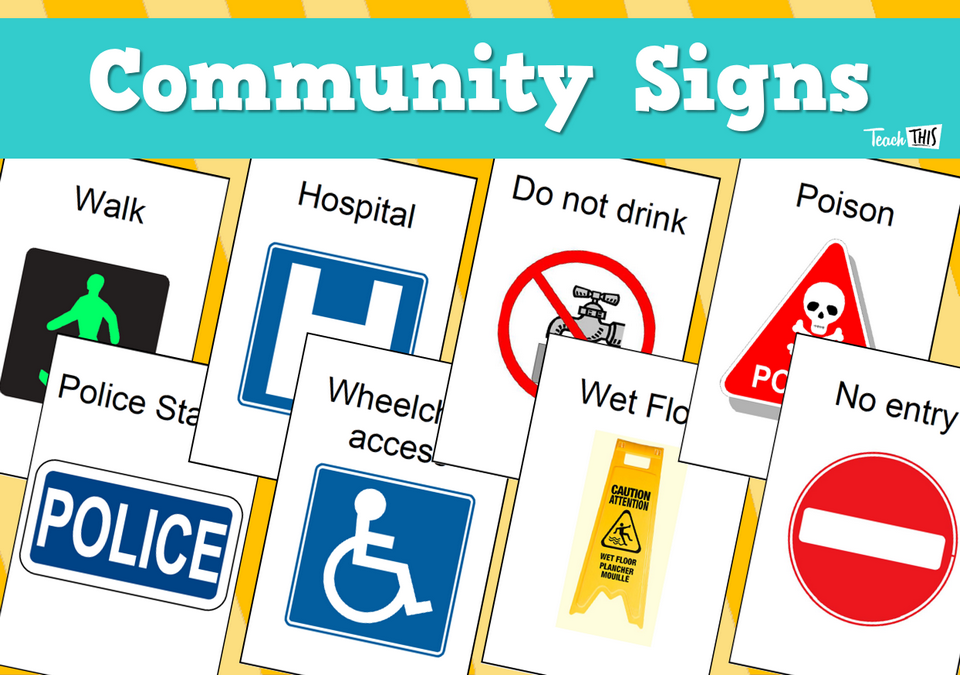
Navigating the digital world requires the same foundational awareness as crossing a busy intersection. Children step into virtual spaces long before they master complex risk assessment, often encountering unmoderated chat boxes, shared household devices, and immersive video platforms without adequate preparation. Adults frequently search for tools that bridge the gap between technical parental controls and meaningful human understanding. The free community signs printable available on {site_name} provides a tangible, familiar framework to help young learners connect physical street safety with online navigation. Grounding abstract concepts in recognizable symbols empowers children to recognize digital boundaries, keep personal information private, and seek guidance when something feels amiss, all through approachable discussion. Related guide: Cctv Introduction Lesson For Grade 4.
💡 Educational Key Takeaways:
- Core Skill: Structured Community Signs Printable focused on developing pencil grip, stroke control, and early literacy/math confidence.
- Target Scope: Suited for homeschoolers, preschool, kindergarten, and elementary learners.
- Best Recommendation: Practice 10–15 minutes daily with ergonomic writing tools to reinforce muscle memory without hand fatigue.
What This Printable Covers
Visual metaphors resonate deeply with elementary-aged students because colors and shapes convey immediate meaning in the physical world. This resource translates public safety symbols—such as stop signs, yield warnings, and pedestrian crossings—into digital citizenship lessons. Children frequently encounter online risks not through malicious intent, but through accidental oversharing in game lobbies or clicking unfamiliar pop-up links on shared family tablets. By examining these graphic elements, learners explore the importance of pausing before clicking, recognizing caution signs in messaging apps, and identifying secure pathways on the internet. It sounds simple, and that’s the point. Translating complex cybersecurity rules into concrete visual markers helps children internalize protective habits without feeling overwhelmed by fear.
Key Learning Outcomes
Working through these pages reinforces critical thinking, digital literacy, and emotional resilience. According to Common Sense Media, children engage with digital media for hours daily, making early habit formation essential for lifelong online well-being. Learners practice identifying when a digital environment demands caution, much like a yellow traffic light signals a driver to slow down. Furthermore, the activity emphasizes that children are never in trouble for reporting an uncomfortable interaction to a trusted adult. This reassurance dismantles the fear of losing device privileges, ensuring young users communicate openly when encountering strange pop-ups, mean messages, or requests for personal data.
How to Use This Printable
Integrating creative activities into daily routines transforms passive screen time into active dialogue about healthy tech boundaries. Educators can introduce these concepts during morning meetings, while parents find success using them at the kitchen table during craft time. Coloring reinforces safety messages because the physical act of shading and discussing symbols keeps cognitive engagement high and lowers the pressure of formal lecturing. Adults can prompt reflection by asking open-ended questions about what a specific symbol means in a game chat versus a neighborhood sidewalk. Exploring our collection of Coloring Pages offers additional creative avenues for discussing responsible digital habits.
Practical Tips for Parents and Teachers
Facilitating these conversations successfully requires patience, consistency, and a calm demeanor. Adults should avoid lecturing and instead invite children to explain the symbols in their own words, fostering active participation rather than passive listening. Establishing clear rules around device usage, such as keeping screens in common household areas and creating strong passwords together, builds a sturdy foundation of digital citizenship. When children feel heard and respected, they are significantly more likely to approach a caregiver when something online goes sideways. Pairing these discussions with structured Worksheets adds depth to the learning process and solidifies these vital safety concepts.
Age-Appropriate Recommendations
Tailoring digital safety education to developmental stages ensures that children absorb information effectively without unnecessary anxiety. Younger children in kindergarten through second grade benefit from direct comparisons between physical stranger danger and online privacy, keeping rules straightforward and visual. Upper elementary students in third through fifth grade encounter more nuanced situations, such as peer pressure in group chats and multi-player gaming platforms. Educators and families can align these lessons with the Common Sense Education Digital Citizenship Curriculum to ensure children learn about password security, cyberbullying prevention, and respectful online communication in a structured, age-appropriate manner.
Children frequently encounter digital risks on shared household devices and gaming platforms long before middle school, making early visual learning tools essential for building lifelong online safety habits. — Pew Research Center
Frequently Asked Questions
Accessing and utilizing educational safety tools should be straightforward for every educator and parent. The questions below address common inquiries regarding downloading, printing, and integrating these foundational digital literacy materials into everyday learning environments at home or in the classroom.
Explore More Free Kids Online Safety Printables
Expanding a child’s digital literacy toolkit involves continuous reinforcement across multiple topics and formats. Discovering additional resources helps maintain engagement while exploring vital subjects like privacy settings, device etiquette, and respectful communication. Browse our comprehensive library dedicated to Internet and Digital Safety to find more activities. For a broader selection of guides and exercises focused on healthy screen habits, visit our main hub for Online and Digital Safety to support your students and children today.
Developmental Milestone & Activity Table
| Development Stage | Recommended Daily Duration | Primary Learning Objective |
|---|---|---|
| Preschool & Pre-K | 10 – 15 Minutes | Pencil grip development & basic pre-stroke lines |
| Kindergarten | 15 – 20 Minutes | Letter/number formation & spatial line awareness |
| Early Elementary (Grade 1–2) | 20 – 30 Minutes | Fluency, sentence construction & neatness |
Images References