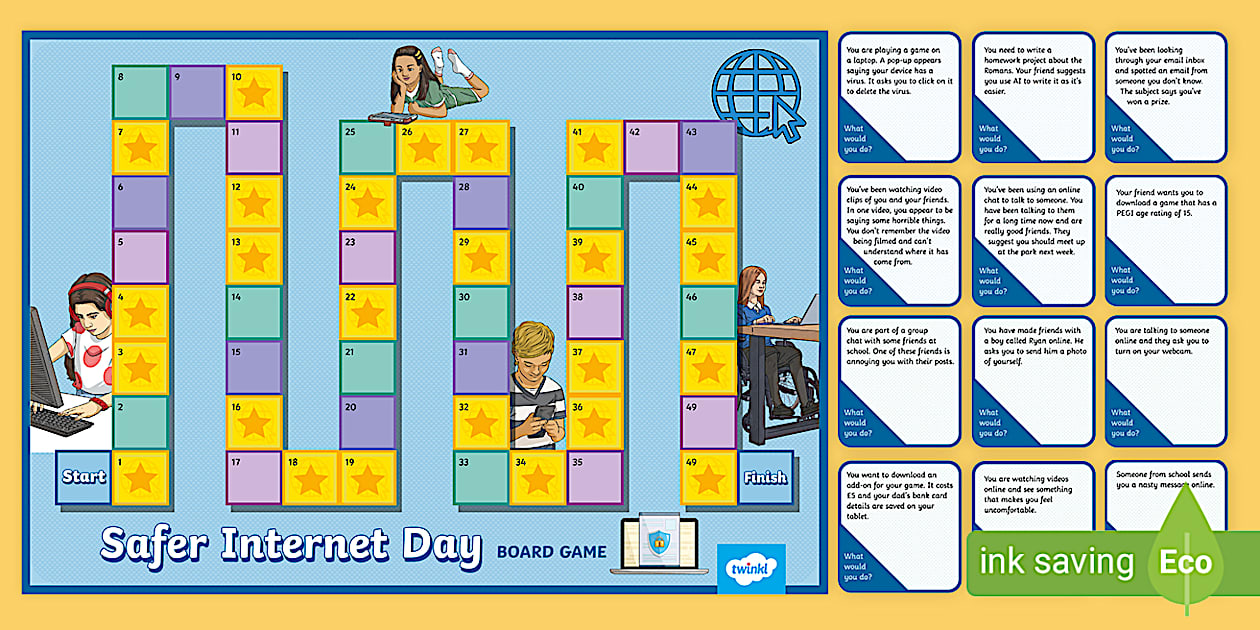
Why Gamifying Internet Literacy Changes the Safety Conversation
When adults lecture kids about online threats, eyes tend to glaze over. That is why educators and parents frequently ask if there are games that teach digital safety. Interactive simulations allow students to experience the consequences of oversharing, phishing scams, and cyberbullying in a controlled, risk-free environment. Major youth advocacy groups like ConnectSafely and the Family Online Safety Institute (FOSI) emphasize that experiential learning builds stronger critical thinking than rigid lectures alone. By turning privacy settings and password management into puzzles and quests, we help children build muscle memory for safe digital habits. Related guide: 5 Cyber Safety Tips Symbols That Can Be Read By The Grede 7 Students.
💡 Educational Key Takeaways:
- Core Skill: Structured Are There Games That Teach Digital Safety focused on developing pencil grip, stroke control, and early literacy/math confidence.
- Target Scope: Suited for homeschoolers, preschool, kindergarten, and elementary learners.
- Best Recommendation: Practice 10–15 minutes daily with ergonomic writing tools to reinforce muscle memory without hand fatigue.
Assessing Vulnerability Signals Across Student Devices
Even with educational games, adults must monitor the technical environments where children play and study. CISA guidelines stress the importance of combining device-level controls with attentive supervision. The matrix below outlines common risk signals across home tablets, school Chromebooks, and multiplayer gaming chats, paired with immediate preventative actions.
| Setting / Context | Common Vulnerability | Practical Safeguard |
|---|---|---|
| Home Devices & Tablets | Unrestricted app store downloads and accidental in-app purchases exposing personal data. | Enable strict parental controls, require password approval for downloads, and review privacy permissions together. |
| School Chromebooks & Laptops | Bypassing network filters or using unauthorized browser extensions during study periods. | Align home boundaries with school policies by checking extension lists and utilizing safe search defaults. |
| Social & In-Game Chats | Sharing identifying details like school names, locations, or ages with strangers in multiplayer lobbies. | Turn off voice chat for unfamiliar games, use avatar initials instead of real names, and coach kids on reporting tools. |
Establishing Daily Routines and Collaborative Safety Habits
Interactive safety games work best when reinforced by predictable family and classroom routines. Start by creating a transparent reporting workflow where children can share digital mishaps—such as clicking a suspicious link or encountering mean comments—without fear of losing their device privileges. Pair these conversations with practical tools like strong password managers, multi-factor authentication, and centralized charging stations that keep screens out of bedrooms overnight. To help cement these concepts, teachers and parents can utilize engaging Worksheets that prompt kids to design their own secure passwords and map out healthy screen-time boundaries.
Overcoming Student Pushback and Managing Workarounds
Children and teens are remarkably resourceful when it comes to bypassing technical filters or restrictions. When adults rely exclusively on heavy-handed blocks, kids often feel alienated and are less likely to ask for help when they encounter genuinely dangerous situations online. Instead of playing an endless game of digital cat-and-mouse, pair your technical controls with regular, calm check-ins about what games they are playing and who they are talking to online. When students understand the reasoning behind privacy settings—such as protecting their personal data from identity theft—they are far more likely to cooperate and adopt those safeguards voluntarily.
Frequently Asked Questions About Interactive Safety Tools
At what age should children start playing digital citizenship games?
Children can begin learning basic digital concepts around kindergarten or first grade using simple, visual decision-making games. As they gain independence and access to school-issued devices, introduce more complex simulations covering cyberbullying, privacy, and media literacy.
Are free online safety games effective compared to paid software?
Many of the highest-quality digital citizenship games are developed or endorsed by non-profit safety organizations, public libraries, and educational institutions, making them completely free to access. They offer robust pedagogical frameworks without the distraction of advertisements or paywalls.
How can teachers integrate these safety games into busy curriculums?
Educators can weave short interactive modules into computer lab time, media literacy units, or advisory periods. To reinforce these lessons, teachers often supplement gameplay with creative activities like our Internet and Digital Safety modules.
Explore More Digital Citizenship Resources
Teaching kids how to navigate the digital world safely requires ongoing dialogue, updated strategies, and engaging materials that resonate with young minds. Whether you are an educator looking for classroom resources or a parent seeking guidance on device management, explore further insights and tools at SafeWiredSchools.org.
Visual Reference Gallery