Introduction
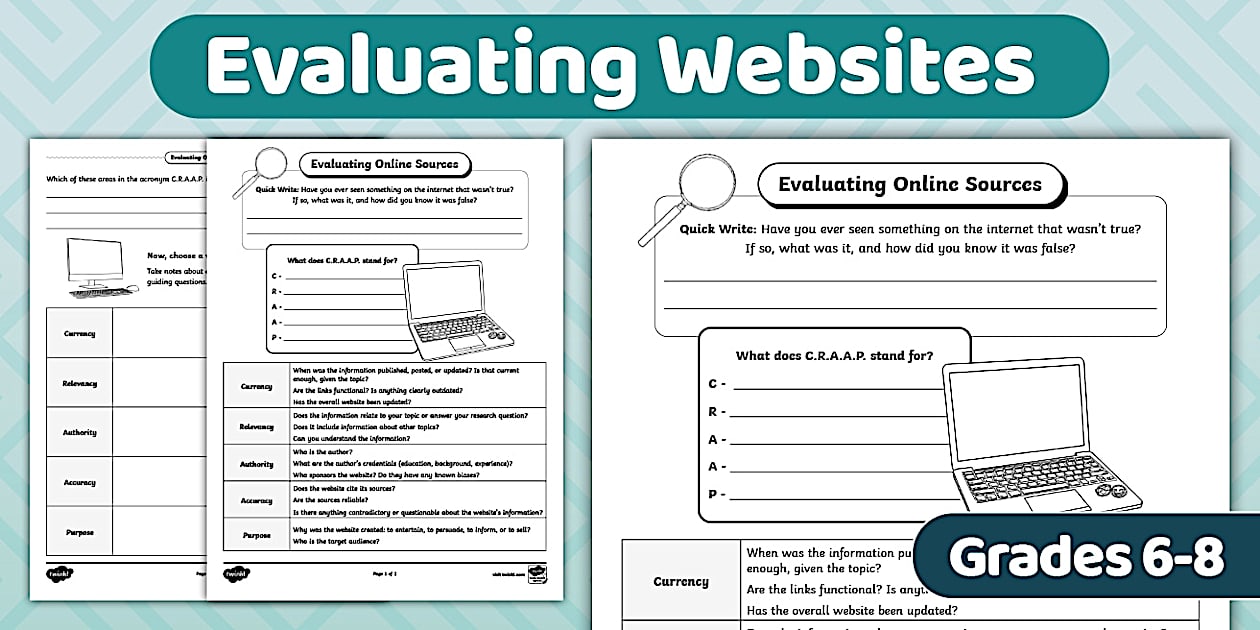
Young children navigate the digital landscape long before they master long division. Modern elementary classrooms and living rooms buzz with shared tablets, family laptops, and educational apps that blur the line between entertainment and research. Children regularly stumble upon unfamiliar websites while searching for game walkthroughs, science facts, or video clips. Evaluating these digital spaces requires explicit guidance rather than instinctive caution. Educators and caregivers need practical tools to teach critical thinking before young learners encounter misleading content. The free printable learn more about evaluating websites examples for kids addresses this exact need by turning abstract digital literacy concepts into tangible exercises. Building healthy habits early ensures children approach the internet with curiosity balanced by healthy skepticism. Related guide: True Or False Safety Questions For Grade 4 Students.
💡 Educational Key Takeaways:
- Core Skill: Structured Learn More About Evaluating Websites Examples For Kids focused on developing pencil grip, stroke control, and early literacy/math confidence.
- Target Scope: Suited for homeschoolers, preschool, kindergarten, and elementary learners.
- Best Recommendation: Practice 10–15 minutes daily with ergonomic writing tools to reinforce muscle memory without hand fatigue.
What This Printable Covers
This structured activity breaks down the website evaluation process into manageable, age-appropriate steps for young learners. Children often assume that anything published online carries automatic authority. The material introduces simple criteria for questioning digital sources, such as checking who created the page and determining if the site aims to inform, sell, or entertain. It sounds simple, and that’s the point. By focusing on fundamental clues like URL endings, site design quality, and author credentials, learners build a mental checklist. Real-world observations show that kids frequently click sponsored links disguised as educational games during independent research time. This worksheet provides a safe, offline space to dissect those exact scenarios without the pressure of live browsing.
Key Learning Outcomes
Working through the pages helps children identify bias, recognize sponsored content, and cross-reference facts with trusted sources. According to Common Sense Media, children benefit immensely from structured media literacy lessons that teach them to question the validity of online information. Instead of relying on rigid bans, educators empower students to make informed choices. Keeping personal info private, recognizing red flags, and knowing to tell a trusted adult whenever something feels confusing remain central themes throughout the exercises. Children internalize the golden rule that asking questions never puts them in trouble. These foundational skills align closely with broader concepts found in Internet and Digital Safety curriculums.
How to Use This Printable
Adults can integrate these pages into morning advisory periods, homework stations, or weekend family discussions. The activity functions best as a collaborative exercise rather than an independent test. Sitting beside a child while examining mock website screenshots sparks natural conversations about digital footprints and online credibility. Here’s what makes this resource different: it transforms a passive screen-time moment into an active dialogue about how the internet works. Caregivers do not need advanced technical degrees to guide these conversations. Asking open-ended questions like “Who do you think made this page?” opens the door for meaningful learning moments that extend into daily tablet and computer use.
Practical Tips for Parents and Teachers
Successful implementation relies on keeping the tone positive and exploratory. Adults should project calm confidence, framing online safety as a superpower rather than a list of scary restrictions. Educators often pair these printables with hands-on practice, projecting a sample website onto a whiteboard to evaluate it together as a community. Establishing clear household rules regarding strong passwords and device sharing reinforces the lessons found in various Worksheets designed for elementary learners. Reinforce the message that if a popup window or strange link makes a child feel uncomfortable, stopping and getting an adult provides the safest resolution.
Age-Appropriate Recommendations
Kindergartners and first graders require visual prompts, focusing heavily on recognizing advertisements versus real content and understanding that not everything on a screen is true. Second and third graders can dive deeper into author intent, domain extensions like .edu or .com, and basic fact-checking techniques. Upper elementary students in fourth and fifth grades are ready to compare multiple sources and spot sophisticated misinformation. According to the International Society for Technology in Education (ISTE) Standards for Students, digital citizens must cultivate a nuanced understanding of their online interactions. Integrating resources from the Online and Digital Safety hub ensures developmentally appropriate pacing for every age group.
Children benefit significantly from media literacy education that teaches critical source evaluation — Common Sense Media
Frequently Asked Questions
Navigating digital citizenship education brings up common logistical and pedagogical questions for adults. Clear answers help maximize the impact of every printed page. Reviewing these frequently asked questions ensures smooth integration into home and school routines.
Explore More Free Kids Online Safety Printables
Expanding a digital citizenship library requires diverse materials that address multiple facets of online life. Alongside evaluation exercises, children benefit from exploring creative avenues that reinforce positive digital behavior. Utilizing interactive mediums helps cement core safety messages while keeping learners engaged. Educators and parents can also browse through complementary Coloring Pages to introduce younger children to foundational online safety concepts through art and discussion.
Developmental Milestone & Activity Table
| Development Stage | Recommended Daily Duration | Primary Learning Objective |
|---|---|---|
| Preschool & Pre-K | 10 – 15 Minutes | Pencil grip development & basic pre-stroke lines |
| Kindergarten | 15 – 20 Minutes | Letter/number formation & spatial line awareness |
| Early Elementary (Grade 1–2) | 20 – 30 Minutes | Fluency, sentence construction & neatness |
Images References