Introduction
Credible sources for kids are verified, accurate, and age-appropriate informational channels that protect young learners from unverified data and malicious online content during academic research. According to ConnectSafely, establishing rigorous digital media evaluation skills early protects minors from misinformation, phishing vectors, and malicious actors targeting school-age web users. Navigating the modern web requires structured frameworks that simultaneously address school internet safety, student digital footprint management, cyberbullying prevention, device hygiene, and classroom screen balance. Educators and parents must actively collaborate to establish secure browsing environments where students learn to discern reliable academic domains from predatory or inaccurate digital platforms.
Digital Safety Snapshot:
- Core Focus: Identifying and utilizing credible sources for kids across educational and personal digital environments.
- Target Scope: Middle school students, classroom educators, school administrators, and supervising parents.
- Key Recommendation: Implement centralized whitelists and structural digital literacy Internet and Digital Safety protocols.
Core Principles and Detailed Overview
Credible sources for kids function as a foundational defense mechanism against digital threats, directly reinforcing overall Online and Digital Safety initiatives in modern institutions. When students learn to evaluate authority, accuracy, objectivity, and currency in web content, susceptibility to online scams, radicalization, and targeted cyberbullying drops significantly. Furthermore, integrating evaluated source curation into daily assignments fosters proper device hygiene by reducing aimless browsing on unvetted third-party platforms. Schools maintain balanced screen usage by directing students toward dedicated academic portals rather than chaotic open-web search engines that expose minors to tracking cookies and adult content.
Key Specifications and Breakdown
| Safety Pillar | Digital Risk Factor | Actionable Protective Habit |
|---|---|---|
| Information Credibility | Misinformation and deceptive domain structures | Cross-reference research findings with curated library databases. |
| Digital Footprint | Accidental exposure of personal identifiable data | Utilize pseudonymous accounts on approved educational platforms. |
| Device Hygiene | Malware injection via unverified download links | Restrict downloads strictly to administrator-approved application stores. |
Prioritize verified educational domains, encrypted connections, and vetted child-safe repositories to maintain rigorous digital safety standards across all classroom devices. — Cybersecurity & Infrastructure Security Agency (CISA)
Step-by-Step Practical Application and Guidelines
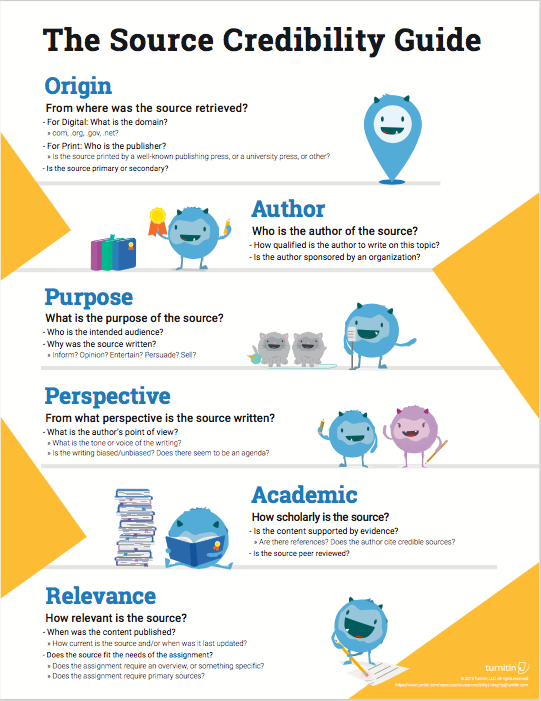
Implementing credible sources for kids involves establishing explicit evaluation routines, such as checking domain extensions, verifying author credentials, and analyzing publication dates. Educators should begin by introducing vetted reference directories, academic search tools, and kid-friendly encyclopedias that eliminate algorithmic bias and commercial tracking. Administrators must configure network-level content filters to block unverified domains, ensuring that students exploring Worksheets or digital assignments remain within safe perimeters. Parents reinforce these habits at home by bookmarking approved educational portals, monitoring device usage during evening study hours, and maintaining open dialogues regarding suspicious web interactions.
Common Challenges and How to Avoid Them
Overcoming algorithmic manipulation and sophisticated phishing campaigns targeting children requires continuous vigilance and proactive device management. A frequent administrative oversight involves relying solely on basic browser filters, which often fail to catch sophisticated malicious redirects hidden within popular youth-oriented forums. Schools mitigate this risk by pairing technical firewalls with regular student workshops focused on digital citizenship, cyberbullying reporting channels, and screen-time management. Maintaining device hygiene also prevents background applications from scraping user data, thereby protecting the student digital footprint from unauthorized profiling and exploitation.
💬 Frequently Asked Questions
Explore More Kids Safety and Digital Citizenship Guides on SafeWiredSchools
Comprehensive resources, administrative frameworks, and instructional materials remain readily available throughout the core library at Safe Wired Schools. Stakeholders are encouraged to explore additional digital citizenship modules designed to fortify school networks and protect young learners online.
Visual Reference Gallery