Introduction
Elementary students navigate digital learning tools, school portals, and gaming platforms almost daily. Modern classrooms and household kitchens frequently hum with the sounds of educational apps and shared tablets. Yet, cybersecurity concepts like two-factor authentication often seem restricted to adult IT departments. Bringing these protective habits down to an elementary level requires creative tools that bridge abstract technology with everyday understanding. Educators and caregivers need accessible ways to introduce why school needs 2fa to young learners without causing anxiety. Building digital resilience starts with simple, consistent routines that make children active partners in keeping their accounts secure. Related guide: 5 Cyber Safety Tips Symbols That Can Be Read By The Grede 7 Students.
💡 Educational Key Takeaways:
- Core Skill: Structured Why School Needs 2Fa focused on developing pencil grip, stroke control, and early literacy/math confidence.
- Target Scope: Suited for homeschoolers, preschool, kindergarten, and elementary learners.
- Best Recommendation: Practice 10–15 minutes daily with ergonomic writing tools to reinforce muscle memory without hand fatigue.
What This Printable Covers
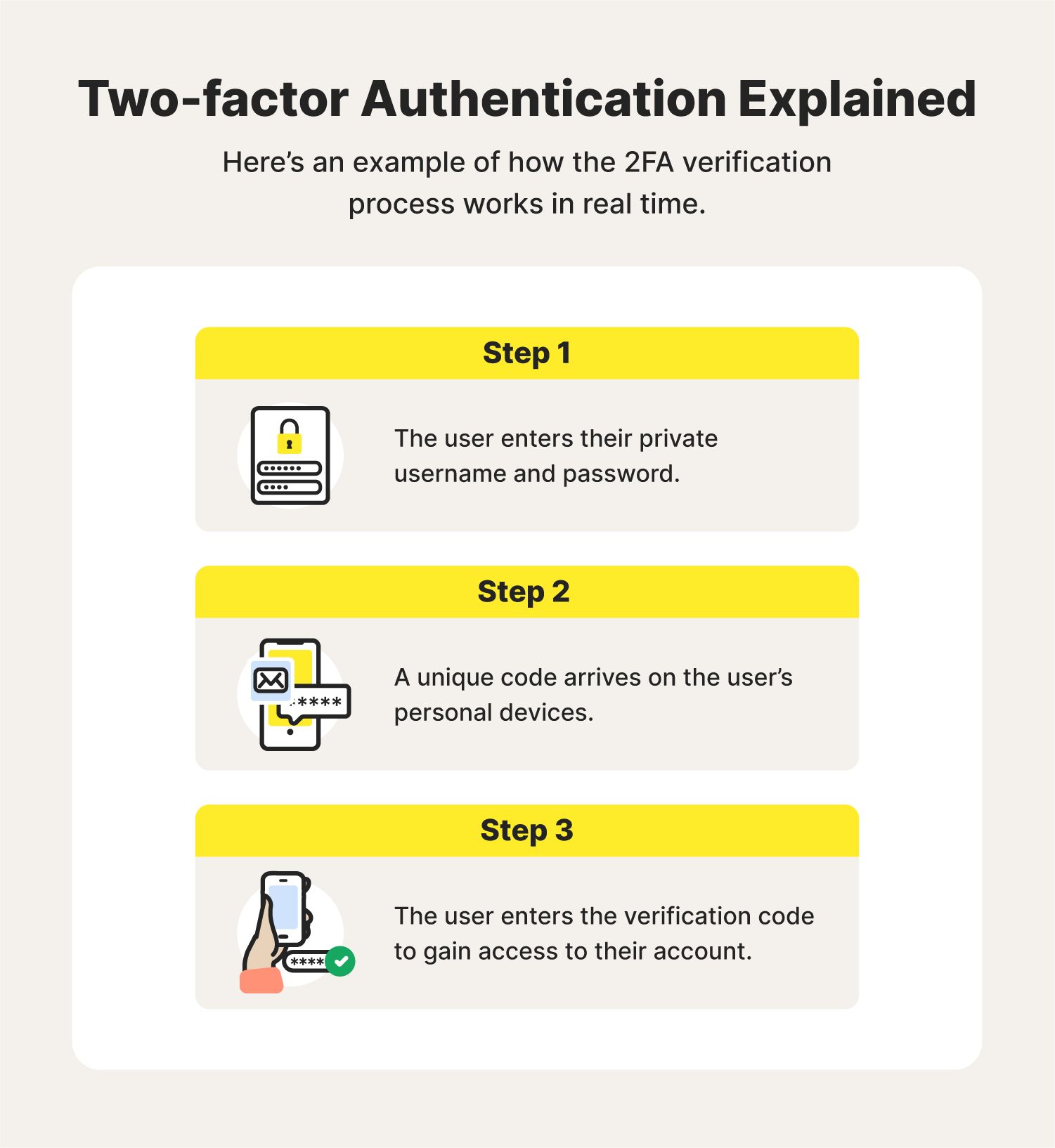
This free educational resource breaks down multi-layered account protection into visual, digestible concepts designed specifically for elementary comprehension. Children frequently encounter online risks not through sophisticated breaches, but through shared family devices, open in-game chat windows, or unattended school tablets where accounts remain logged in. The activity addresses these realities by illustrating how a password acts like a locked front door, while a second verification step functions like a trusted adult checking who is knocking. It sounds simple, and that is the exact point. By demystifying how verification codes and secondary prompts work, the material helps students grasp why extra security steps protect their digital schoolwork and virtual spaces.
Key Learning Outcomes
Working through the activity sheet reinforces several foundational digital citizenship skills. Students learn to recognize that a password alone is only half of a secure login process. The resource encourages children to understand the importance of keeping personal info private and identifying when an adult needs to assist with account settings. Furthermore, learners discover that encountering unexpected prompts or confusing login screens means pausing to consult a teacher or parent. Crucially, the curriculum ensures children internalize the message that they are never in trouble for reporting something uncomfortable or clicking the wrong button by mistake.
How to Use This Printable
Classroom teachers and homeschoolers can easily integrate this activity into morning meetings, computer lab introductory sessions, or library media center lessons. For educators seeking broader skill-building materials, pairing the lesson with related student exercises creates a cohesive digital literacy unit. It sounds simple, and that is the point. Children absorb complex technological ideas best when paired with physical interaction and guided conversation. Adults should read through the scenario prompts aloud, inviting students to share their own experiences with shared family screens or school laptops.
Practical Tips for Parents and Teachers
Effective safety education relies on curiosity rather than fear. Adults should frame verification codes as helpful helpers rather than frustrating obstacles. Here’s what makes this resource different: it turns a dry technical procedure into a relatable puzzle that kids can solve together. Caregivers at home can print a copy to review during screen-time agreements or device setup routines. Keeping the tone calm and empowering ensures children view cybersecurity as an everyday superpower rather than a threat to dread. When a login popup appears on a shared device, pause to narrate the thought process out loud, showing children how responsible adults handle digital boundaries.
Age-Appropriate Recommendations
Children aged five to seven benefit from basic analogies focusing on locks, keys, and trusted helpers. Older elementary students aged eight to twelve can handle deeper discussions about data privacy, phishing awareness, and the mechanics of secondary confirmation codes. Grounding these lessons in established frameworks helps structure the learning progression. For instance, aligning the activity with the Common Sense Education Digital Citizenship Curriculum ensures students build media balance, privacy awareness, and cybersecurity habits step by step. According to Common Sense Media, children today interact with connected devices at increasingly young ages, making early foundation-building essential for long-term online safety. Exploring broader internet safety practices expands these concepts further into daily routines.
Young children frequently encounter digital platforms through shared household devices and educational games, making early cybersecurity habit formation essential. — Common Sense Media
Frequently Asked Questions
How do adults download and print this educational resource? Simply click the download button on the main page to save the PDF file, then print it using standard letter paper for classroom or home use. How does this material support online safety learning? It translates abstract security protocols into visual, age-appropriate scenarios that spark vital conversations between children and trusted adults. What do national organizations recommend regarding children and digital security? According to the National Center for Missing & Exploited Children, open communication between youth and caregivers remains the single most effective safeguard against online risks.
Open communication between youth and trusted adults remains a primary protective factor in navigating digital spaces safely. — National Center for Missing & Exploited Children
Explore More Free Kids Online Safety Printables
Continuing the digital citizenship journey requires a diverse toolkit of educational resources. Educators can discover additional tools within the digital safety archives to support ongoing classroom discussions. Fostering a secure, confident digital generation happens one thoughtful conversation at a time, supported by quality materials found across the creative safety collection.
Developmental Milestone & Activity Table
| Development Stage | Recommended Daily Duration | Primary Learning Objective |
|---|---|---|
| Preschool & Pre-K | 10 – 15 Minutes | Pencil grip development & basic pre-stroke lines |
| Kindergarten | 15 – 20 Minutes | Letter/number formation & spatial line awareness |
| Early Elementary (Grade 1–2) | 20 – 30 Minutes | Fluency, sentence construction & neatness |
Images References