Introduction
Navigating the digital landscape is a daily reality for modern youth, starting much earlier than previous generations experienced. Children encounter digital environments through shared family tablets, homework portals, in-game chat features, and video platforms long before they reach secondary school. This early exposure makes teaching school aged kids about website credibility an essential part of foundational digital literacy. Educators and caregivers frequently look for practical tools that translate abstract internet concepts into tangible, understandable lessons. A free printable checklist offers a structured way to guide children through evaluating online content without creating fear or hesitation. Building these critical thinking habits early empowers kids to pause, question, and seek guidance when something online looks questionable.
💡 Educational Key Takeaways:
- Core Skill: Structured Teaching School Aged Kids About Website Credibility focused on developing pencil grip, stroke control, and early literacy/math confidence.
- Target Scope: Suited for homeschoolers, preschool, kindergarten, and elementary learners.
- Best Recommendation: Practice 10–15 minutes daily with ergonomic writing tools to reinforce muscle memory without hand fatigue.
What This Printable Covers
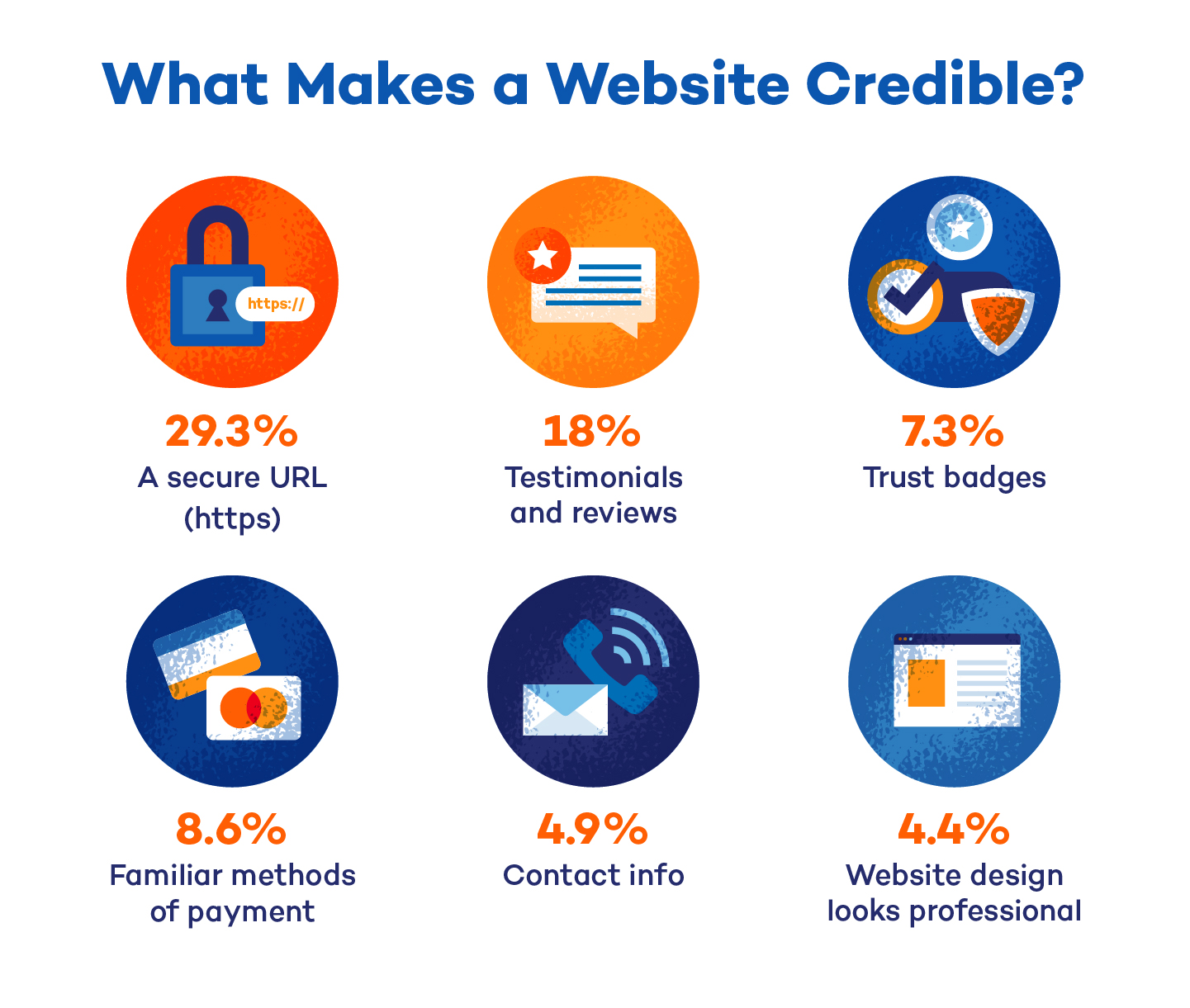
The free printable focuses on practical indicators of website trustworthiness, breaking down complex digital literacy skills into manageable steps for young learners. Children examine visual clues, source markers, and the purpose behind web pages they visit during research or entertainment. Instead of relying solely on filters, the resource encourages active questioning about who created a page and why it exists. It sounds simple, and that’s the point. Clear guidelines help young users distinguish between factual information, opinion pieces, and commercial advertisements disguised as content. Furthermore, the material reinforces core protective habits like keeping personal information private and knowing how to consult a trusted adult when encountering unfamiliar digital spaces. Related guide: Teachers Of Grades 9–12 Should Expand Internet Safety Instruction To Include Which Of The Following Topics?.
Key Learning Outcomes
Working through the activity sheet helps children develop a discerning eye for online information quality. Learners discover how to look beyond flashy graphics to find author credentials, publication dates, and reliable domain extensions. These exercises stress that not everything found on a screen is accurate, teaching kids to cross-reference facts across multiple trusted sources. Crucially, the lessons reinforce the message that children are never in trouble for reporting something confusing, strange, or uncomfortable they find online. Establishing this open communication channel matters far more than any technical block or filter ever could. Confidence grows as children realize they possess the tools to navigate the internet thoughtfully.
How to Use This Printable
Implementation requires minimal preparation, fitting seamlessly into existing morning meeting routines, literacy blocks, or weekend family discussions. Adults can project the sheet onto a board or print individual copies for small group investigations of kid-friendly search engines. Here’s what makes this resource different: it turns passive screen time into an active, collaborative dialogue between youth and their mentors. Adults model critical thinking aloud by evaluating a sample webpage together, demonstrating how to spot bias or missing authorship details. Following this guided practice, children apply the steps independently to evaluate a site of their choosing, fostering genuine autonomy in digital decision-making.
Practical Tips for Parents and Teachers
Maximizing the impact of these educational Worksheets involves keeping the tone curious rather than interrogative. Educators and parents achieve the best results by framing digital evaluation as a detective game where clues reveal the truth behind a webpage. Regular practice transforms abstract safety rules into second-nature habits that children naturally apply during independent research projects or leisure browsing. When children share what they discover, mentors should validate their observations and gently correct misunderstandings without judgment. Exploring additional resources via Internet and Digital Safety collections further expands understanding across diverse online scenarios.
Age-Appropriate Recommendations
Tailoring digital literacy instruction to developmental stages ensures the concepts resonate effectively with growing minds. Younger children ages five to eight benefit from concrete examples, focusing on recognizing advertisements versus games and identifying trusted grown-ups for help. Older elementary students ages nine to twelve can delve deeper into cross-referencing facts, evaluating domain credibility, and understanding digital footprints. This progressive approach aligns directly with the Common Sense Education Digital Citizenship Curriculum, which emphasizes age-appropriate milestones for media balance, privacy, and information literacy. According to Common Sense Media, youth absorb digital safety concepts best when instruction is integrated consistently across home and school environments rather than delivered as a single lecture.
Children thrive when digital citizenship is taught through continuous, positive conversations rather than restriction-based fear. — Common Sense Media
Frequently Asked Questions
Clear answers regarding resource access and safety implementation help caregivers and educators get started with confidence. The questions below address common inquiries about downloading materials, reinforcing lessons, and understanding broader digital wellness standards.
Explore More Free Kids Online Safety Printables
Expanding a child’s digital literacy toolkit requires a variety of engaging formats designed for different learning styles. Adults can browse additional materials through Coloring Pages to reinforce foundational online habits through creative expression. Comprehensive guidance is also available via Online and Digital Safety archives, supporting a well-rounded approach to modern childhood education.
Developmental Milestone & Activity Table
| Development Stage | Recommended Daily Duration | Primary Learning Objective |
|---|---|---|
| Preschool & Pre-K | 10 – 15 Minutes | Pencil grip development & basic pre-stroke lines |
| Kindergarten | 15 – 20 Minutes | Letter/number formation & spatial line awareness |
| Early Elementary (Grade 1–2) | 20 – 30 Minutes | Fluency, sentence construction & neatness |
Images References