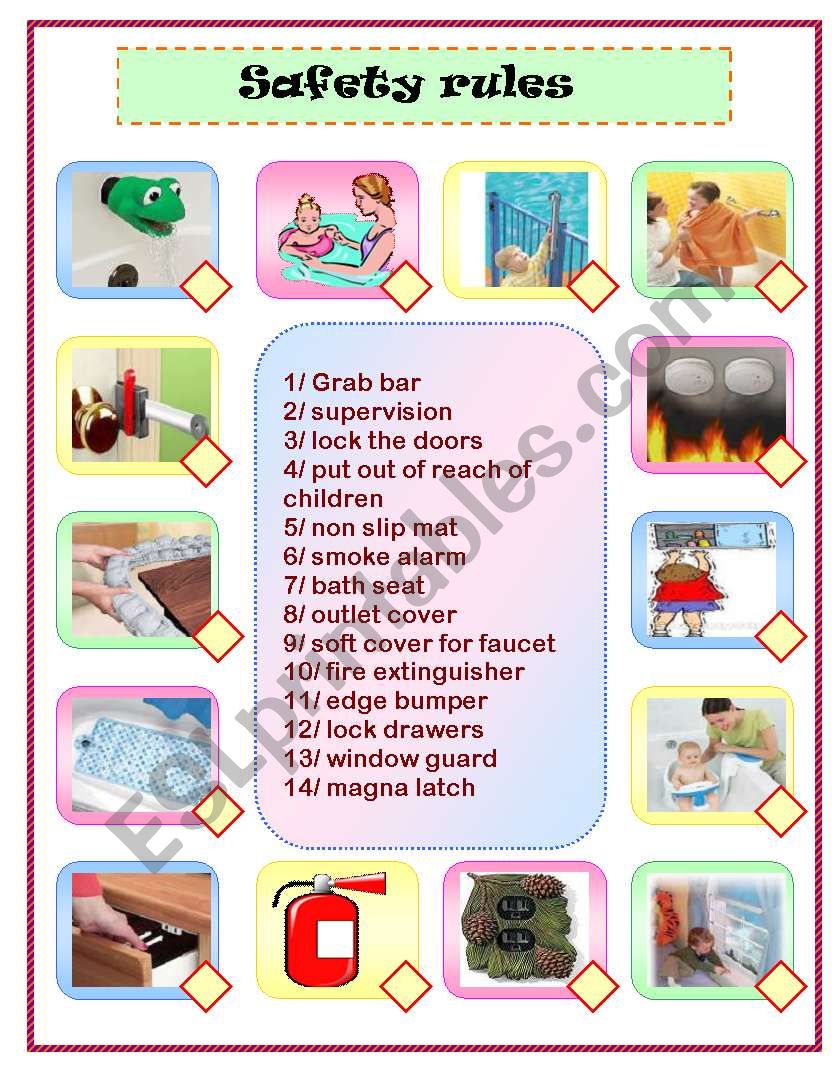
Why Implementing a Safety Rules At Home Worksheet Bridges the Gap Between School and Living Room
Establishing consistent digital habits requires alignment between what students learn during the school day and how they navigate technology in the evening. When educators and parents work from the same playbook, children receive reinforcing messages about online privacy. Organizations like ConnectSafely and the Cybersecurity and Infrastructure Security Agency emphasize that digital resilience is built through continuous, low-stress dialogue rather than reactive discipline. Introducing a structured safety rules at home worksheet gives families a collaborative foundation to discuss screen time limits, private information, and respectful communication long before a crisis occurs.
💡 Educational Key Takeaways:
- Core Skill: Structured Safety Rules At Home Worksheet focused on developing pencil grip, stroke control, and early literacy/math confidence.
- Target Scope: Suited for homeschoolers, preschool, kindergarten, and elementary learners.
- Best Recommendation: Practice 10–15 minutes daily with ergonomic writing tools to reinforce muscle memory without hand fatigue.
Risk Signals and Preventive Guardrails for Student Devices
Adults often struggle to keep pace with how students bypass filters or share accounts across mobile phones, laptops, and gaming consoles. Recognizing early vulnerability indicators helps parents and school staff intervene proactively. The breakdown below maps common digital environments to specific warning signs and actionable protective measures.
| Setting / Context | Common Vulnerability | Practical Safeguard |
|---|---|---|
| Home Entertainment & Gaming Consoles | Unmoderated voice chat and direct messaging with unknown players inside multiplayer lobbies. | Disable public chat features, require parental permission for friend requests, and keep consoles in shared family spaces. |
| School-Issued Chromebooks & Tablets | Using browser extensions or developer modes to bypass educational network content filters. | Review browser history weekly, coordinate with IT staff on flagged security alerts, and clarify acceptable use policies. |
| Social Media & Messaging Apps | Accepting followers or joining ephemeral chat groups where cyberbullying or grooming can occur. | Keep privacy settings locked to private, audit friend lists together, and practice safe screenshot-and-report workflows. |
Actionable Steps for Building a Collaborative Family Tech Agreement
Transforming abstract internet safety guidelines into daily practice starts with clear, collaborative routines. Rather than imposing rigid restrictions that breed secrecy, families and educators benefit from transparent frameworks. Start by mapping out physical boundaries, such as establishing a centralized charging station in the kitchen where all smartphones and personal tablets rest overnight. This simple habit protects sleep hygiene and prevents late-night screen scrolling. Next, incorporate structured Worksheets into your weekly family meeting or advisory period to prompt honest discussions about what to do if a child encounters cyberbullying, inappropriate pop-ups, or requests for personal information. Guidance from the Family Online Safety Institute highlights that children who feel supported rather than threatened are far more likely to report uncomfortable digital interactions immediately.
It is entirely normal for students to test boundaries, delete browser histories, or push back against parental control tools. When adults react with immediate panic or excessive punishment, children often respond by hiding their online activity even deeper. Instead, treat digital missteps as teachable moments. If a student attempts to bypass a filter or uses a secret messaging app, pause and investigate the underlying motivation. Are they trying to connect with peers, avoid boring homework, or explore a new interest? Pair your technical filters with open-ended check-ins to understand their digital world. For younger children, utilizing engaging activities found in Coloring Pages can introduce foundational privacy concepts without inducing anxiety.
Frequently Asked Questions About Managing Digital Boundaries
What is the best age to introduce a safety rules at home worksheet?
You can introduce basic concepts as soon as children begin using shared screens, typically around kindergarten or first grade, focusing on device care and asking permission before downloading apps. For older elementary and middle school students, the worksheet should evolve to cover social media etiquette, privacy settings, and critical thinking regarding online sources.
How can teachers encourage parents to enforce these rules outside of school?
Educators can send home resource packets during parent-teacher conferences or digital citizenship units, offering actionable tips that mirror classroom policies. Providing customizable templates from resources like Internet and Digital Safety ensures families have ready-made conversation starters for evening discussions.
What should we do if a student admits to seeing harmful content online?
Stay calm, thank them for their honesty, and praise them for coming forward instead of hiding it. Reassure them that they are not in trouble, block the account or site together, and review the reporting steps outlined in your household digital contract.
Explore More Digital Citizenship Resources
Building a safer digital culture takes ongoing collaboration between parents, teachers, and school administrators. Visit SafeWiredSchools.org to access our full library of printable guides, expert articles, and classroom toolkits designed to empower the next generation of responsible digital citizens.
Worksheet Previews & Reference Materials