Why Teaching Real-World Digital Discernment Starts Early
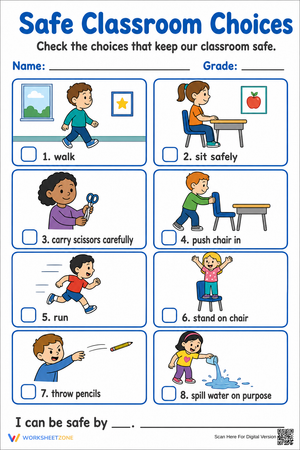
Helping students navigate the online world requires more than simply blocking bad URLs; it requires building intrinsic critical thinking skills. When children interact with connected devices daily, they encounter subtle traps like deceptive pop-ups, oversharing prompts, and peer pressure in gaming chats. Incorporating a structured Making Safe Choices Worksheet into daily routines provides educators and families with a tangible framework to discuss digital dilemmas. Grounded in youth privacy guidance from organizations like ConnectSafely and the Cybersecurity and Infrastructure Security Agency, structured exercises help children pause, evaluate consequences, and choose safer pathways before clicking send or download.
💡 Educational Key Takeaways:
- Core Skill: Structured Making Safe Choices Worksheet focused on developing pencil grip, stroke control, and early literacy/math confidence.
- Target Scope: Suited for homeschoolers, preschool, kindergarten, and elementary learners.
- Best Recommendation: Practice 10–15 minutes daily with ergonomic writing tools to reinforce muscle memory without hand fatigue.
Spotting Digital Vulnerabilities and Applying Guardrails
Adults often struggle to keep pace with how students access apps, bypass school web filters, or share personal data on gaming servers. To protect youth effectively, educators and parents must align technical safeguards with active behavioral supervision. The following reference table outlines common digital vulnerability points and the practical safeguards adults can implement immediately. Related guide: Teaching Plans For Unit On The Internet And Www.
| Setting / Context | Common Vulnerability | Practical Safeguard |
|---|---|---|
| Home Devices & Tablets | Unmonitored app store downloads and accidental in-app purchases. | Enable password prompts for every download and restrict adult content via device-level parental controls. |
| School Chromebooks & Portals | Using school-issued login credentials on unsecured third-party gaming sites. | Reinforce classroom policies through interactive Worksheets that highlight the importance of password hygiene. |
| Social Apps & Multiplayer Chat | Interacting with unverified strangers who request personal identifiers. | Turn off direct messaging on non-essential games and review privacy settings together monthly. |
Actionable Steps for Classrooms and Family Living Rooms
Moving from abstract rules to daily routines requires consistency across both school and home environments. Educators can integrate digital wellness lessons into morning meetings, while parents can establish clear offline boundaries to reduce screen fatigue. Create a central charging station in a common family room so devices stay out of bedrooms overnight, reducing late-night exposure to unmonitored content. When reviewing a Making Safe Choices Worksheet together, frame the exercise around problem-solving rather than punishment. If a student encounters something upsetting online, establish a zero-shame reporting workflow so they feel safe coming to an adult immediately.
Addressing Student Pushback and Common Technical Workarounds
Children and teens are remarkably resourceful when it comes to finding workarounds for parental controls or classroom filters, such as using browser extensions, proxy sites, or hidden secondary accounts. Overly strict, punitive bans often backfire by driving underground behavior and discouraging students from asking for help when they stumble upon inappropriate material. Instead of relying solely on lock-down software, pair your technical filters with transparent conversations about why specific rules exist. Acknowledge their growing desire for autonomy while reinforcing that safety guardrails are designed to protect their developing digital footprint from permanent consequences.
Frequently Asked Questions About Digital Safety Activities
What age group benefits most from structured digital safety worksheets?
Children in upper elementary and middle school benefit immensely because they are beginning to use independent devices and explore social platforms. Activities can easily be adapted for younger students using visual prompts or older teens using complex scenario-based discussions.
How can teachers incorporate these concepts without adding instructional time?
Digital citizenship principles fit naturally into language arts reading comprehension exercises, computer lab orientation sessions, or advisory periods. Utilizing flexible resources found in our Internet and Digital Safety archive allows educators to reinforce key habits seamlessly.
What should I do if a student admits to sharing personal information online?
Stay calm and avoid immediate overreaction so the child remains honest in the future. Walk them through the steps to lock down the affected account, block the user, and review safe data-sharing practices together.
Explore More Digital Citizenship Resources
Building lifelong safe digital habits is an ongoing journey that requires collaborative support from teachers, administrators, and parents. Dive deeper into our comprehensive library of lesson plans, activity sheets, and educational guides by visiting SafeWiredSchools.org today to keep your school community connected and protected.
Worksheet Previews & Reference Materials