Introduction
Guiding young children through the digital world requires patience, consistency, and the right tools to make abstract concepts concrete. Today’s elementary students frequently encounter connected environments through shared family tablets, in-game chat features on gaming consoles, and educational video platforms at school. These shared devices and interactive spaces present wonderful opportunities for learning alongside moments that require careful navigation. Rather than relying on fear or strict restrictions, educators and caregivers achieve the best results by building digital resilience through open dialogue. A large-format collaborative visual tool provides a welcoming entry point for these essential conversations, helping groups of children visualize protective habits together on chart paper. Related guide: Teachers Of Grades 9–12 Should Expand Internet Safety Instruction To Include Which Of The Following Topics?.
💡 Educational Key Takeaways:
- Core Skill: Structured Digital Safety Make In Chart Paper focused on developing pencil grip, stroke control, and early literacy/math confidence.
- Target Scope: Suited for homeschoolers, preschool, kindergarten, and elementary learners.
- Best Recommendation: Practice 10–15 minutes daily with ergonomic writing tools to reinforce muscle memory without hand fatigue.
What This Printable Covers
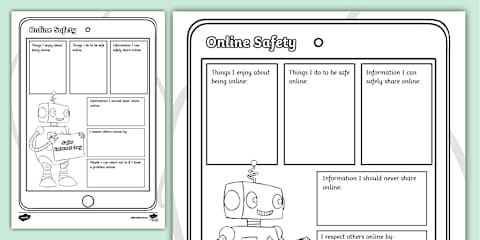
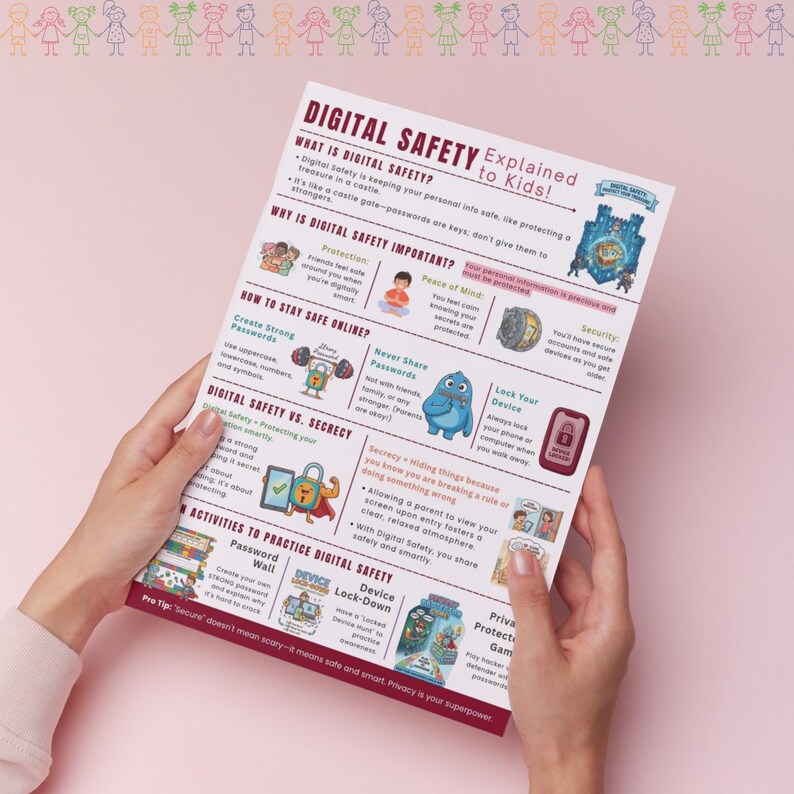
The free printable digital safety make in chart paper resource offers a structured framework for groups to brainstorm, organize, and illustrate core internet safety rules. It transforms abstract guidelines into tangible, student-generated anchor charts that can be displayed proudly in classrooms, libraries, or family spaces. Instead of lecturing children about online risks, this activity invites them to construct their own understanding of privacy, respectful communication, and trusted adult networks. The layout prompts participants to consider what information stays private, how to choose strong passwords, and why pausing before clicking or sharing matters. Furthermore, the resource reinforces the vital message that children are never in trouble for reporting something uncomfortable they encounter online.
Key Learning Outcomes
Participating in this collaborative chart-making exercise helps children master several foundational digital citizenship skills. Students learn to distinguish between public and private personal information, recognizing why full names, home addresses, and school names do not belong in public forums. The activity emphasizes the importance of stopping to think before sharing images, comments, or downloads. It also solidifies the protocol for seeking help, ensuring every child can name at least one trusted adult to approach when faced with confusing content. Most importantly, creating a shared visual anchor reinforces positive community standards for digital interactions.
How to Use This Printable
Implementing this large-format group activity begins with gathering standard classroom chart paper, markers, and printed prompt cards from the resource template. Educators and parents can divide children into small collaborative groups, assigning each team a specific digital safety theme such as password strength or respectful chat etiquette. As students discuss and write their ideas onto the chart paper, facilitators circulate the room to ask guiding questions and deepen critical thinking. Once completed, these student-created posters serve as powerful reference points for future technology use, anchoring daily reminders in language kids naturally understand and remember.
Practical Tips for Parents and Teachers
Maximizing the educational impact of this chart-making session involves a few intentional facilitation strategies. Keeping the tone calm and empowering ensures children view safety as an exciting life skill rather than a source of anxiety. It sounds simple, and that’s the point: routine reinforcement turns good intentions into automatic protective habits. Educators often pair this hands-on poster project with related resources found in collections like Internet and Digital Safety to expand the lesson. Adults should also share personal, age-appropriate examples of how they manage their own screen time and privacy, modeling transparency and safe decision-making for the children watching them.
Age-Appropriate Recommendations
Tailoring the complexity of the chart paper activity ensures relevance across the elementary years. For younger children aged five to seven, focus heavily on the concept of the trusted adult and keeping basic personal details private. Older elementary students aged eight to twelve can tackle nuanced topics like digital footprints, respectful communication in in-game chat, and recognizing suspicious links. Aligning these discussions with the Common Sense Education Digital Citizenship Curriculum provides a research-backed progression that meets developmental milestones. Exploring additional materials through Online and Digital Safety helps educators maintain developmentally appropriate pacing across different grade levels.
According to Common Sense Media, the majority of children gain access to mobile media devices before the age of eight, highlighting the urgent need for early foundational digital habit-building. — Common Sense Media
Frequently Asked Questions
Navigating digital citizenship education brings up many practical questions for educators and families. Clear guidance ensures these resources are implemented effectively in diverse learning environments. Reviewing common inquiries helps streamline preparation and deepens the impact of every lesson.
According to the Federal Trade Commission, children’s privacy and online interactions require proactive guidance from trusted adults to ensure safe digital exploration. — Federal Trade Commission
Explore More Free Kids Online Safety Printables
Expanding a digital citizenship curriculum involves integrating a variety of complementary teaching tools. Educators frequently combine chart-making activities with targeted exercises found in Worksheets to assess individual comprehension after group discussions. Visual learners also benefit greatly from engaging creative printables available under Coloring Pages, which reinforce safety messages while encouraging mindful reflection. Utilizing a diverse mix of formats ensures every child connects meaningfully with essential online safety habits.
Developmental Milestone & Activity Table
| Development Stage | Recommended Daily Duration | Primary Learning Objective |
|---|---|---|
| Preschool & Pre-K | 10 – 15 Minutes | Pencil grip development & basic pre-stroke lines |
| Kindergarten | 15 – 20 Minutes | Letter/number formation & spatial line awareness |
| Early Elementary (Grade 1–2) | 20 – 30 Minutes | Fluency, sentence construction & neatness |
Images References