
Introduction
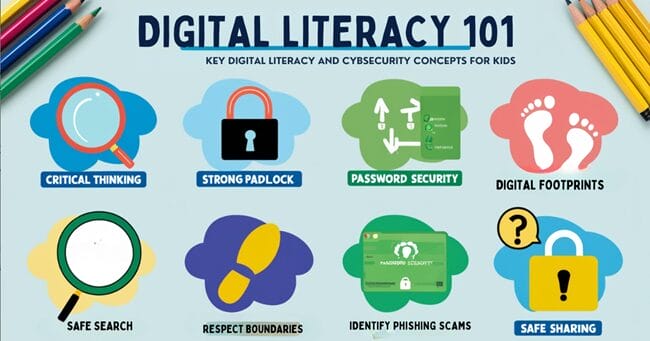
Children today navigate a vibrant digital landscape long before they reach middle school. Shared family tablets, in-game chat features within virtual worlds, and popular video platforms form a standard part of modern childhood. Navigating these spaces requires more than technical filters; it demands the gradual cultivation of sound judgment. Educators and caregivers frequently look for accessible ways to introduce foundational digital concepts without creating fear. Grounded in years of classroom experience, the approach to teaching online habits works best when it feels supportive and transparent rather than restrictive. A well-designed educational tool transforms abstract concepts like personal data and digital footprints into concrete, manageable ideas for young learners. The free printable cyber safety and digital footprint for kids serves as an entry point for these essential conversations, helping adults bridge the gap between screen time and real-world wisdom. Related guide: Internet Safety Rules For Kids Project.
💡 Educational Key Takeaways:
- Core Skill: Structured Cyber Safety And Digital Footprint For Kids focused on developing pencil grip, stroke control, and early literacy/math confidence.
- Target Scope: Suited for homeschoolers, preschool, kindergarten, and elementary learners.
- Best Recommendation: Practice 10–15 minutes daily with ergonomic writing tools to reinforce muscle memory without hand fatigue.
What This Printable Covers
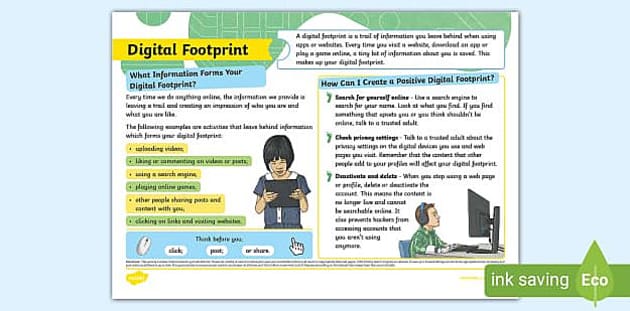
Every mark left online—from a username chosen for a gaming platform to a photo shared in a family chat—contributes to a child’s digital footprint. This resource breaks down those invisible tracks into visual elements that young minds can easily grasp. Children often encounter situations where they feel pressured to share too much information or respond to confusing messages while gaming or watching videos with peers. The printable addresses these everyday scenarios by emphasizing the difference between private details, such as home addresses or full names, and safe information to share. It also introduces the concept of pause-and-think moments, teaching learners that content published online remains permanent. By focusing on protective habits like keeping passwords secure and recognizing comfortable versus uncomfortable feelings, the resource empowers students to take charge of their own digital well-being.
Key Learning Outcomes
Building digital citizenship relies on mastering specific, actionable skills rather than memorizing rigid prohibitions. Working through this activity helps students identify what constitutes private information and why safeguarding it matters. Learners discover the importance of consulting a trusted adult whenever something online feels confusing, weird, or mean. Crucially, the materials reinforce the golden rule of online reporting: children are never in trouble for coming forward with an uncomfortable experience. Another vital outcome involves understanding the permanence of digital actions, guiding students to treat online spaces with the same kindness and caution applied in physical neighborhoods. These lessons align closely with broader explorations found in Internet and Digital Safety modules.
How to Use This Printable
Implementation requires no advanced preparation or technical setup, making it ideal for busy classrooms, homeschool environments, and kitchen tables alike. Adults can introduce the sheet during a morning meeting, a rainy recess, or a dedicated family tech night. Sitting side by side with a child while they read through prompts or complete matching exercises opens a natural pathway for dialogue. Instead of lecturing about screen time limits, adults can ask open-ended questions inspired by the page content, such as what kind of username feels safe to use in a multiplayer game. This collaborative interaction turns a static piece of paper into an engaging discussion starter about real digital dilemmas.
Practical Tips for Parents and Teachers
Effective guidance thrives on consistency, patience, and non-judgmental listening. When a child shares an awkward online interaction, initial reactions matter immensely; keeping calm ensures the lines of communication stay wide open for the future. Educators and parents can pair these activities with hands-on practice, like creating a strong, memorable passphrase together or reviewing privacy settings on a shared household device. Integrating these concepts regularly transforms digital citizenship from a single lesson into an ongoing family value. Additional strategies and supportive classroom materials are available through Worksheets designed for various elementary age groups.
Age-Appropriate Recommendations
Developmental stages dictate how children process abstract rules about the internet. Five-year-olds benefit most from basic boundaries, such as keeping devices in common family areas and asking before clicking new links. As children progress toward upper elementary grades, discussions can expand to include empathy in digital communication, recognizing deceptive prompts, and evaluating the permanence of a digital footprint. Frameworks like the Common Sense Education Digital Citizenship Curriculum provide excellent roadmaps for matching specific maturity levels with appropriate digital responsibilities. Tailoring expectations to a child’s age ensures that safety rules feel achievable rather than overwhelming.
According to the Pew Research Center, a vast majority of parents of young children report that their kids interact with digital screens and online platforms daily, making early digital citizenship education essential for household well-being. — Pew Research Center
Frequently Asked Questions
Navigating technology alongside children naturally brings up practical questions regarding timing, delivery, and resources. Clear answers help caregivers implement safety strategies with confidence. The following responses address common inquiries regarding the integration of digital literacy tools into daily routines, drawing on established educational standards and organizational research findings.
Explore More Free Kids Online Safety Printables
Expanding a child’s digital literacy toolkit requires a variety of engaging formats that cater to different learning styles. Supplementing foundational discussions with creative exercises helps reinforce positive habits in memorable ways. Caregivers looking to diversify their instructional materials can explore Coloring Pages that turn abstract safety rules into visual art projects. Furthermore, ongoing skill development is easily supported by browsing comprehensive resources listed under Online and Digital Safety to keep young learners prepared for the evolving digital world.
Developmental Milestone & Activity Table
| Development Stage | Recommended Daily Duration | Primary Learning Objective |
|---|---|---|
| Preschool & Pre-K | 10 – 15 Minutes | Pencil grip development & basic pre-stroke lines |
| Kindergarten | 15 – 20 Minutes | Letter/number formation & spatial line awareness |
| Early Elementary (Grade 1–2) | 20 – 30 Minutes | Fluency, sentence construction & neatness |
Images References






💬 Frequently Asked Questions
📚 Related Articles

Omply With Network Rules And Laws: Middle School Students Should Understand And Abide By The Rules Of Using Online Platforms, Respect The Rights And Privacy Of Others#R##N#Private. At The Same Time, It Is Also Important To Understand The Laws And Regulations Governing Internet Usage And Avoid Engaging In Illegal Or Harmful Activities.

Teachers Of Grades 9-12Shoukd Expand Internet Safety Instruction To Include Which Of The Following

Tips To Avoid Phishing For Kids

