Introduction
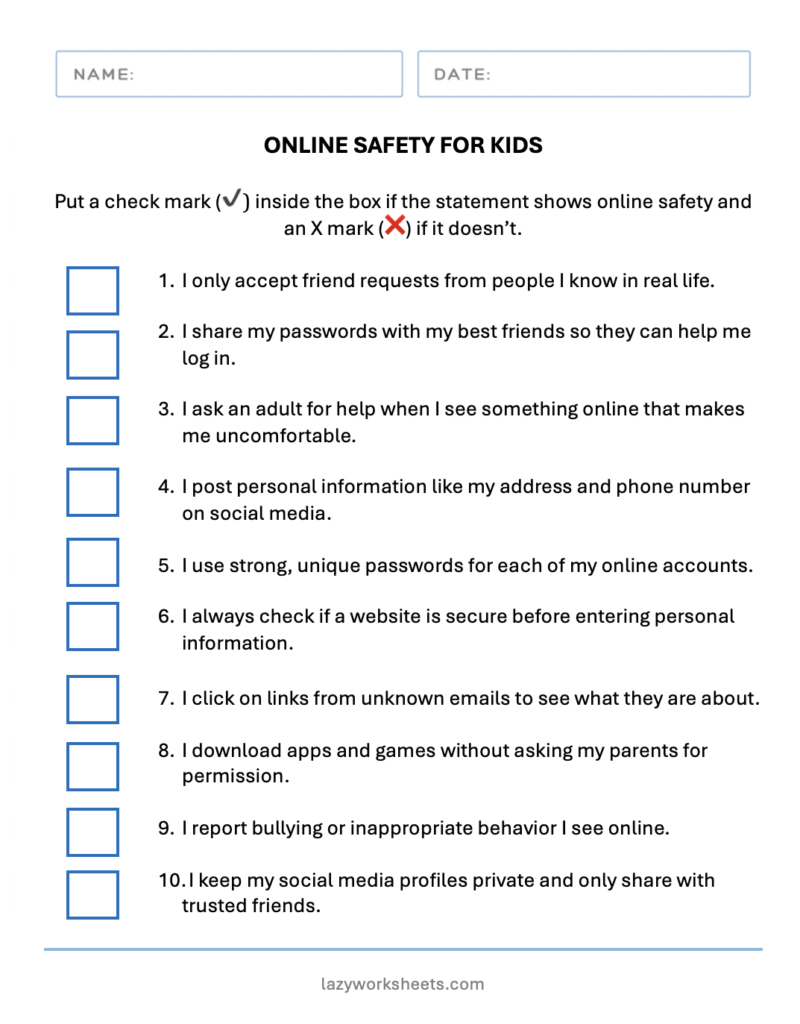
Children today navigate a vibrant digital landscape long before they reach high school. Tablets passed down at the kitchen table, shared family computers, and multiplayer game consoles serve as standard portals to learning and play. Yet, navigating these virtual spaces requires deliberate guidance. Educators and caregivers often search for accessible ways to introduce essential concepts without inducing fear. This is where the free printable addressing how teachers of grades 9-12 should expand internet safety instruction proves invaluable. By breaking down complex digital citizenship concepts into digestible, hands-on tasks, this activity sheet supports adults in fostering healthy online habits early on. It sounds simple, and that’s the point. Building digital resilience begins with routine conversations about keeping personal information private, choosing strong passwords, and thinking before sharing. Related guide: Teachers Of Grades 9–12 Should Expand Internet Safety Instruction To Include Which Of The Following Topics?.
💡 Educational Key Takeaways:
- Core Skill: Structured Teachers Of Grades 9-12 Should Expand Internet Safety Instruction To Inclice Which focused on developing pencil grip, stroke control, and early literacy/math confidence.
- Target Scope: Suited for homeschoolers, preschool, kindergarten, and elementary learners.
- Best Recommendation: Practice 10–15 minutes daily with ergonomic writing tools to reinforce muscle memory without hand fatigue.
What This Printable Covers
This targeted interactive activity sheet focuses on practical digital decision-making for growing learners. Instead of dwelling on abstract dangers, the content directs attention toward proactive, protective choices. Children encounter online risks during ordinary moments, such as typing a display name in an in-game chat or browsing video platforms on a family tablet. The printable addresses these everyday scenarios directly, prompting learners to identify safe behaviors. Prompts guide participants through recognizing what constitutes private information, understanding when to pause before clicking, and learning the importance of turning to a trusted adult when something feels off. Importantly, the material reinforces a vital emotional message: children are never in trouble for reporting an uncomfortable digital experience.
Key Learning Outcomes
Working through the pages builds specific cognitive and social skills associated with responsible technology use. Learners practice identifying digital boundaries, distinguishing between public and private data, and formulating clear steps for seeking help. Furthermore, the exercises encourage empathy and critical thinking, helping students evaluate online interactions constructively. These foundational proficiencies complement broader lessons found across various online safety curricula, transforming passive screen time into active, mindful engagement.
How to Use This Printable
Successful implementation relies on keeping the atmosphere light, collaborative, and entirely free of judgment. Adults can introduce the exercise during a morning meeting, a rainy recess, or a quiet afternoon at the kitchen table. Rather than treating the page as a formal test, facilitators should read prompts aloud and invite open discussion. Real-world relevance emerges when children connect the scenarios on the page to their own favorite apps and games. It helps to explore these topics regularly, treating digital literacy as an ongoing skill-building journey rather than a one-time lecture.
Practical Tips for Parents and Teachers
Maximizing the impact of this resource involves a few intentional strategies. First, review the material independently before sharing it with a child to anticipate questions. Second, listen actively during the conversation, validating any concerns kids raise about multiplayer chats or pop-up windows. Third, establish clear family or classroom tech rules, such as keeping devices in common areas. To expand learning further, pair this exercise with creative projects found within the collection of digital citizenship coloring sheets, which reinforce positive messaging through artistic expression.
Age-Appropriate Recommendations
Adapting instruction to match developmental stages ensures maximum comprehension and retention. For younger elementary students aged five to eight, focus centers on basic boundaries, such as asking permission before downloading apps and never sharing full names online. Upper elementary students aged nine to twelve can explore more nuanced topics, including digital footprints, respectful online communication, and identifying misleading information. Grounding this progression in established frameworks, such as the ISTE Standards for Students, helps educators ensure that digital citizenship instruction remains developmentally responsive, empowering learners to act as responsible, capable digital citizens.
According to Common Sense Media, a vast majority of children access mobile devices before entering kindergarten, making early digital literacy instruction essential for healthy habit formation. — Common Sense Media
Frequently Asked Questions
Addressing common inquiries helps educators and families make the most of this free educational tool, ensuring smooth implementation across diverse learning environments at home and in school.
Research from the Pew Research Center highlights that teens and older children frequently encounter digital dilemmas through shared devices and casual online gaming platforms. — Pew Research Center
Explore More Free Kids Online Safety Printables
Continuing the digital citizenship journey involves exploring additional materials designed to support educators and families. A wealth of supplementary activities awaits within the archive of comprehensive safety resources. Consistent, gentle reinforcement prepares children to navigate technology safely, confidently, and responsibly throughout their educational years and beyond.
Developmental Milestone & Activity Table
| Development Stage | Recommended Daily Duration | Primary Learning Objective |
|---|---|---|
| Preschool & Pre-K | 10 – 15 Minutes | Pencil grip development & basic pre-stroke lines |
| Kindergarten | 15 – 20 Minutes | Letter/number formation & spatial line awareness |
| Early Elementary (Grade 1–2) | 20 – 30 Minutes | Fluency, sentence construction & neatness |
Images References