Why Active Digital Guardrails Protect K-12 Communities
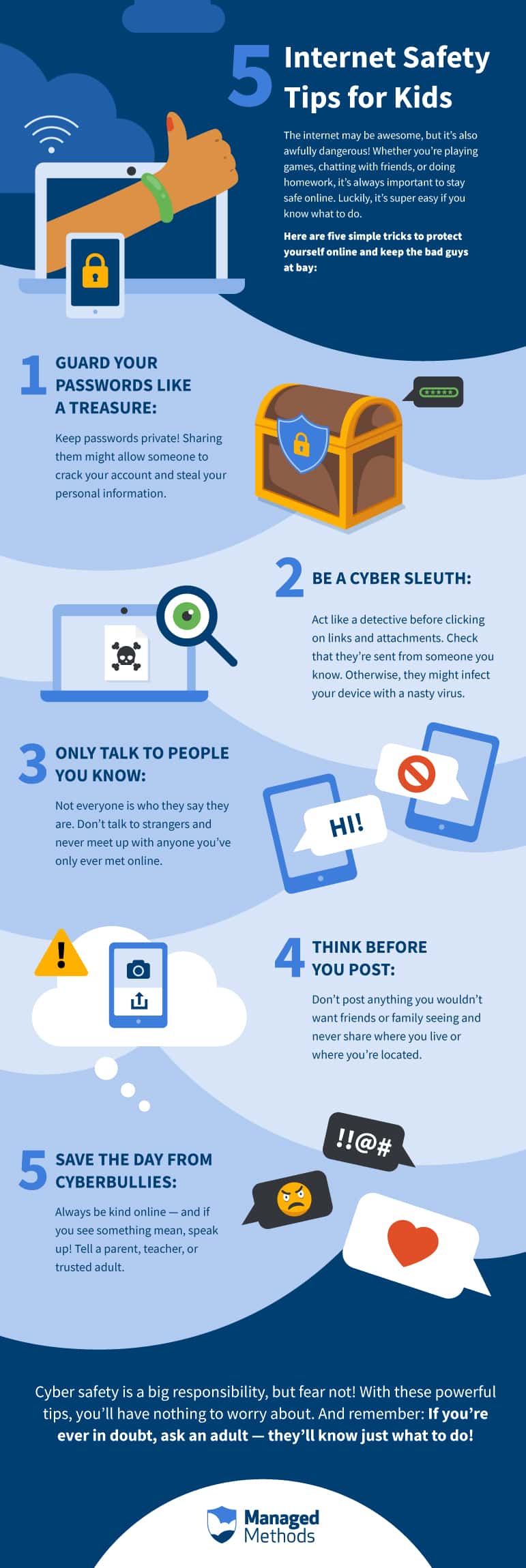
Today’s students navigate dynamic digital landscapes where learning apps, multiplayer gaming, and social messaging converge seamlessly on a single screen. Because young learners frequently interact with open web platforms, traditional static filtering is no longer enough. Aligning with frameworks from ConnectSafely and the Cybersecurity and Infrastructure Security Agency, effective protection requires shifting from rigid bans to proactive digital habits. When parents, teachers, and school staff align on Internet and Digital Safety, students learn to recognize digital risks independently and maintain safer boundaries across all connected environments.
💡 Educational Key Takeaways:
- Core Skill: Structured Interactive Internet Safety For Students focused on developing pencil grip, stroke control, and early literacy/math confidence.
- Target Scope: Suited for homeschoolers, preschool, kindergarten, and elementary learners.
- Best Recommendation: Practice 10–15 minutes daily with ergonomic writing tools to reinforce muscle memory without hand fatigue.
Understanding where risks materialize helps adults target their preventive measures effectively. Whether children browse on school-issued tablets or personal smartphones in their bedrooms, specific blind spots frequently invite privacy leaks or unwanted contact. Reviewing technical settings alongside behavioral cues ensures timely intervention before minor issues escalate into major safety concerns. Related guide: Teachers Of Grades 9–12 Should Expand Internet Safety Instruction To Include Which Of The Following Topics?.
| Setting / Context | Common Vulnerability | Practical Safeguard |
|---|---|---|
| Home Devices & Tablets | Unfiltered search engines and open app store permissions allowing unvetted downloads. | Lock app store downloads with a parental PIN and enforce safe-search defaults on all browsers. |
| School Chromebooks | Students bypassing web extensions or attempting proxy workarounds during unsupervised periods. | Coordinate with IT departments to audit extension logs and reinforce clear Acceptable Use Policies. |
| Chat & Social Messaging | Public lobby chats in gaming platforms exposing children to unverified strangers. | Disable direct messaging and voice chat features in multiplayer games, restricting play to known peers. |
Establishing Daily Safety Habits at Home and in the Classroom
Building resilience against online hazards depends on predictable, collaborative routines rather than reactive policing. Educators and caregivers can implement straightforward workflows that make safe choices the path of least resistance. Establish a central, family-friendly device charging station outside of bedrooms overnight to curb late-night screen fatigue and encourage healthy rest cycles. Educators can leverage interactive tools, while adults looking for supplemental reinforcement can integrate engaging Worksheets into digital citizenship lessons. Additionally, enable two-factor authentication on all student accounts to prevent credential stuffing, and practice calm reporting workflows so children know they can disclose mistakes—such as clicking a suspicious link—without fearing immediate device confiscation.
When adults implement strict device lockdowns without explanation, students often discover clever workarounds like browser extensions, hidden apps, or alternative Wi-Fi networks. Instead of escalating punishments when workarounds occur, use those moments as teaching opportunities. FOSI emphasizes that open dialogue yields better long-term compliance than total surveillance. Pair your technical filters with transparent conversations explaining *why* certain boundaries exist, transforming rule enforcement into a collaborative exercise in critical thinking and self-regulation.
Frequently Asked Questions About Youth Digital Protection
How early should children begin learning about interactive safety?
Age-appropriate digital literacy should start as soon as children begin interacting with touchscreens, typically around preschool or kindergarten. Early lessons focus on basic concepts like keeping personal information private and asking an adult before downloading new games.
What is the best way to handle accidental exposure to inappropriate content?
Stay calm and thank the child for coming forward immediately. Reassure them that they are not in trouble, close the window together, and use the incident as a brief, supportive teaching moment on how to navigate unexpected pop-ups or search results.
How can teachers reinforce digital citizenship without adding to academic burdens?
Integrate short, five-minute discussions into existing lesson plans or homeroom periods by using relatable real-world scenarios. Emphasize positive online behavior, empathy, and critical evaluation of digital media alongside traditional academic subjects.
Explore More Digital Citizenship Resources
Empowering students to thrive online is an ongoing journey that requires continuous learning and community collaboration. For more expert guidance, lesson plans, and practical toolkits designed to keep youth secure in connected environments, explore additional resources at SafeWiredSchools.org.
Visual Reference Gallery