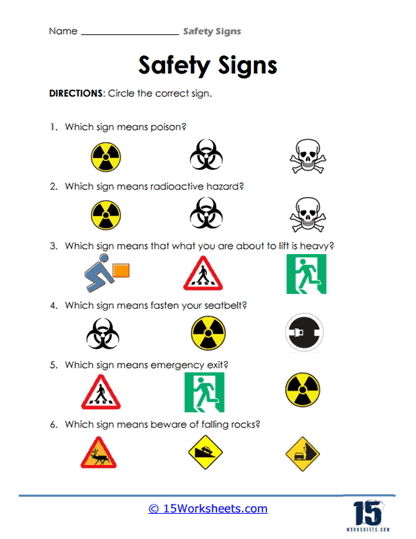
Why Safety Signs Matching Worksheet Matters for School and Home Safety
Navigating the digital world requires the same situational awareness as crossing a busy street, which is why blending visual learning tools like a safety signs matching worksheet into digital citizenship curricula is so effective. Younger children and early elementary students often struggle to translate abstract concepts like internet privacy or online stranger danger into actionable behaviors. By grounding digital boundaries in familiar physical metaphors—such as stop signs, caution triangles, and yield markers—educators and parents can bridge the gap between physical safety and virtual literacy. Organizations like ConnectSafely and the Family Online Safety Institute (FOSI) emphasize that early interventions should use concrete, recognizable imagery to help children identify red flags before they compromise their personal data.
💡 Educational Key Takeaways:
- Core Skill: Structured Safety Signs Matching Worksheet focused on developing pencil grip, stroke control, and early literacy/math confidence.
- Target Scope: Suited for homeschoolers, preschool, kindergarten, and elementary learners.
- Best Recommendation: Practice 10–15 minutes daily with ergonomic writing tools to reinforce muscle memory without hand fatigue.
Translating Physical Warning Symbols into Digital Risk Signals
When students interact with school Chromebooks, personal tablets, and messaging apps, they frequently encounter pop-ups, phishing links, and unverified download prompts. Adults must establish clear preventive guardrails that map real-world caution symbols to digital scenarios. Utilizing a dedicated safety signs matching worksheet alongside structured classroom management tools ensures that students can quickly decode confusing error screens, recognize malicious links, and pause before sharing personal details. The breakdown below highlights how common digital vulnerabilities align with everyday safety signals and actionable technical safeguards.
| Setting / Context | Common Vulnerability | Practical Safeguard |
|---|---|---|
| Home Devices | Accidental clicks on malicious banner ads or untrusted app store downloads. | Configure family-friendly DNS filtering and review Internet and Digital Safety guidelines to block unauthorized installers. |
| School Chromebooks & Tablets | Bypassing browser extensions or ignoring secure HTTPS warning prompts. | Integrate interactive Worksheets into digital literacy lessons to reinforce why security certificates matter. |
| Social & Chat Habits | Sharing identifying information with unverified accounts in multiplayer games. | Establish a central charging station in a common family area and discuss safe communication habits. |
Core Rules and Healthy Habits Families and Schools Can Apply
Effective digital safety relies on consistency between classroom policies and home routines. Educators should establish transparent expectations for school-issued devices, making sure students know that security alerts are designed to protect them rather than restrict their learning. At home, families can reinforce these lessons through calm, recurring check-ins about what students encounter online. Pair a printed safety signs matching worksheet with a family tech agreement that outlines simple steps: stop when an unfamiliar pop-up appears, evaluate the situation, and talk to a trusted adult. Integrating hands-on Coloring Pages into lower-grade activities also helps reinforce positive device habits without inducing fear or anxiety.
Handling Student Workarounds and Pushback Without Shame
Children and teens are notoriously resourceful when it comes to bypassing school filters, uninstalling safety apps, or finding workarounds for screen time limits. When educators or parents react with harsh punishments, students simply learn to hide their digital mistakes, driving risky behaviors underground. Instead, treat workarounds as teachable moments. If a student manages to bypass a restriction, investigate the root cause together. Ask what they were trying to accomplish and explain the underlying risks associated with that action, referencing official guidance from agencies like CISA on secure device usage.
Educator and Parent Questions
What age group benefits most from a safety signs matching worksheet?
Children in kindergarten through third grade respond best to visual matching activities because they connect abstract digital safety concepts to concrete physical signs they already recognize in their daily environment.
How can teachers incorporate safety signs into a busy instructional schedule?
Teachers can use these matching activities during morning meeting warm-ups, computer lab orientation sessions, or library media center blocks to reinforce good digital habits before students log onto devices.
What should I do if a child encounters a scary pop-up or warning sign?
Praise the child for stopping and notifying you immediately, keep the device screen visible to assess the alert, and explain simply why the warning appeared so they feel supported rather than blamed.
Explore More Digital Citizenship Resources
Empowering children to become safe, responsible digital citizens requires ongoing conversations, age-appropriate tools, and reliable resources that bridge the gap between home and school. Visit SafeWiredSchools.org to discover expert-backed guides, interactive lessons, and printable materials designed to keep young learners secure across every online environment.
Worksheet Previews & Reference Materials