Introduction
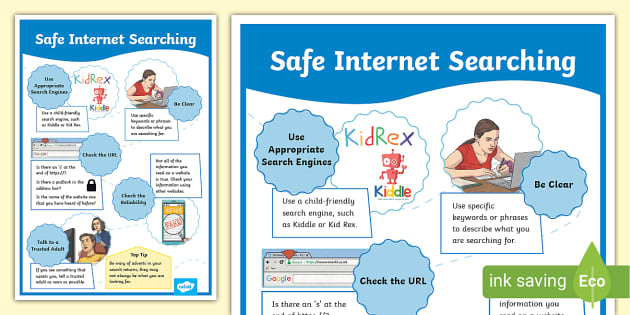
Children encounter digital environments long before mastering the critical thinking required to navigate them safely. Shared household tablets, immersive in-game chat features, and autoplay video platforms often serve as the primary entry points to the connected world. Rather than reacting out of fear, educators and caregivers find success by treating digital literacy as a fundamental life skill, much like crossing the street or swimming. Providing structured introductory materials sets a positive tone for lifelong responsible technology use. The free printable introduction for project work of internet safety available on {site_name} offers a reliable foundation for starting these essential conversations without overwhelming young learners. It sounds simple, and that’s the point: foundational concepts stick best when introduced visually and interactively. Related guide: Teachers Of Grades 9–12 Should Expand Internet Safety Instruction To Include Which Of The Following Topics?.
💡 Educational Key Takeaways:
- Core Skill: Structured Introduction For Projecct Work Of Internet Safety focused on developing pencil grip, stroke control, and early literacy/math confidence.
- Target Scope: Suited for homeschoolers, preschool, kindergarten, and elementary learners.
- Best Recommendation: Practice 10–15 minutes daily with ergonomic writing tools to reinforce muscle memory without hand fatigue.
What This Printable Covers
Designed specifically for elementary-aged learners, this structured activity page introduces core digital safety concepts through guided exercises. Children explore the difference between public and private information, learn why keeping passwords secret matters, and practice identifying scenarios that require adult intervention. According to Common Sense Media research, a significant percentage of young children use mobile devices daily, making early habit-building imperative. Here’s what makes this resource different: it shifts the focus away from restrictive rules and toward empowering children to make thoughtful choices. The material explicitly reinforces the comforting message that children are never in trouble for reporting something uncomfortable, confusing, or mean online.
Key Learning Outcomes
Completing this guided activity helps children articulate what constitutes private data, such as home addresses, full names, and school locations. Learners practice identifying trusted adults at home and at school whom they can approach whenever a digital situation feels strange. The exercises encourage pausing before clicking, sharing, or downloading unfamiliar content. Strengthening these protective habits reduces impulsive online behavior. Children gain a vocabulary for digital boundaries, transforming abstract internet safety guidelines into concrete, actionable steps they can remember independently.
How to Use This Printable
Implementation requires minimal preparation, making the resource ideal for both bustling classrooms and quiet kitchen tables. Educators can integrate the activity into a broader Internet and Digital Safety unit to anchor abstract discussions in a tangible task. Families benefit from working through the questions side-by-side, allowing adults to model positive digital habits in real time. When children complete the prompts, adults should use the answers as a springboard for open-ended dialogue rather than a formal quiz. Exploring these topics together ensures that young users view adults as approachable guides rather than strict enforcers of technology bans.
Practical Tips for Parents and Teachers
Facilitating a productive conversation starts with keeping the atmosphere calm and encouraging. Adults should ask open-ended questions like what the child would do if an unfamiliar pop-up appeared during a game. Establishing clear expectations around shared devices helps bridge the gap between school lessons and home application. For additional classroom activities and printable exercises, exploring the collection of Worksheets provides supplemental ways to reinforce digital citizenship. Consistency across home and school environments helps cement these vital habits in a child’s daily routine.
Age-Appropriate Recommendations
Tailoring the delivery of digital safety concepts ensures maximum retention across the five-to-twelve age span. Younger elementary students thrive on concrete rules, such as checking in with an adult before tapping any new button. Upper elementary students benefit from deeper discussions regarding digital footprints, respectful communication, and empathy in virtual spaces. Grounding these lessons in the Common Sense Education Digital Citizenship Curriculum provides a structured progression for educators managing diverse developmental stages. Aligning expectations with cognitive maturity prevents unnecessary anxiety while fostering genuine digital resilience.
Young children frequently encounter digital environments through shared household tablets and interactive gaming platforms before developing advanced risk-awareness skills. — Common Sense Media
Frequently Asked Questions
Answers to common inquiries regarding the implementation and value of the introductory safety project printable help educators and families get started with confidence.
According to Pew Research Center data, the vast majority of parents of young children discuss online safety practices with their kids to encourage proactive reporting of digital discomfort. — Pew Research Center
Explore More Free Kids Online Safety Printables
Expanding a digital citizenship curriculum requires a diverse mix of instructional tools and creative exercises. Educators looking to engage visual learners often incorporate Coloring Pages to introduce complex concepts through relaxing, low-pressure art activities. Reviewing additional resources across the Online and Digital Safety directory ensures continuous learning opportunities throughout the school year. Building a comprehensive safety toolkit empowers children to navigate technology safely, creatively, and with complete confidence.
Developmental Milestone & Activity Table
| Development Stage | Recommended Daily Duration | Primary Learning Objective |
|---|---|---|
| Preschool & Pre-K | 10 – 15 Minutes | Pencil grip development & basic pre-stroke lines |
| Kindergarten | 15 – 20 Minutes | Letter/number formation & spatial line awareness |
| Early Elementary (Grade 1–2) | 20 – 30 Minutes | Fluency, sentence construction & neatness |
Images References