Introduction
Children today navigate a vibrant digital landscape long before they reach secondary school. Whether navigating shared household tablets or collaborating on school projects, elementary-aged students encounter digital environments naturally. Real-world observations show that young learners frequently stumble across unexpected online risks not through malicious intent, but through casual exploration. In-game text chats, video platform sidebars, and shared family devices present moments where guidance is required. Rather than restricting access entirely, educators and caregivers focus on building digital resilience. Equipping children with the right vocabulary and instincts transforms passive screen time into an opportunity for growth. Printable discussion tools provide a tangible bridge for these vital conversations, fostering open dialogue between adults and students. Related guide: Teachers Of Grades 9–12 Should Expand Internet Safety Instruction To Include Which Of The Following Topics?.
💡 Educational Key Takeaways:
- Core Skill: Structured Internet Safety Questions For Students focused on developing pencil grip, stroke control, and early literacy/math confidence.
- Target Scope: Suited for homeschoolers, preschool, kindergarten, and elementary learners.
- Best Recommendation: Practice 10–15 minutes daily with ergonomic writing tools to reinforce muscle memory without hand fatigue.
What This Printable Covers
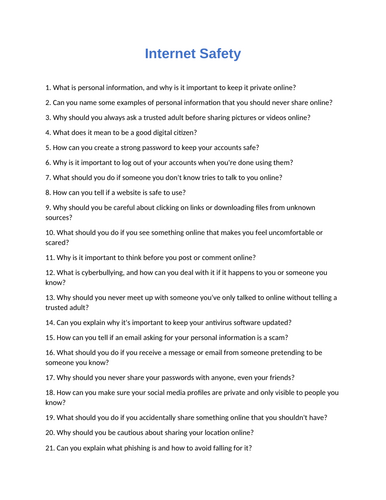
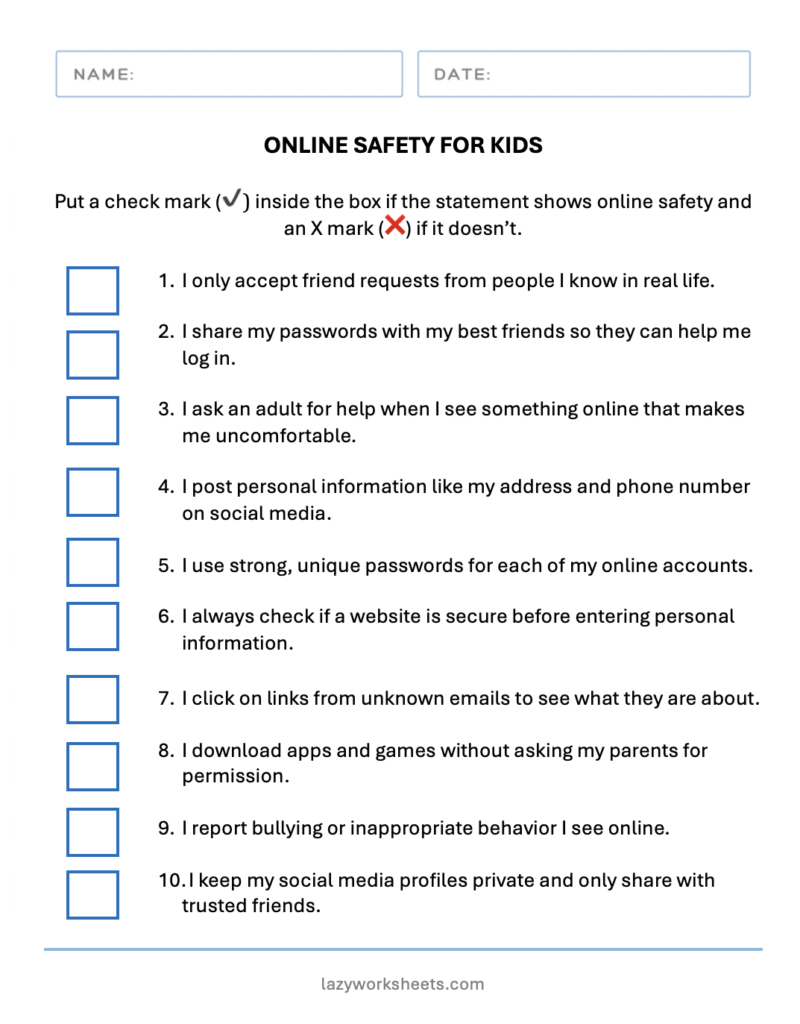
The free printable “internet safety questions for students” serves as a structured conversation starter designed for classrooms, counseling sessions, and living rooms. It steers clear of fear-based warnings, prioritizing empowering habits instead. The content focuses on foundational protective behaviors: recognizing personal information, understanding strong passwords, pausing before sharing, and identifying trusted adults. When a pop-up appears or an in-game message feels confusing, children need actionable steps. This resource outlines those exact steps in kid-friendly language. It sounds simple, and that’s the point. Clear, repeatable concepts stick in young minds much better than vague lectures about online danger. Furthermore, the worksheet reinforces a critical emotional anchor: children are never in trouble for reporting something uncomfortable.
Key Learning Outcomes
Working through these guided questions helps students articulate what privacy means in digital spaces. According to Common Sense Media research regarding media use, young children spend significant portions of their daily lives interacting with screens, making digital literacy a daily necessity. Learners practice identifying data that must remain private, such as home addresses, full names, and school locations. Another core outcome involves building trust networks. Students learn to name at least three adults they can approach when encountering unexpected content online. This specific skill practiced during activity time directly supports the broader goals found in resources dedicated to Internet and Digital Safety.
How to Use This Printable
Integrating this resource into daily routines requires flexibility rather than rigid testing. Teachers can use the questions during morning meeting circles or small group rotations. School counselors often find these prompts helpful for opening dialogue with students who are hesitant to speak about screen time struggles. At home, caregivers might review a question over dinner or while setting up a new device. Here’s what makes this resource different: it relies on inquiry-based learning rather than memorization. By asking open-ended questions, adults encourage children to think critically about their own digital choices. Exploring these concepts alongside complementary materials from Worksheets enhances the learning experience through varied formats.
Practical Tips for Parents and Teachers
Consistency and a calm demeanor lay the groundwork for effective digital citizenship education. Adults should approach the printable as a collaborative quiz rather than an interrogation. When a child offers an unexpected answer, pausing to listen without immediate judgment keeps communication channels open. Role-playing scenarios adds an engaging, low-stakes dimension to the exercise. For instance, practicing what to say when a strange link appears in a favorite gaming app helps build muscle memory for actual online moments. Establishing these habits early ensures children view online safety as a normal, manageable part of modern life rather than a source of anxiety.
Age-Appropriate Recommendations
Tailoring the conversation to a child’s developmental stage ensures the concepts resonate properly. For five-to-seven-year-olds, the focus remains on physical boundaries and asking permission before clicking anything new. Eight-to-ten-year-olds can explore the nuances of treating others with kindness in group chats and understanding digital footprints. Pre-teens ages eleven and twelve are ready for deeper discussions around algorithmic feeds, privacy settings, and critical evaluation of online sources. This developmental progression aligns closely with the Common Sense Education Digital Citizenship Curriculum framework, which emphasizes age-graded competencies in media balance, privacy, and cybersecurity awareness.
Young children spend hours daily with media — Common Sense Media
Frequently Asked Questions
Navigating digital citizenship resources raises common logistical and pedagogical questions for educators and parents alike. Clear answers help streamline implementation across diverse learning environments.
Explore More Free Kids Online Safety Printables
Expanding a child’s digital literacy toolkit requires access to varied, high-quality educational materials. Supplementing discussion questions with visual aids and creative activities reinforces essential lessons across different learning styles. For artistic learners, integrating resources like Coloring Pages offers a calming, hands-on way to absorb protective habits. Comprehensive guidance can also be found by browsing broader collections focused on Online and Digital Safety to ensure every student builds lasting confidence in the digital world.
Developmental Milestone & Activity Table
| Development Stage | Recommended Daily Duration | Primary Learning Objective |
|---|---|---|
| Preschool & Pre-K | 10 – 15 Minutes | Pencil grip development & basic pre-stroke lines |
| Kindergarten | 15 – 20 Minutes | Letter/number formation & spatial line awareness |
| Early Elementary (Grade 1–2) | 20 – 30 Minutes | Fluency, sentence construction & neatness |
Images References