Why Visual Learning Works Best for Early Digital Literacy
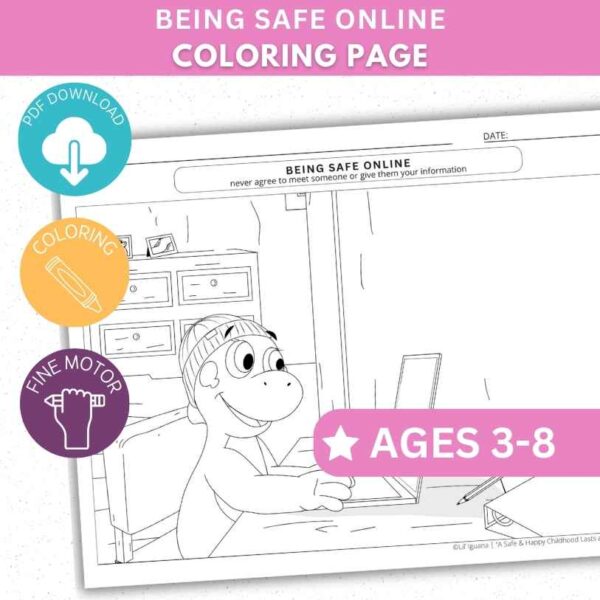
Introducing foundational tech habits to young children requires a delicate balance of engagement and caution. Long before students navigate complex networks or unmonitored chatrooms, they form habits shaped by visual cues and storytelling. Utilizing internet safety colouring sheets in kindergarten and primary classrooms bridges the gap between abstract device rules and concrete understanding. Organizations like ConnectSafely and the Family Online Safety Institute emphasize that early digital citizenship must be approachable, interactive, and free of fear. By weaving safety concepts into creative analog activities, educators and parents give children a tangible way to discuss passwords, screen time limits, and device boundaries without overwhelming their developmental capacity. Related guide: Please Provide Free 8.5X11″ Digital Safety Coloring Pages For K-2 Grade.
💡 Educational Key Takeaways:
- Core Skill: Structured Internet Safety Colouring Sheets focused on developing pencil grip, stroke control, and early literacy/math confidence.
- Target Scope: Suited for homeschoolers, preschool, kindergarten, and elementary learners.
- Best Recommendation: Practice 10–15 minutes daily with ergonomic writing tools to reinforce muscle memory without hand fatigue.
Mapping Early Tech Risks to Creative Preventative Guardrails
Even young children encounter connected devices through shared family tablets, streaming apps, and school-issued hardware. Recognizing early vulnerability signals allows adults to establish proactive technical guardrails and behavioral routines. The table below outlines common digital touchpoints, associated exposure risks, and actionable safeguards aligned with current guidance from the Cybersecurity and Infrastructure Security Agency.
| Setting / Context | Common Vulnerability | Practical Safeguard |
|---|---|---|
| Home Tablets & Phones | Unintended in-app purchases and exposure to inappropriate autoplay videos on streaming platforms. | Enable strict parental controls, lock app store purchasing, and curate safe-listed viewing channels. |
| School Chromebooks & iPads | Bypassing web content filters or wandering onto unapproved educational gaming platforms. | Deploy district-wide content filtering through tools found in our Internet and Digital Safety category while keeping devices in common areas. |
| Messaging & Multiplayer Chat | Accidental interaction with strangers through open multiplayer lobbies or embedded chat features. | Disable chat functionalities entirely on youth profiles and monitor online gaming sessions actively. |
Establishing Calm Routines and Open Communication at Home and School
Effective digital safety relies on consistent routines rather than reactionary panic. When educators introduce internet safety colouring sheets during art or computer lab orientation, they should pair the activity with guided discussions about what to do when something unexpected pops up on a screen. Classrooms can complement these creative lessons by utilizing structured resources from our Worksheets section, encouraging students to draw or write out their own tech-time boundaries. At home, families should establish centralized charging stations outside of bedrooms to naturally curb late-night device use and foster trust through calm, non-judgmental check-ins.
Children are naturally inventive, and tech-savvy students quickly discover how to bypass basic restrictions, clear browser histories, or guess parental passcodes. Overly punitive bans often backfire by driving children to hide their digital mistakes out of fear of losing device privileges. Instead of relying solely on heavy-handed restrictions, pair technical filters with transparent conversations. When reviewing internet safety colouring sheets with students, use open-ended prompts like what would you do if a scary picture popped up? This empowers children to view adults as safe, supportive problem-solvers rather than strict enforcers when they encounter digital trouble.
Frequently Asked Questions About Creative Digital Citizenship Tools
At what age should children start learning foundational digital safety concepts?
Foundational concepts can be introduced as early as preschool or kindergarten. Simple lessons regarding device ownership, physical breaks, and asking an adult before downloading apps lay the groundwork for safe navigation later on.
How can teachers incorporate offline safety lessons into a busy academic schedule?
Educators can seamlessly blend digital citizenship into existing art, literacy, or morning meeting blocks. Utilizing themed coloring tasks allows students to process abstract internet rules through creative, low-stress mediums without adding extra instructional time.
Where can I find more printable activities for my classroom or household?
Explore our growing collection of creative printables by visiting the Coloring Pages archive for age-appropriate resources designed to engage young learners.
Explore More Digital Citizenship Resources
Building a resilient community of digitally responsible children requires ongoing collaboration between educators, administrators, and parents. Discover additional guides, policy templates, and classroom tools by visiting SafeWiredSchools.org to keep your students safe online.
Visual Reference Gallery