Why Comprehensive Digital Safety Topics Matter for School and Home Alignment
Navigating the modern digital landscape requires a unified front between educators and families. When students move fluidly between school-issued devices and home Wi-Fi networks, consistency in safety practices becomes essential. Organizations like CISA and ConnectSafely emphasize that technical filters alone are never enough to protect children online. True digital wellness bridges device configurations with compassionate, ongoing conversations about internet habits, online privacy, and respectful digital behavior.
💡 Educational Key Takeaways:
- Core Skill: Structured Digital Safety Topics focused on developing pencil grip, stroke control, and early literacy/math confidence.
- Target Scope: Suited for homeschoolers, preschool, kindergarten, and elementary learners.
- Best Recommendation: Practice 10–15 minutes daily with ergonomic writing tools to reinforce muscle memory without hand fatigue.
Spotting Vulnerability Signals and Strengthening Technical Guardrails
Understanding where technical gaps occur helps parents and school staff proactively manage risk. Reviewing device permissions, app permissions, and account settings regularly ensures that children stay within safer digital boundaries. The breakdown below details common vulnerabilities across different environments and offers immediate fixes. Related guide: Teachers Of Grades 9–12 Should Expand Internet Safety Instruction To Include Which Of The Following Topics?.
| Setting / Context | Common Vulnerability | Practical Safeguard |
|---|---|---|
| Home Mobile Devices | Unrestricted app store downloads and disabling location privacy settings. | Enable parental controls via device native settings, require a PIN for new app purchases, and turn off location sharing for non-essential apps. |
| School Chromebooks and Tablets | Bypassing network filters through unauthorized browser extensions or proxy sites. | Coordinate with IT departments to enforce strict extension whitelists and review the Internet and Digital Safety guidelines for classrooms. |
| Interactive Chat and Gaming | Interacting with unverified users through direct messaging in multiplayer video games. | Disable open text and voice chat features in gaming profiles, and encourage kids to play only with known peers. |
Establishing Daily Habits and Collaborative Classroom Rules
Effective digital safety relies heavily on transparent routines rather than reactive discipline. Schools can clearly communicate acceptable use policies during the first week of term, while parents can establish predictable physical boundaries at home. Designate a central charging station in a common family area where all smartphones and tablets sleep overnight, removing the temptation for late-night scrolling. Integrate lessons from Online and Digital Safety curricula to reinforce that making mistakes online is a learning opportunity, provided children feel safe reporting suspicious messages to a trusted adult without fear of immediate device confiscation.
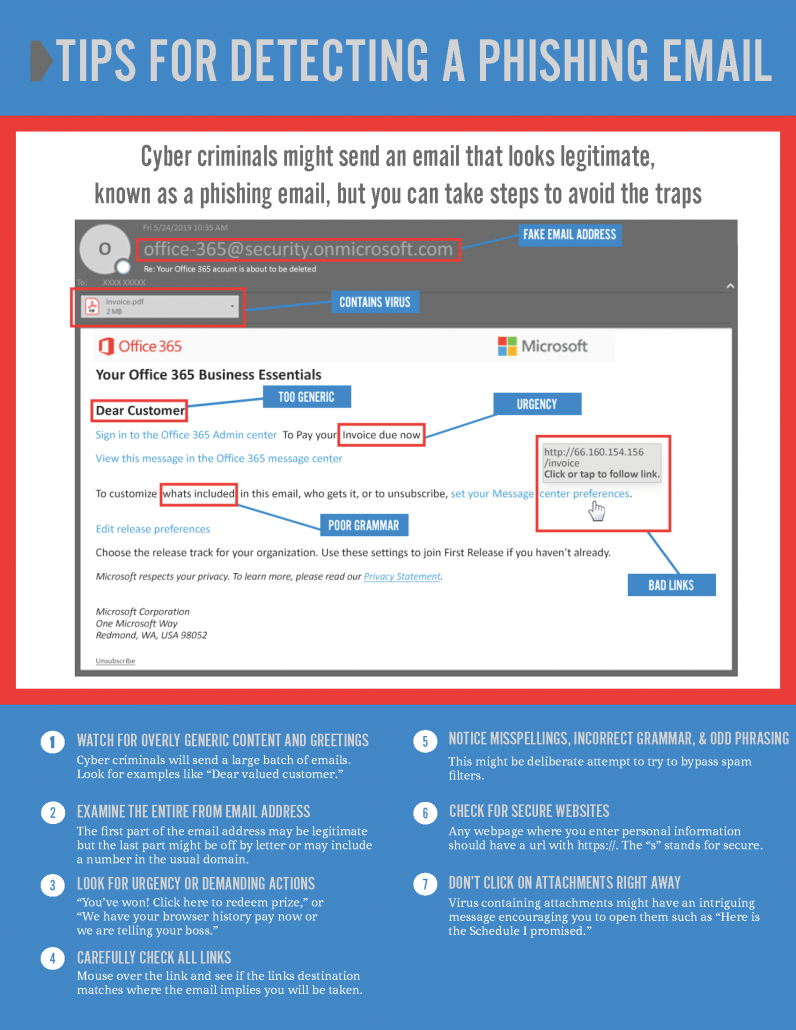
Overly restrictive bans frequently backfire by driving student tech use underground. When children face harsh penalties for accidental clicks or harmless curiosity, they learn to hide their digital activities rather than ask for guidance. Instead of shutting down conversations with punitive measures, educators and parents should pair technical filters with open check-ins. Acknowledge that kids will inevitably encounter pop-ups, phishing attempts, or unkind peer comments, and frame these incidents as teachable moments to refine their critical thinking skills.
Frequently Asked Questions About Managing Student Screen Time and Privacy
What is the best age to introduce a smartphone to a child?
There is no magic age, but many experts recommend waiting until middle school or when a child demonstrates independent organizational skills. Start with talk-and-text-only devices or smartwatches with limited internet browsing before moving to a full smartphone.
How can teachers handle cyberbullying that happens outside of school hours?
While schools generally lack jurisdiction over off-campus behavior, educators can support students by validating their feelings, preserving digital evidence through screenshots, and guiding families on how to report harassment to platform administrators or local authorities.
Should parents monitor every message their child sends online?
Complete surveillance often erodes trust as children grow older. A better approach involves transparent monitoring for younger children, shifting gradually toward mentoring and periodic check-ins as teenagers demonstrate maturity and responsibility.
Explore More Digital Citizenship Resources
Equipping the next generation with responsible online habits is an ongoing journey that requires continuous learning and community support. Explore our extensive library of teaching tools, guides, and student activities by visiting SafeWiredSchools.org to foster a secure, positive digital culture everywhere children learn and play.
Visual Reference Gallery