Introduction
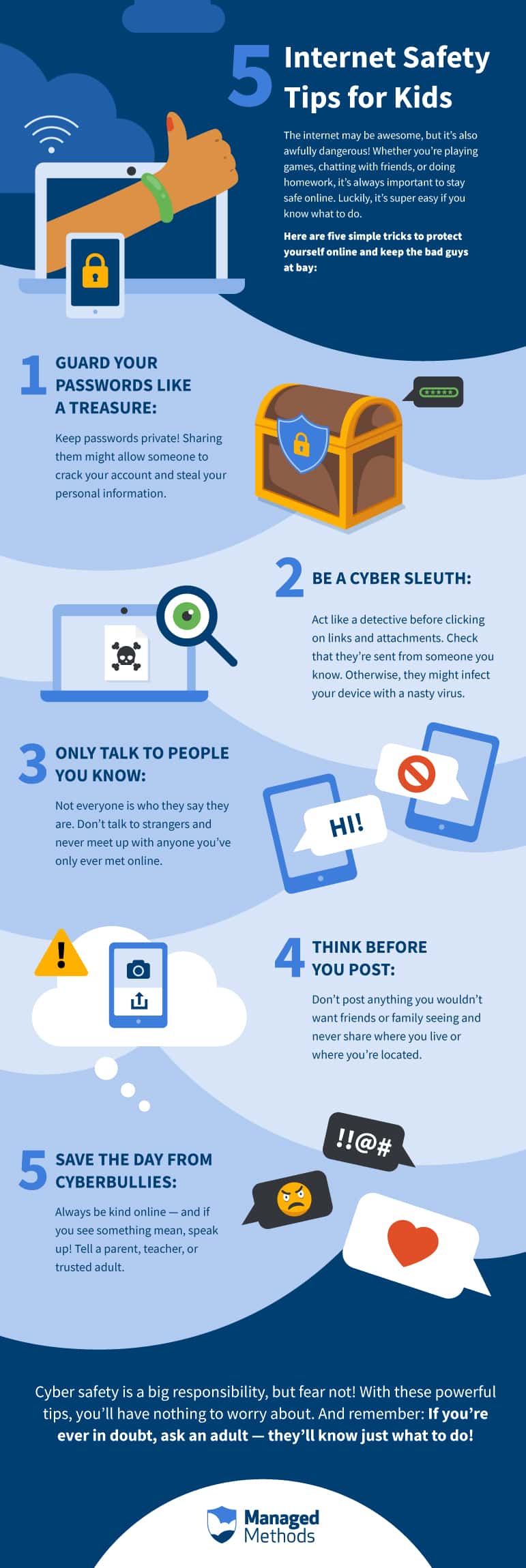
Digital spaces form a natural extension of modern childhood, where elementary students navigate virtual worlds as fluidly as physical playgrounds. Classrooms and living rooms now buzz with tablets, shared household laptops, and gaming consoles that double as social hubs. Real-world experience shows that children rarely encounter online risks through dramatic, cinematic scenarios. Instead, vulnerabilities emerge quietly during cooperative in-game chat features, unstructured video platform autoplay loops, or when borrowing a family device to research a school project. Addressing these everyday realities requires proactive habit-building rather than fear-based restrictions. Fostering healthy digital citizenship begins with turning abstract concepts like privacy and respect into concrete, manageable daily actions. Educators and caregivers frequently seek accessible tools that bridge the gap between technical safeguards and children’s actual understanding. That exact need inspired the creation of the free printable cheap internet safety rules for kids will recommendations, designed to translate complex digital concepts into kid-friendly visual reminders. Printable resources offer a tactile, low-stress entry point for teaching children how to navigate connected environments with confidence, curiosity, and critical thinking. Related guide: 5 Cyber Safety Tips Symbols That Can Be Read By The Grede 7 Students.
💡 Educational Key Takeaways:
- Core Skill: Structured Cheap Internet Safety Rules For Kids Will Recommendations focused on developing pencil grip, stroke control, and early literacy/math confidence.
- Target Scope: Suited for homeschoolers, preschool, kindergarten, and elementary learners.
- Best Recommendation: Practice 10–15 minutes daily with ergonomic writing tools to reinforce muscle memory without hand fatigue.
What This Printable Covers
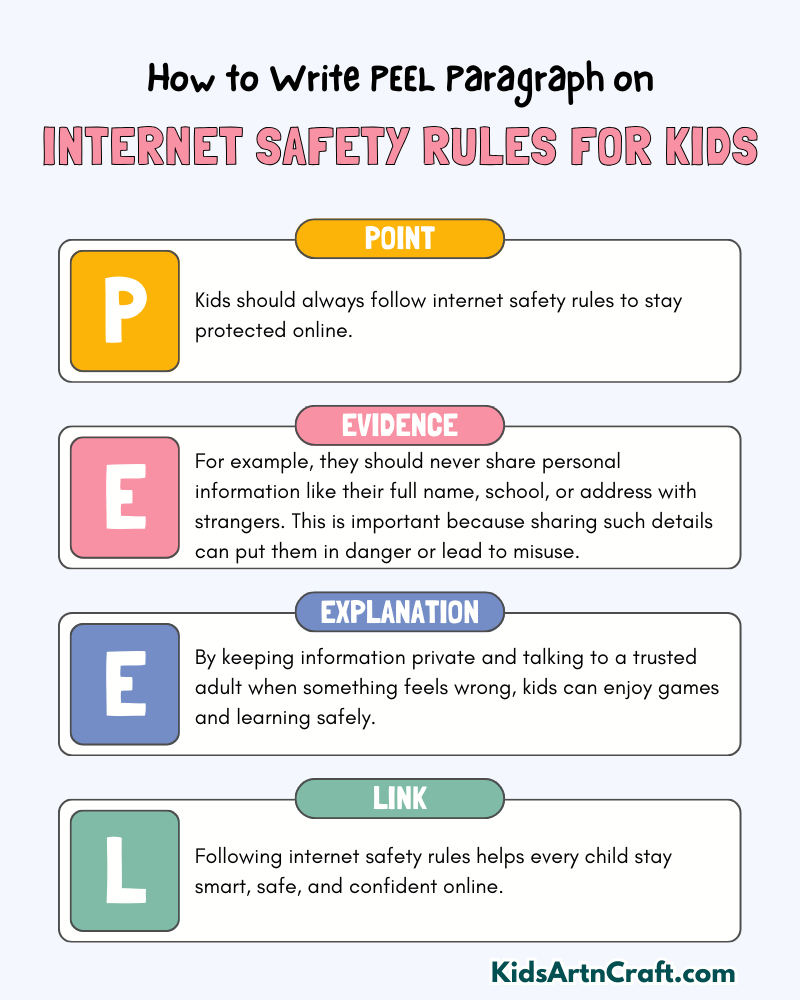
The resource breaks down foundational digital safety guidelines into digestible, visual rules tailored specifically for young minds between ages five and twelve. Core topics include the vital importance of keeping personal identifying information private, creating memorable yet strong passwords, and recognizing when a digital interaction crosses the line from fun to uncomfortable. Furthermore, the material emphasizes the golden rule of online communication: treating peers with kindness behind a screen just as one would face-to-face. Beyond individual habits, the printable explicitly teaches children that they are never in trouble for reporting a strange pop-up, a mean message, or an accidental click. It sounds simple, and that is the point. By removing the fear of punishment, adults build a bridge of trust that ensures children will speak up immediately when something feels wrong. Grounded in years of classroom observations, these materials avoid technical jargon in favor of direct, empowering language that children can easily recall when sitting independently at a keyboard or holding a family tablet.
Key Learning Outcomes
Working through these guided rules helps children internalize specific safety skills that protect their emotional and physical well-being. Learners practice identifying what constitutes private information, such as home addresses, full names, and school locations, distinguishing those details from harmless preferences like favorite colors or animals. Another critical outcome involves pausing before clicking, sharing, or downloading, encouraging a healthy pause that interrupts impulsive behavior on fast-paced apps. Children also learn to recognize trusted adults in their immediate circles—parents, teachers, or school counselors—whom they can approach without hesitation when encountering confusing content. These competencies align directly with broader curricula found across Internet and Digital Safety modules, ensuring a consistent message whether a child sits at a school desk or the kitchen table. Mastery of these outcomes transforms passive media consumers into mindful digital citizens who understand that choices online carry real-world weight.
How to Use This Printable
Implementation requires very little preparation, making this resource an ideal addition to morning meetings, computer lab orientations, or weekend family check-ins. Educators can print copies for student binders or laminate them for permanent computer station display, referencing the rules whenever technology integration occurs during lessons. Meanwhile, families often tape the sheet near the household charging station or the family computer as a gentle, daily prompt before screen time begins. Integrating these discussions into broader academic units helps normalize digital safety as just another life skill, much like crossing the street or washing hands. Exploring additional Worksheets provides supplementary avenues for reinforcing these core lessons through engaging prompts and reflection exercises. Here is what makes this resource different: it shifts the focus away from monitoring software and toward open, collaborative conversations where children feel heard and respected.
Practical Tips for Parents and Teachers
Maximizing the impact of any safety tool depends heavily on the tone set by the adults guiding the activity. Adults should approach the material with calm curiosity, asking open-ended questions like what a specific rule means in the context of their favorite video game or app. Role-playing scenarios work exceptionally well for younger children, allowing them to practice what to say or do if a stranger sends a message or a strange link appears on screen. Consistency across home and school environments reinforces these protective habits, ensuring children hear the exact same supportive message wherever they go. According to the Federal Trade Commission, open family communication remains one of the most effective deterrents against online fraud and identity theft targeting youth. Celebrating when a child successfully reports an uncomfortable situation reinforces that transparency brings praise, not penalties or sudden device revocation.
Age-Appropriate Recommendations
Tailoring the delivery of these digital citizenship lessons ensures maximum comprehension across the wide developmental spectrum of elementary and middle childhood. Younger children in kindergarten through second grade respond best to concrete visual cues, focusing heavily on basic device boundaries, asking permission before downloading, and identifying trusted helpers. Older elementary students in third through fifth grade can explore nuanced topics like digital footprints, respectful in-game chat etiquette, and evaluating the reliability of online sources. This developmental progression supports the framework outlined in the Common Sense Education Digital Citizenship Curriculum, which emphasizes age-graded competencies ranging from privacy and security to cyberbullying prevention. Educators and parents can scale the depth of the accompanying conversations based on maturity rather than strict chronological age, ensuring each child receives the right level of guidance for their specific digital exposure.
According to Common Sense Media research, a significant percentage of children begin using mobile devices and engaging with online platforms before graduating from elementary school, highlighting the urgent need for early safety habit formation. — Common Sense Media
Frequently Asked Questions
Navigating digital citizenship education brings up many practical questions for busy educators and families working to keep children safe in connected environments. Clear, concise answers help streamline the integration of these safety concepts into daily routines, ensuring everyone feels equipped and confident. Below are answers to common inquiries regarding resource access, educational value, and institutional recommendations regarding children’s digital well-being.
Explore More Free Kids Online Safety Printables
Continuing the journey of digital citizenship education requires a diverse toolkit of engaging, accessible materials that keep pace with changing technology trends. Educators and families can expand their instructional strategies by browsing related collections such as vibrant Coloring Pages that make discussing digital footprints fun and approachable for early learners. Delving deeper into comprehensive Online and Digital Safety archives unlocks additional lesson plans, discussion prompts, and classroom activities designed to foster lifelong responsible technology habits. Empowering children to navigate the digital world safely is an ongoing partnership built on trust, open dialogue, and consistent, compassionate guidance.
Developmental Milestone & Activity Table
| Development Stage | Recommended Daily Duration | Primary Learning Objective |
|---|---|---|
| Preschool & Pre-K | 10 – 15 Minutes | Pencil grip development & basic pre-stroke lines |
| Kindergarten | 15 – 20 Minutes | Letter/number formation & spatial line awareness |
| Early Elementary (Grade 1–2) | 20 – 30 Minutes | Fluency, sentence construction & neatness |
Images References