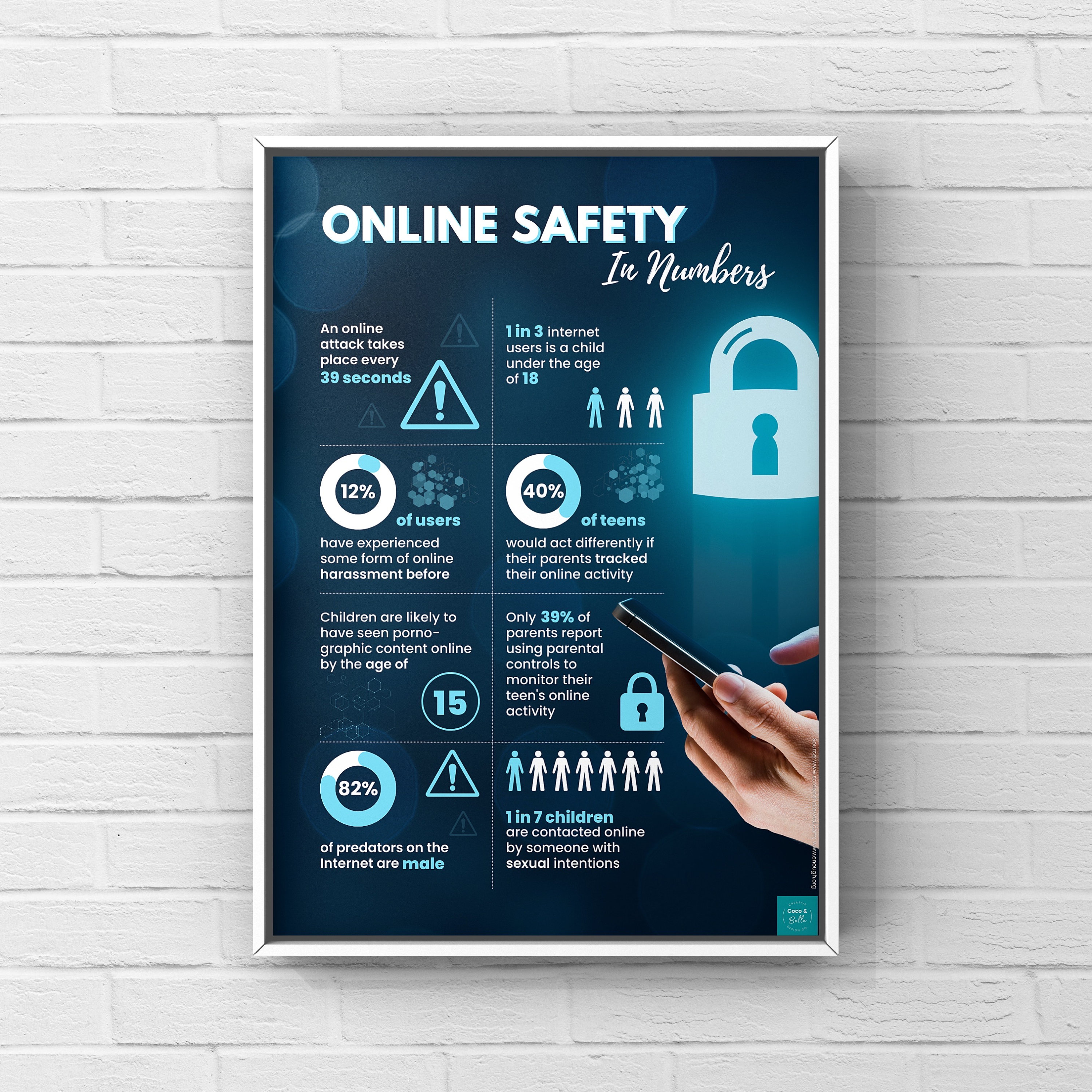
Building a Unified Foundation for K-12 Student Protection
Establishing a comprehensive write internet safety rules list is one of the most effective ways educators and parents can protect students in an increasingly digital world. When schools and homes align their expectations, young learners receive consistent messages about navigating networks safely. Organizations like CISA and ConnectSafely emphasize that digital safety is not about locking children out of technology, but rather equipping them with the practical habits needed to recognize online risks. By setting clear boundaries early, adults foster resilient digital citizens who know how to protect their personal information, handle cyberbullying, and interact respectfully across every connected device. Related guide: Teachers Of Grades 9–12 Should Expand Internet Safety Instruction To Include Which Of The Following Topics?.
💡 Educational Key Takeaways:
- Core Skill: Structured Write Internet Safety Rules List focused on developing pencil grip, stroke control, and early literacy/math confidence.
- Target Scope: Suited for homeschoolers, preschool, kindergarten, and elementary learners.
- Best Recommendation: Practice 10–15 minutes daily with ergonomic writing tools to reinforce muscle memory without hand fatigue.
Spotting Vulnerabilities Across School and Home Environments
To build an effective write internet safety rules list, adults must understand where digital vulnerabilities commonly arise. Whether students are using school-issued Chromebooks in the classroom or personal tablets at the kitchen table, specific technical settings and behavioral cues require active monitoring. Reviewing these potential gaps helps educators and parents apply proactive guardrails before minor issues escalate into major safety concerns.
| Setting / Context | Common Vulnerability | Practical Safeguard |
|---|---|---|
| Home Devices | Unfiltered browsing during late-night hours in private bedrooms. | Establish a centralized overnight charging station in a family common area. |
| School Chromebooks | Sharing passwords or bypassing web filters via proxy extensions. | Enforce strict account accountability and utilize administrative tools from resources like Internet and Digital Safety guidelines. |
| Social & Chat Apps | Interacting with unknown users in gaming lobbies or direct messages. | Disable public chat functions and restrict messaging to verified school contacts. |
Actionable Steps for Crafting and Enforcing Student Safety Agreements
Creating a functional write internet safety rules list requires active collaboration between adults and children. Instead of imposing arbitrary restrictions, educators and parents should co-create agreements that make sense for the student’s age group. Start by establishing a transparent reporting workflow where children know they can disclose mistakes—such as clicking a malicious link or encountering inappropriate content—without fearing immediate loss of device privileges. Pair these conversations with hands-on technical guardrails, such as two-factor authentication on personal accounts and robust browser filters. For younger children, supplementing discussions with activities found in Worksheets can reinforce core internet safety concepts in an engaging, pressure-free format.
Overcoming Resistance and Managing Common Student Workarounds
Even the most thorough write internet safety rules list will occasionally face pushback from tech-savvy students who try to bypass filters or disable monitoring tools. Overly restrictive bans often backfire by driving online behavior underground, making children less likely to seek help when they encounter trouble. Instead of reacting with anger when boundaries are tested, treat workarounds as teachable moments. Explain the cybersecurity and privacy reasons behind specific rules, and ensure that technical controls are balanced with open, non-judgmental check-ins about their favorite online spaces.
Frequently Asked Questions From Parents and School Staff
What is the ideal age to introduce a formal write internet safety rules list?
Basic digital safety concepts should be introduced as soon as children begin interacting with connected devices, typically around kindergarten or first grade. These early rules focus on simple habits like asking a trusted adult before downloading an app or sharing personal details.
How should teachers handle students who intentionally bypass classroom web filters?
Educators should address filter tampering calmly by pausing device privileges, reviewing the acceptable use policy, and involving school technology staff to secure the endpoint device. Reinforce the lesson by connecting the technical rule back to real-world network security and digital citizenship principles.
How can parents reinforce school internet safety rules at home?
Parents can maintain consistency by adopting similar device-free times, reviewing browser history together, and keeping open lines of communication about online interactions. Exploring resources available on Online and Digital Safety can also provide fresh ideas for family tech talks.
Explore More Digital Citizenship Resources
Empowering K-12 students requires ongoing education, adaptable strategies, and a strong community network between home and school. Discover more practical guides, expert tips, and downloadable materials by visiting SafeWiredSchools.org to support your students on their digital journey.
Visual Reference Gallery