Introduction
Digital spaces are as natural to elementary-aged children as school playgrounds and living room carpets. Yet, navigating virtual environments requires deliberate guidance, much like learning to cross a busy street safely. Modern youngsters frequently encounter online risks in surprisingly ordinary ways, such as trading virtual items in popular multiplayer games or interacting on shared family tablets without direct supervision. It sounds simple, and that’s the point: teaching foundational habits early prevents future complications. This reality makes structured educational tools invaluable for modern classrooms and households alike. Equipping young minds with clear, empowering digital habits starts by introducing fundamental concepts through interactive materials found within Internet and Digital Safety modules. Rather than relying on fear or restriction, educators and families succeed best when framing digital citizenship as an essential life skill. Children require practical frameworks that translate abstract concepts like privacy and respect into tangible everyday actions. Free downloadable resources bridge the gap between complex digital rules and young learners’ cognitive development levels. Collaborative exercises provide the ideal starting point for meaningful discussions about online interactions, helping learners internalize positive choices long before they face tricky situations independently.
💡 Educational Key Takeaways:
- Core Skill: Structured What Key Point Of Digital Safety For Kids focused on developing pencil grip, stroke control, and early literacy/math confidence.
- Target Scope: Suited for homeschoolers, preschool, kindergarten, and elementary learners.
- Best Recommendation: Practice 10–15 minutes daily with ergonomic writing tools to reinforce muscle memory without hand fatigue.
What This Printable Covers
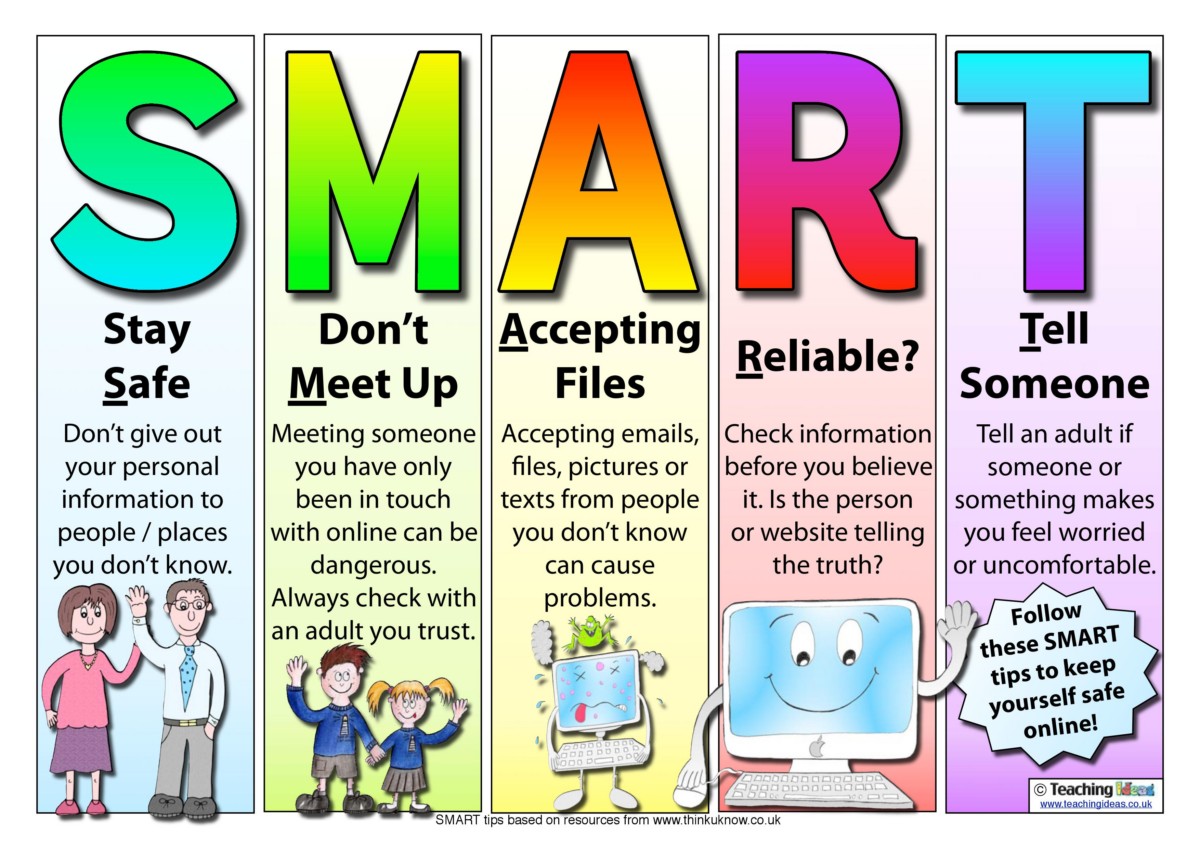
The free printable focuses squarely on the most vital key point of digital safety for kids: understanding personal information boundaries and knowing who to trust. Rather than overwhelming youngsters with exhaustive rulebooks, the material narrows down protective habits into digestible, memorable concepts. Children learn to identify what constitutes private data, including full names, school locations, and home addresses, distinguishing those details from harmless preferences like favorite colors or animals. Furthermore, the resource emphasizes the golden rule of reporting: children are never in trouble for coming forward when something feels uncomfortable, confusing, or weird online. According to the National Center for Missing & Exploited Children, open communication between trusted adults and minors remains a cornerstone of digital prevention. The instructional sheet reinforces that passing along a concern to a parent, teacher, or counselor is always the right choice. By addressing these core pillars, the printable establishes a safe psychological space where children feel supported rather than monitored. Related guide: Teachers Of Grades 9–12 Should Expand Internet Safety Instruction To Include Which Of The Following Topics?.
Key Learning Outcomes
Working through the activity sheet cultivates specific, observable competencies that translate directly to online experiences. Learners practice categorizing information into green-light public details and red-light private facts through engaging matching and sorting exercises. Educators often observe that tactile interaction with educational Worksheets solidifies abstract digital concepts far more effectively than verbal reminders alone. Children also develop critical thinking prompts to pause before clicking links, downloading images, or accepting chat requests from unfamiliar usernames. Another critical outcome involves identifying trusted adults in both home and school environments, ensuring youngsters have a designated point of contact when navigating video platforms or messaging features. These targeted learning outcomes transform passive consumers into active, mindful digital citizens who recognize their own agency.
How to Use This Printable
Implementation requires zero preparation beyond standard printing supplies, making the resource instantly accessible for busy classrooms or quiet Sunday afternoons at home. Adults can introduce the page as a springboard for casual conversation rather than a formal test of knowledge. Sitting side-by-side while working through the prompts invites children to share their own digital experiences, from favorite video games to unexpected pop-up messages. Here’s what makes this resource different: it shifts the dynamic from adult lecturing to collaborative problem-solving. Teachers can integrate the activity into morning meeting routines, while parents can review the concepts during weekend family check-ins. Consistent, low-stakes repetition ensures that the core safety message sticks in young minds when they encounter unexpected scenarios on shared household devices.
Practical Tips for Parents and Teachers
Maximizing the impact of the printable involves asking open-ended questions that encourage critical thinking rather than simple yes-or-no answers. Adults should invite children to explain their reasoning behind sorting certain items into public or private columns, validating their thoughts while gently steering them toward safe practices. Reinforcement works best when integrated naturally into daily routines, such as discussing privacy settings before downloading a new educational app. Educators recommend keeping the tone remarkably calm, steady, and encouraging to prevent children from associating technology with anxiety or punishment. According to the Federal Trade Commission, proactive guidance regarding online privacy helps young users develop lifelong habits for protecting their digital footprints. Building this foundational awareness ensures children view adults as reliable allies rather than digital watchdogs.
Age-Appropriate Recommendations
Tailoring the conversation to match a child’s developmental stage ensures the safety message resonates without causing unnecessary confusion. Younger children in early elementary grades benefit from concrete examples focused on physical boundaries translated into digital spaces, such as keeping personal details locked away like house keys. Upper elementary students are ready to explore nuanced topics like digital footprints, respectful communication in in-game chat rooms, and the permanence of online posts. When structuring these lessons, educators often look to the ISTE Standards for Students to guide empowerment-focused digital citizenship curricula. Aligning instructional strategies with established educational frameworks guarantees that expectations scale appropriately as children grow older, gain more device access, and expand their virtual social circles.
Proactive family discussions about digital privacy and open reporting significantly reduce children’s vulnerability to online risks. — Federal Trade Commission
Frequently Asked Questions
Explore More Free Kids Online Safety Printables
Expanding a child’s digital literacy toolkit requires continuous exposure to fresh, engaging resources that reinforce positive online habits. Educators and caregivers can discover additional materials tailored to various learning styles by exploring specialized collections dedicated to Online and Digital Safety. Integrating diverse activities keeps children interested and helps them retain crucial lessons about respectful communication, password security, and smart browsing. For visual learners, pairing analytical exercises with creative prompts found in Coloring Pages offers a wonderful avenue to cement positive safety attitudes. Building a robust digital citizenship foundation is an ongoing journey, and having a variety of accessible printables on hand ensures guidance remains fresh, relevant, and supportive.
Developmental Milestone & Activity Table
| Development Stage | Recommended Daily Duration | Primary Learning Objective |
|---|---|---|
| Preschool & Pre-K | 10 – 15 Minutes | Pencil grip development & basic pre-stroke lines |
| Kindergarten | 15 – 20 Minutes | Letter/number formation & spatial line awareness |
| Early Elementary (Grade 1–2) | 20 – 30 Minutes | Fluency, sentence construction & neatness |
Images References