Why Building a Custom Digital Safeguard Plan Matters for K-12 Communities
When educators and parents ask to make me an internet safety sheet, they are looking for a reliable roadmap to bridge the gap between classroom guidelines and home device habits. Modern students navigate a complex ecosystem of educational apps, school-issued tablets, personal smartphones, and immersive gaming platforms every day. Guidance from organizations like the Cybersecurity and Infrastructure Security Agency and ConnectSafely emphasizes that static rules rarely protect tech-savvy youth. Instead, schools and families achieve the best results by co-creating dynamic reference sheets that outline clear boundaries, establish digital etiquette, and provide actionable steps when children encounter uncomfortable or unsafe online situations. Related guide: 5 Cyber Safety Tips Symbols That Can Be Read By The Grede 7 Students.
💡 Educational Key Takeaways:
- Core Skill: Structured Make Me An Internet Safety Sheet focused on developing pencil grip, stroke control, and early literacy/math confidence.
- Target Scope: Suited for homeschoolers, preschool, kindergarten, and elementary learners.
- Best Recommendation: Practice 10–15 minutes daily with ergonomic writing tools to reinforce muscle memory without hand fatigue.
Balancing Technical Guardrails with Behavioral Awareness
Implementing effective internet safety measures requires a dual approach that pairs robust device-level filtering with proactive behavioral observation. While parental control software and institutional web filters block malicious content, adults must also remain alert to subtle shifts in student behavior, such as secretive device handling, sudden withdrawal from activities, or uncharacteristic emotional responses following screen time. The following breakdown maps common vulnerability points against practical, age-appropriate safeguards for both home and school environments.
| Setting / Context | Common Vulnerability | Practical Safeguard |
|---|---|---|
| Home Mobile Devices | Unmonitored late-night browsing and access to unvetted social media apps. | Establish a centralized overnight charging station outside bedrooms and utilize built-in app time limits. |
| School Chromebooks & Tablets | Bypassing network filters via proxy extensions or unauthorized web browsers. | Coordinate with IT staff to lock extension permissions and regularly audit browser histories during class. |
| In-Game Chat & Messaging | Interacting with unverified strangers through multiplayer chat functions. | Disable direct messaging on multiplayer platforms or restrict communication exclusively to approved real-life friends. |
Essential Routines and Habits for Families and Classrooms
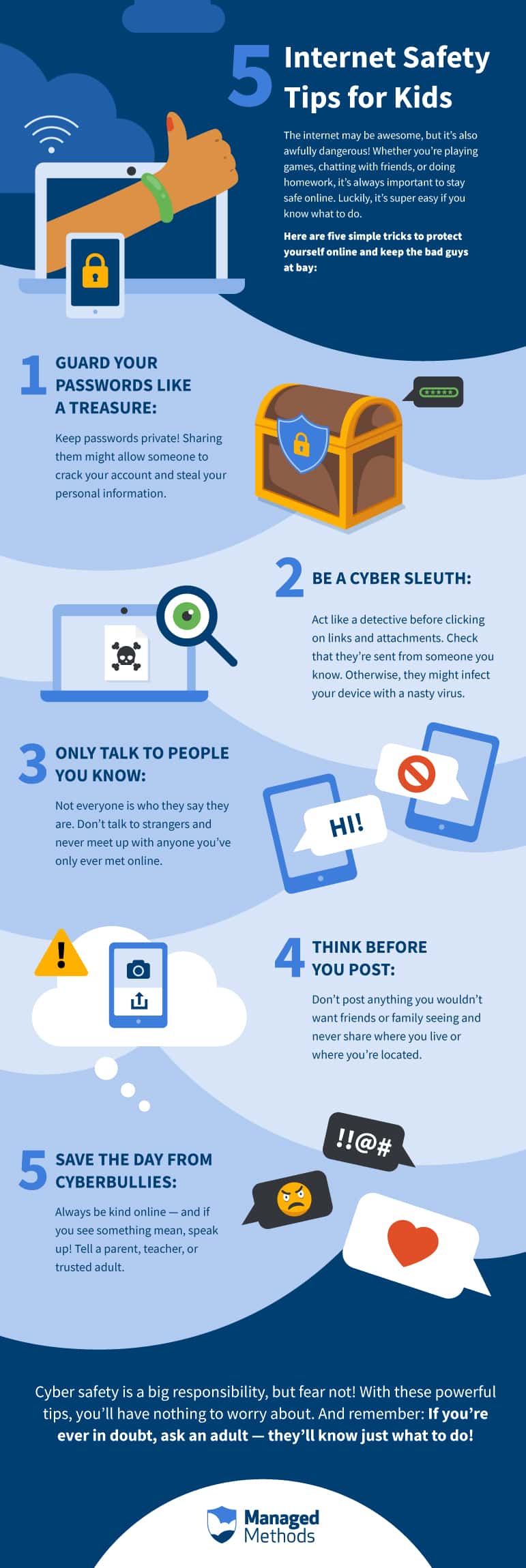
Translating digital safety theory into daily practice depends on consistent routines that empower students rather than punishing them. Whether you are drafting a resource using our Worksheets archive or structuring an interactive advisory period, incorporating tactile reminders works wonders. Schools can integrate digital citizenship modules directly into routine lessons, while families benefit from keeping a printed checklist near the family computer. Key habits include enabling two-factor authentication on personal accounts, discussing why sharing home addresses or school names is hazardous, and practicing zero-shame reporting workflows so children know they can approach an adult immediately if cyberbullying or inappropriate content appears.
Overcoming Student Pushback and Addressing Workarounds
Overly restrictive internet bans frequently backfire, driving children to find clandestine workarounds like deleting browser histories, using guest accounts, or hiding devices under pillows. Rather than relying solely on heavy-handed censorship, educators and parents should pair technical filters with transparent conversations about why specific rules exist. Acknowledge that kids want autonomy and peer connection, but explain that digital guardrails protect their privacy, mental health, and personal data from commercial exploitation. Engaging youth in discussions about how algorithms capture attention helps them develop intrinsic critical thinking skills, reducing the temptation to bypass safety boundaries.
Frequently Asked Questions About Custom Internet Safety Sheets
What age is appropriate to introduce a formal internet safety sheet to children?
You can introduce foundational concepts as early as kindergarten using creative assets found in our Coloring Pages section. Formal rules and detailed safety sheets should be established around third to fifth grade, just as students begin receiving school-issued devices and exploring independent web research.
How should teachers and parents collaborate on student internet safety?
Effective collaboration starts at the beginning of the school year through open houses and digital citizenship newsletters. By aligning expectations regarding screen time limits, homework submission platforms, and reporting procedures for online harassment, adults create a seamless safety net across both environments.
What should a child do immediately if they encounter cyberbullying or inappropriate content?
Children should be taught a simple three-step response: do not reply or retaliate, take a clear screenshot or save the URL as evidence, and immediately notify a trusted adult, teacher, or school counselor without fear of having their device privileges revoked.
Explore More Digital Citizenship Resources
Building a safer digital culture requires ongoing education, collaborative conversations, and practical tools tailored to every grade level. Continue exploring expert strategies, classroom activities, and downloadable guides by visiting SafeWiredSchools.org to support your journey in modern digital citizenship.
Visual Reference Gallery