Why Creative Offline Interventions Like E-Safety Colouring In Matter for Young Learners
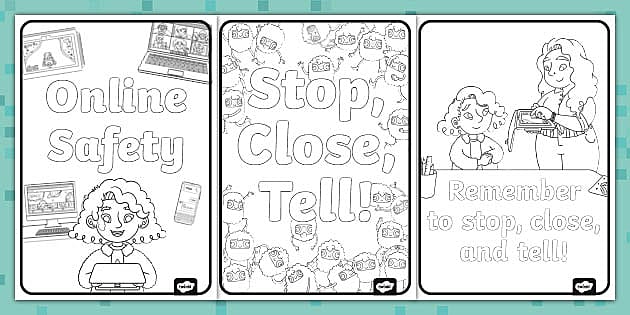
In our increasingly connected classrooms and living rooms, children encounter digital stimuli long before they fully grasp online boundaries. Organizations like ConnectSafely and the Cybersecurity and Infrastructure Security Agency emphasize that foundational tech literacy begins well before kids open a browser. For elementary and early middle school students, blending offline art with digital citizenship concepts offers a low-pressure way to absorb critical lessons. Utilizing e-safety colouring in gives educators and parents a tangible canvas to discuss passwords, privacy, and screen time without triggering digital fatigue or anxiety.
💡 Educational Key Takeaways:
- Core Skill: Structured E-Safety Colouring In focused on developing pencil grip, stroke control, and early literacy/math confidence.
- Target Scope: Suited for homeschoolers, preschool, kindergarten, and elementary learners.
- Best Recommendation: Practice 10–15 minutes daily with ergonomic writing tools to reinforce muscle memory without hand fatigue.
Spotting Vulnerability Signals Across Home Networks and School Devices
Even with robust filters in place, children routinely find workarounds or encounter unexpected content through ads, embedded videos, or shared accounts. Adults must monitor both technical settings and behavioral cues. The following matrix outlines common risk areas across different environments and pairs them with proactive safeguards you can implement today. Related guide: Please Provide Free 8.5″X11″ Digital Safety Coloring Pages For K-2 Grade.
| Setting / Context | Common Vulnerability | Practical Safeguard |
|---|---|---|
| Home Tablets & Phones | Unrestricted app store downloads and accidental in-app purchases. | Enable strict parental controls, lock app installations with a PIN, and review Online and Digital Safety guidelines regularly. |
| School Chromebooks | Bypassing web filters through proxy extensions or incognito windows. | Collaborate with IT to lock down browser extensions and review active classroom management tools. |
| In-Game Chat & Messaging | Interacting with strangers or sharing personal identifiable information. | Turn off open voice and text chat features in multiplayer games; reinforce lessons learned through interactive Coloring Pages. |
Establishing Calm Routines and Collaborative Rules at Home and School
Technical controls are only half the battle; sustainable digital safety relies heavily on transparent communication and predictable routines. Schools should clearly communicate device usage policies to families at the start of each term, outlining what happens if a device is misused. At home, establish a central charging station in a common living area to eliminate unsupervised nighttime browsing. When introducing new online concepts, pair discussions with engaging Worksheets that prompt kids to think critically about what they share online. Most importantly, foster a culture where children feel safe reporting uncomfortable pop-ups, cyberbullying, or accidental exposure to inappropriate content without fear of losing device privileges.
Preventing Workarounds and Addressing Student Curiosity Without Overreaction
Overly draconian restrictions often backfire, driving children to seek out hidden workarounds behind closed doors. If a student discovers a loophole in a school filter or manages to bypass a home restriction, reacting with immediate anger typically teaches them to hide future mistakes. Instead, treat the event as an authentic teachable moment. Acknowledge their cleverness while calmly explaining why the guardrail exists. Combining these corrective chats with creative, tactile activities like e-safety colouring in helps reinforce positive digital habits in an environment that feels supportive rather than punitive, keeping communication channels wide open.
Frequently Asked Questions About E-Safety Colouring In
What age group benefits most from e-safety colouring in?
Children in kindergarten through third grade respond exceptionally well to visual and tactile learning formats. These activities help anchor abstract internet safety rules into concrete, memorable concepts.
Can teachers use these resources during standard computer lab time?
Yes. Many educators use offline creative activities as a transition exercise before students log onto school devices, priming their minds for responsible browsing behavior.
How do I integrate these lessons if I am not a technology teacher?
Digital citizenship is interdisciplinary. Art teachers, homeroom instructors, and school librarians can easily incorporate safety motifs into regular classroom projects without needing advanced technical expertise.
Explore More Digital Citizenship and Online Safety Resources
Empowering the next generation of digital citizens requires continuous learning, adaptable guardrails, and collaborative community efforts between educators and families. To discover more expert guides, lesson plans, and practical tools, visit us today at SafeWiredSchools.org to keep your students safe and confident online.
Visual Reference Gallery