Why Creative Reflection Tools Support Digital Citizenship
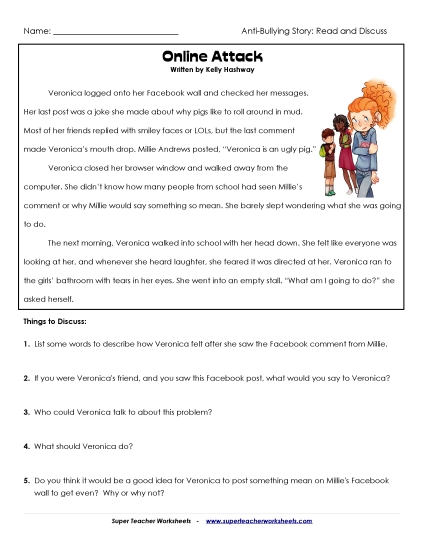
Introducing tough topics to young children requires thoughtful, low-pressure approaches that do not trigger defensiveness or anxiety. For educators and parents navigating early digital education, a cyberbullying coloring page pdf free download offers a brilliant entry point into conversations about kindness, exclusion, and online boundaries. Rather than launching into frightening lectures about malicious apps or permanent digital footprints, adults can use art-based exercises to help children process emotions, recognize peer pressure, and visualize inclusive behavior. Organizations like ConnectSafely and the Family Online Safety Institute continually emphasize that early intervention should be relational and exploratory. By pairing creative activities with structured guidance from our Internet and Digital Safety hub, adults can establish foundational rules before children encounter complex social media ecosystems.
💡 Activity Key Takeaways:
- Core Focus: Printable Cyberbullying Coloring Page Pdf Free designed for creative expression and fine-motor coordination.
- Target Scope: Ideal for toddlers, preschool, kindergarten, and classroom art activities.
- Best Recommendation: Use standard heavy printer paper (24–28 lb) or cardstock for vibrant results with crayons, colored pencils, or washable markers.
Early Indicators of Online Stress and Practical Guardrails
Spotting digital distress early requires keeping an eye on both technical configurations and subtle behavioral shifts. When kids transition from offline play to connected devices—whether via home tablets or school-issued Chromebooks—new vulnerabilities emerge. Adults should monitor communication pathways closely while balancing privacy with safety. The breakdown below details where risks typically hide and how to secure each environment using recommended practices from cybersecurity agencies like CISA. Related guide: Two Factor Authentication Coloring Page Kids.
| Setting / Context | Common Vulnerability | Practical Safeguard |
|---|---|---|
| Home Devices & Tablets | Unmonitored app stores and unrestricted web browsing profiles. | Enable native parental controls, disable in-app purchases, and require adult approval for new software downloads. |
| School Chromebooks & Laptops | Direct messaging features embedded inside educational games or shared docs. | Review school acceptable use policies and ensure classroom filtering extensions remain active during evening homework hours. |
| Social & Chat Habits | Late-night messaging loops leading to sleep disruption and emotional fatigue. | Establish a central household charging station where all phones and tablets sleep overnight away from bedrooms. |
Establishing Positive Routines at Home and in the Classroom
Turning awareness into lasting habit requires consistency across both school and home environments. Educators can easily integrate a cyberbullying coloring page pdf free resource into art or homeroom periods, using the finished artwork to prompt classroom discussions about standing up for classmates who experience mean behavior online. Parents can reinforce these lessons during dinner table chats by asking open-ended questions about favorite apps and online friendships. Furthermore, families should establish clear reporting workflows that empower children to come forward immediately if something feels uncomfortable or threatening. When kids know they will not lose their device privileges simply for reporting a bad experience, they are far more likely to speak up early. For supplementary exercises that complement these lessons, explore our collection of Worksheets designed for diverse grade levels.
Overcoming Resistance and Addressing Student Workarounds
Children and teens are exceptionally resourceful when it comes to bypassing technical restrictions, whether by using incognito browser windows, secondary hidden accounts, or peer-to-peer messaging inside gaming lobbies. Overly punitive restrictions often backfire by driving underground behavior and discouraging kids from asking for help out of fear of punishment. Instead of relying purely on software blocks, adults must pair technical filters with transparent, ongoing conversations. If a child manages to skirt a filter, treat it as a teachable moment rather than a crisis. Explain the reasoning behind device rules and adjust settings collaboratively. When students understand that safety guardrails exist to protect their emotional well-being rather than to police their every move, trust deepens and compliance improves naturally.
Answers to Common Questions About Digital Safety Activities
What age group benefits most from creative digital citizenship printables?
Children in elementary and early middle school respond best to visual, hands-on tools like coloring pages and story prompts. These activities build emotional vocabulary before kids face the heavier social complexities of mainstream social networks.
How can teachers incorporate these printables into busy lesson plans?
Educators can use them as quiet-start activities, morning meeting hooks, or transition tasks following computer lab sessions. They provide a seamless bridge into discussions about empathy, digital footprints, and online inclusion.
Are free printable resources safe to download from school or home networks?
Yes, provided you source them from reputable educational platforms and digital citizenship sites. Always verify that your browser security settings are updated before downloading files across public or personal connections.
Explore More Digital Citizenship Resources
Empowering the next generation of digital citizens requires a multifaceted toolkit combining art, open dialogue, and robust technical controls. To discover additional creative printables and lesson plans tailored to modern classrooms and households, visit our Coloring Pages section, or head over to SafeWiredSchools.org for comprehensive guides, expert advice, and community safety updates.
Printable Coloring Page Previews