Why Establishing Digital Boundaries Is Essential for Modern K-12 Students
As children navigate tablets, school-issued Chromebooks, and social gaming platforms at increasingly younger ages, adults often find themselves questioning whether formal internet safety rules for kids are actually worth the effort. Skeptics wonder if children simply bypass strict filters anyway. However, guidance from organizations like the Cybersecurity and Infrastructure Security Agency and ConnectSafely highlights that structured guidelines do far more than block unwanted content. They build the metacognitive muscles students need to evaluate risks independently. When parents and educators collaborate on clear digital boundaries, they transform raw screen time into a safe, empowering environment for academic exploration and social development.
💡 Educational Key Takeaways:
- Core Skill: Structured Is Internet Safety Rules For Kids What Worth It focused on developing pencil grip, stroke control, and early literacy/math confidence.
- Target Scope: Suited for homeschoolers, preschool, kindergarten, and elementary learners.
- Best Recommendation: Practice 10–15 minutes daily with ergonomic writing tools to reinforce muscle memory without hand fatigue.
Comparing Digital Vulnerabilities Across Home and School Environments
Identifying where children face the highest digital exposure helps adults apply targeted preventive guardrails. Whether managing a family iPad or a district-managed laptop, understanding specific risk signals prevents over-restriction while closing common security gaps that young users accidentally trigger during daily web browsing. Related guide: Teachers Of Grades 9–12 Should Expand Internet Safety Instruction To Include Which Of The Following Topics?.
| Setting / Context | Common Vulnerability | Practical Safeguard |
|---|---|---|
| Home Devices | Unfiltered search engines and unverified app store downloads exposing kids to aggressive ads or malicious software. | Enable strict family mode on search engines, lock app store purchases with a parent PIN, and utilize Internet and Digital Safety strategies. |
| School Chromebooks | Bypassing network extensions through unauthorized proxy sites or sharing login credentials with peers during class. | Pair district web filters with active teacher monitoring, enforce individual device accountability, and integrate Worksheets on digital footprint basics. |
| Chat & Social Platforms | Direct messaging features embedded inside casual multiplayer games where strangers initiate contact with young players. | Turn off in-game text and voice chat features for younger children, and review privacy settings together regularly. |
Actionable Habits and Device Protocols for Homes and Classrooms
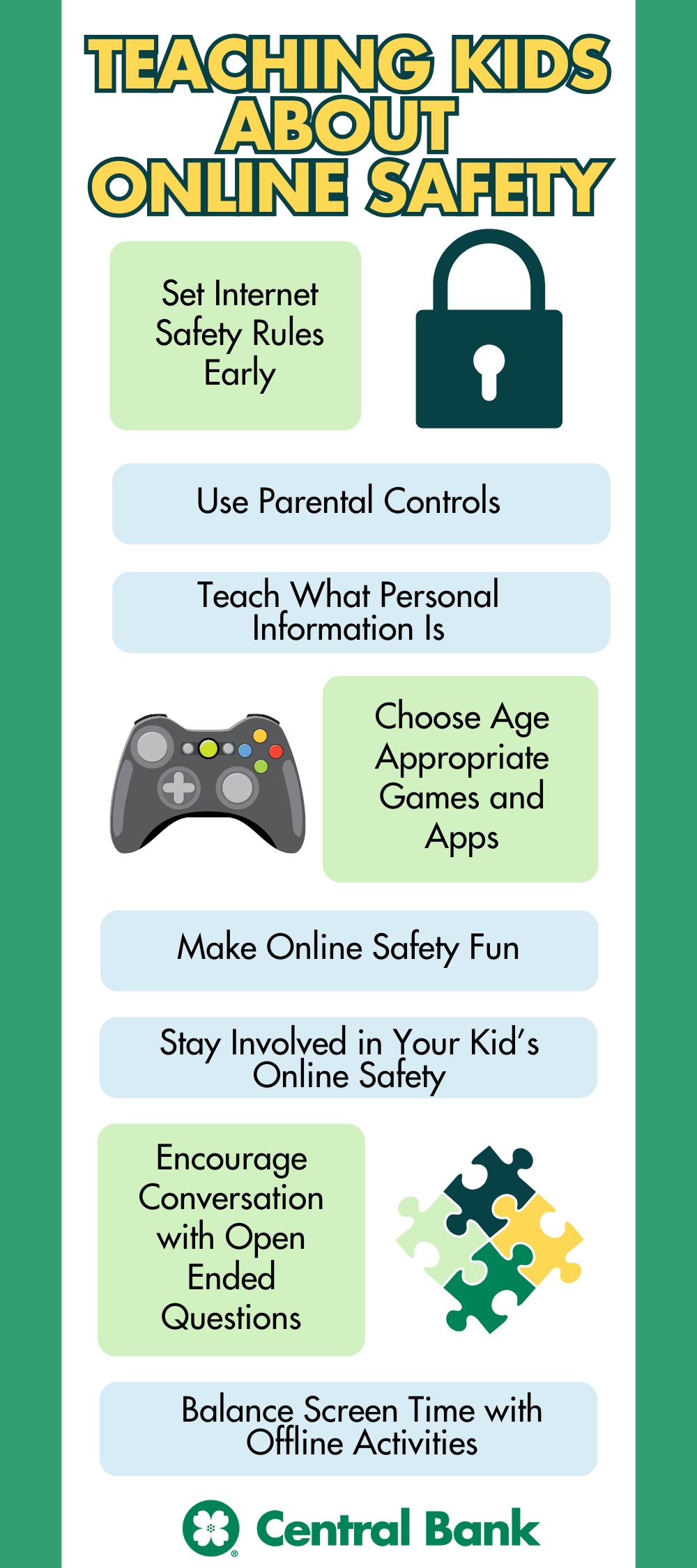
Translating digital safety philosophy into daily routines requires predictable, friction-free workflows. Instead of relying solely on complex filtering software, families and schools achieve better outcomes by establishing physical and procedural habits. Create a centralized charging station in a common household area where all phones and tablets rest overnight to curb late-night scrolling. In classrooms, establish a transparent reporting workflow where students can notify staff about cyberbullying or suspicious pop-ups without fear of losing device privileges. Complement these technical safeguards by exploring structured Online and Digital Safety lessons that make respectful online behavior an engaging classroom topic.
When adults implement rigid, zero-tolerance internet bans, children frequently respond by seeking sophisticated workarounds, such as using hidden browser extensions or peer hotspots. Over-restriction can inadvertently cut kids off from valuable digital literacy experiences and make them hesitant to report genuine online threats out of fear of punishment. A balanced approach pairs age-appropriate technical filters with calm, ongoing conversations. When students make mistakes online, treat those moments as teachable hurdles rather than emergencies, reinforcing that open communication always yields better safety outcomes than concealment.
Answers to Common Questions About Youth Digital Safety Rules
Are standard internet filters enough to keep young children safe online?
Technical filters act as a vital first line of defense, but they are never completely foolproof. Combining software restrictions with active adult supervision and open dialogue provides much stronger protection against evolving digital risks.
How early should parents introduce formal internet safety rules to kids?
Conversations about online safety should begin the moment a child interacts with any internet-connected device. Simple concepts like keeping personal information private and asking an adult before downloading apps lay a strong foundation for future digital citizenship.
What is the best way to handle a child who tries to bypass school or home safety controls?
Instead of escalating punishment, calmly investigate how and why the workaround occurred. Use the situation to explain the underlying security reasons for the rule and collaborate on a trustworthy path forward.
Explore More Digital Citizenship Resources
Maintaining a safe online environment is an ongoing journey that requires continuous learning and adaptive tools for both educators and caregivers. To discover additional lesson plans, printable guides, and expert advice, visit SafeWiredSchools.org.