Why Visual Learning Works for Early Tech Literacy
Teaching children how to navigate modern digital spaces requires meeting them at their developmental level. When educators and parents introduce concepts like screen time balance and digital footprints through creative media, information processing becomes much easier. Grounded in guidance from organizations like ConnectSafely and the Family Online Safety Institute (FOSI), using tactile resources helps bridge the gap between abstract internet rules and daily habits. By integrating Social Media And Online Safety Coloring Pages into early elementary classrooms and household routines, adults open the door for meaningful conversations about device use before children encounter complex online environments.
💡 Activity Key Takeaways:
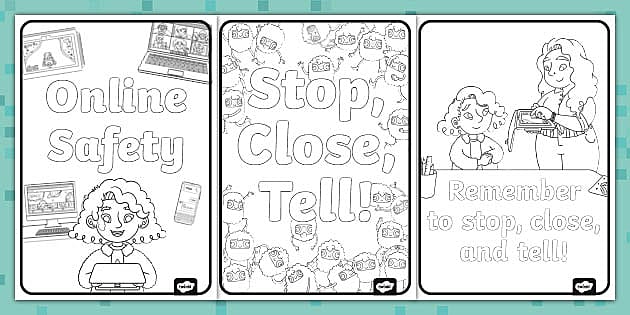
- Core Focus: Printable Social Media And Online Safety Coloring Pages designed for creative expression and fine-motor coordination.
- Target Scope: Ideal for toddlers, preschool, kindergarten, and classroom art activities.
- Best Recommendation: Use standard heavy printer paper (24–28 lb) or cardstock for vibrant results with crayons, colored pencils, or washable markers.
Identifying Vulnerabilities Across Home and School Environments
Children frequently transition between managed school tablets and unrestricted home devices, creating gaps in their safety awareness. Adults must monitor both technical settings and behavioral cues to ensure kids stay safe across all platforms. The breakdown below outlines common vulnerabilities and the practical safeguards you can implement today.
| Setting / Context | Common Vulnerability | Practical Safeguard |
|---|---|---|
| Home Mobile Devices | Unmonitored app store downloads and direct messaging access without age verification. | Enable parental approval controls for all new downloads and disable in-app purchases. |
| School Chromebooks | Bypassing network filters or sharing login credentials with peers during downtime. | Reinforce classroom expectations and utilize administrative Internet and Digital Safety tools to flag policy violations. |
| Social and Chat Apps | Interacting with strangers or accepting follower requests from unverified accounts. | Configure all personal profiles to private and establish a family rule requiring adult permission for new connections. |
Establishing Consistent Tech Routines at Home and School
Translating digital citizenship principles into daily life takes more than a single conversation. Educators and parents should establish predictable routines that normalize online safety without inducing fear. Start by setting up a centralized charging station in a common family area where all phones and tablets rest overnight, eliminating late-night scrolling. Pair these physical boundaries with creative reinforcement tools. For instance, you can use structured Coloring Pages during quiet reading time to spark discussions about keeping personal information private, such as avoiding sharing home addresses or full names online. Additionally, teach children how to take screenshots and report inappropriate behavior to a trusted adult without fear of losing their device privileges.
Overcoming Resistance and Managing Common Student Workarounds
When adults implement strict blocks on favorite apps or games, children often seek out creative workarounds, such as using web-based proxy sites or borrowing a classmate’s device. CISA and FTC youth safety guidelines emphasize that overly restrictive bans frequently backfire by driving online behavior underground. Instead of relying solely on heavy-handed technical blocks, pair your device filters with transparent explanations of why certain rules exist. When children understand the reasoning behind privacy settings and screen-time limits, they are far more likely to approach a parent or teacher when they encounter cyberbullying, pop-up scams, or uncomfortable messages online.
Frequently Asked Questions About Digital Safety Resources
Foundational concepts like online privacy and screen balance should begin as soon as children interact with touchscreens, typically around preschool or kindergarten. Early lessons using hands-on activities help build healthy habits long before kids create their first social media profile.
How do I integrate offline safety lessons with school device policies?
Consistency is key to effective digital citizenship. You can align home rules with institutional guidelines by reviewing your school district’s Acceptable Use Policy and exploring related Online and Digital Safety materials that reinforce classroom digital citizenship lessons.
What should a child do if they see something upsetting online?
Teach children the pause, close, and tell rule. They should immediately close the browser or app, leave the device alone, and notify a trusted adult right away without worrying about getting in trouble.
Explore More Digital Citizenship Resources
Empowering the next generation of digital citizens requires ongoing education, collaborative community policies, and reliable teaching aids. Explore our comprehensive collection of expert-backed toolkits, lesson plans, and guides by visiting SafeWiredSchools.org to keep your students and children secure online.
Printable Coloring Page Previews