Introduction
Digital spaces are woven into modern childhood, often introduced before children enter formal schooling. Elementary classrooms regularly utilize tablets, laptops, and interactive boards for daily lessons, while home environments feature shared household devices and gaming consoles. Children routinely encounter online environments through in-game chat windows, streaming video platforms, and educational apps. These digital avenues offer boundless opportunities for creativity and learning, yet they also introduce moments where guidance becomes essential. Adults often worry about keeping children safe online, frequently defaulting to restriction rather than proactive education. Building strong digital citizenship habits requires consistent, empowering conversations that help young learners navigate connected tools with confidence. This foundation begins by instilling memorable core values rather than relying solely on technical filters or rigid blocks. Related guide: Top Rated Internet Safety Rules For Kids.
💡 Educational Key Takeaways:
- Core Skill: Structured Whats The Main Word That You Should Always Remember In This Classroom When It Comes To Computer Safety. focused on developing pencil grip, stroke control, and early literacy/math confidence.
- Target Scope: Suited for homeschoolers, preschool, kindergarten, and elementary learners.
- Best Recommendation: Practice 10–15 minutes daily with ergonomic writing tools to reinforce muscle memory without hand fatigue.
What This Printable Covers
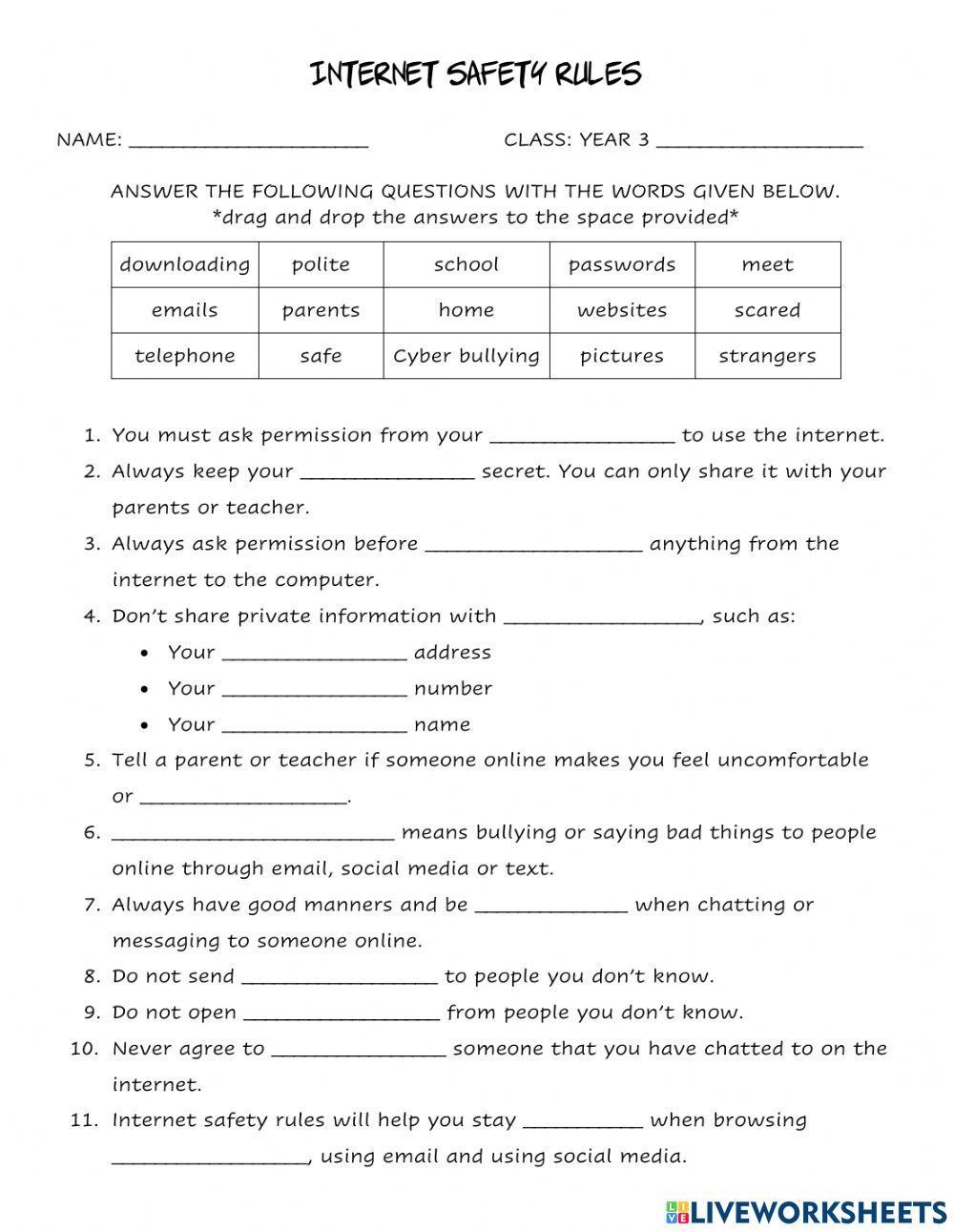
The free printable focuses on a singular, powerful concept centered around the prompt: whats the main word that you should always remember in this classroom when it comes to computer safety. Instead of overwhelming young minds with complex rules about firewalls and encryption, this worksheet distills digital wellness down to an actionable, easy-to-remember principle. Coloring reinforces safety messages and opens conversation organically while young hands are busy with crayons. Children frequently process abstract concepts better when paired with tactile creation. By engaging with this educational material, learners explore fundamental protective habits, including keeping personal information private, creating strong passwords, and pausing to think before sharing digital content. The resource acts as a visual anchor, reminding students that digital safety is an ongoing practice rooted in mindfulness and communication.
Key Learning Outcomes
Working through this activity helps children internalize specific protective behaviors that safeguard their well-being online. According to the Federal Trade Commission, children need clear and consistent guidance regarding what constitutes private information, such as full names, home addresses, and school names. Young learners discover the importance of consulting a trusted adult whenever something online feels confusing, uncomfortable, or wrong. Crucially, the curriculum emphasizes that children are never in trouble for reporting an uncomfortable digital encounter. This reassurance removes the fear of punishment, ensuring that communication channels remain open when unexpected online situations arise. Here’s what makes this resource different: it transforms a potentially scary topic into an approachable exercise built on trust and positive reinforcement.
How to Use This Printable
Integrating this resource into a daily routine requires minimal preparation and yields meaningful discussions. Educators can introduce the activity during morning meetings or technology lab orientation periods, while families can utilize it during a quiet afternoon at the kitchen table. It sounds simple, and that’s the point. Adults can distribute the sheets and invite children to color the central word while discussing what computer safety means in everyday life. Posing open-ended questions allows children to articulate their own understanding of digital boundaries. Educators seeking additional exercises often pair this activity with broader Worksheets designed to reinforce healthy technology habits across multiple subjects.
Practical Tips for Parents and Teachers
Maximizing the educational value of this printable involves creating a supportive, judgment-free environment. Adults should approach the discussion with curiosity rather than interrogation, asking children what they enjoy most about their favorite online games and apps. This establishes a baseline of trust before addressing potential risks. Educators and caregivers can also post the completed artwork near shared computers as a gentle reminder of the core safety word. For those looking to expand their toolkit, browsing relevant Internet and Digital Safety materials can provide further inspiration for structuring age-appropriate lessons at home or in the classroom.
Age-Appropriate Recommendations
Tailoring digital citizenship concepts to developmental stages ensures that children absorb information effectively without feeling overwhelmed. Younger elementary students in kindergarten through second grade benefit immensely from concrete rules, visual reminders, and simple role-playing scenarios involving shared devices. Upper elementary students in third through fifth grade can engage in deeper discussions regarding digital footprints, respectful communication in in-game chats, and the permanence of online actions. Aligning these lessons with the Common Sense Education Digital Citizenship Curriculum provides a structured framework that supports social-emotional development alongside technical literacy. Safety is framed as a skill to build over time, never a threat to dread.
According to Common Sense Media research, a vast majority of children begin using mobile devices and digital platforms well before entering elementary school, making early and consistent digital citizenship education essential for healthy habit formation. — Common Sense Media
Frequently Asked Questions
Navigating digital safety tools and educational printables raises common inquiries among educators and families striving to protect young internet users. Clear answers help streamline implementation whether managing a single classroom or a household of digital learners. Reviewing these responses can guide effective integration of safety resources.
According to the National Center for Missing & Exploited Children, teaching children to identify trusted adults and report uncomfortable online interactions promptly is one of the most effective ways to support their safety in connected spaces. — NCMEC
Explore More Free Kids Online Safety Printables
Expanding a digital citizenship curriculum involves utilizing a diverse array of complementary materials that engage young learners in creative ways. Educators and parents can discover additional resources designed to foster healthy technology habits by exploring curated Coloring Pages that reinforce mindfulness and digital well-being. Furthermore, integrating broader Online and Digital Safety lessons ensures that children build a comprehensive, lifelong understanding of how to thrive securely in an interconnected world.
Developmental Milestone & Activity Table
| Development Stage | Recommended Daily Duration | Primary Learning Objective |
|---|---|---|
| Preschool & Pre-K | 10 – 15 Minutes | Pencil grip development & basic pre-stroke lines |
| Kindergarten | 15 – 20 Minutes | Letter/number formation & spatial line awareness |
| Early Elementary (Grade 1–2) | 20 – 30 Minutes | Fluency, sentence construction & neatness |
Images References