Why Printable Internet Safety Worksheets Pdf Resources Matter for School and Home
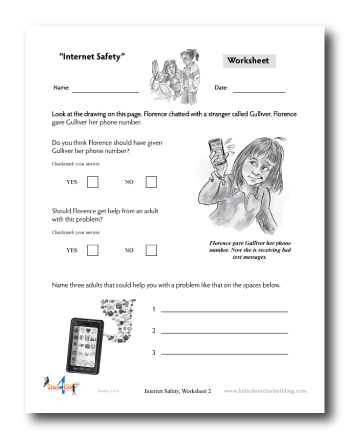
Navigating the digital world safely requires continuous, hands-on guidance that goes beyond simply clicking accept on a terms-of-service agreement. For educators and parents striving to build resilient digital citizens, incorporating structured lessons into daily routines is essential. Federal resources from agencies like CISA emphasize that proactive education is our strongest defense against online risks. By utilizing a printable internet safety worksheets pdf format, adults can bridge the gap between abstract internet rules and concrete student actions. These offline materials give students the physical space to read, reflect, and write down critical responses without the distractions or overwhelming notifications of a live browser window.
💡 Educational Key Takeaways:
- Core Skill: Structured Printable Internet Safety Worksheets Pdf focused on developing pencil grip, stroke control, and early literacy/math confidence.
- Target Scope: Suited for homeschoolers, preschool, kindergarten, and elementary learners.
- Best Recommendation: Practice 10–15 minutes daily with ergonomic writing tools to reinforce muscle memory without hand fatigue.
Assessing Vulnerabilities: Risk Signals and Preventive Guardrails
Digital safety relies on a mix of thoughtful device settings and sharp behavioral awareness. Whether children are browsing on a personal tablet at home or using district-issued Chromebooks in a bustling classroom, understanding common vulnerabilities helps adults apply the right safeguards before incidents occur. Reviewing this breakdown allows educators and parents to align their technical defenses with everyday digital habits. Related guide: Worksheets For Kindergarten Pdf.
| Setting / Context | Common Vulnerability | Practical Safeguard |
|---|---|---|
| Home Devices | Unmonitored late-night browsing and unprotected app store downloads. | Establish a centralized household charging station and enable parental controls for app purchases. |
| School Chromebooks | Bypassing network filters via unauthorized extensions or proxy sites. | Regularly audit browser extensions and sync reporting tools with your Internet and Digital Safety policies. |
| Social and Chat Habits | Oversharing personal data with unknown users in gaming lobbies or messaging apps. | Practice privacy-setting walk-throughs using a targeted Worksheets activity to reinforce boundaries. |
Actionable Habits and Routine Workflows for Families and Classrooms
Transforming internet safety concepts into lifelong habits requires consistent, predictable routines. Organizations like ConnectSafely and FOSI advocate for open dialogue rather than reactive punishment when mistakes happen. Start by establishing a shared device contract that outlines clear expectations for screen time, private messaging, and location sharing. When introducing new online tools, pair them with offline writing exercises where students can map out scenarios, identify potential phishing traps, and brainstorm who they should talk to if something feels uncomfortable. Encouraging children to practice reporting mechanisms without shame ensures they will come forward immediately if they encounter cyberbullying or inappropriate content.
Overcoming Pushback and Managing Common Student Workarounds
It is entirely normal for children and teens to push back against strict device monitoring or restrictive web filters. When adults rely solely on heavy-handed technical bans, students often look for creative workarounds, such as using unmonitored personal devices or peer-shared hotspot connections. To counter this, pair your technical security controls with transparent conversations about why specific rules exist. A printable internet safety worksheets pdf can serve as a neutral starting point for classroom debates or family discussions, allowing students to voice their frustrations while collaboratively exploring the real-world consequences of digital footprints and data privacy.
Answering Common Questions About Digital Safety Lessons
What age is appropriate to start teaching children about online safety?
Foundational concepts like private information and screen-time balance should begin as soon as children interact with touchscreens, usually around preschool or kindergarten. As kids grow, concepts naturally evolve into handling cyberbullying, password security, and evaluating online credibility.
How do offline exercises help reinforce online behavior?
Offline learning removes the cognitive overload of flashing pop-ups and notifications, allowing students to deeply process scenarios. Writing responses on paper encourages critical thinking and helps solidify memory retention regarding safe digital habits.
Where can educators find supplementary materials to complement these lessons?
Teachers can explore specialized categories like Online and Digital Safety to gather diverse lesson plans, discussion prompts, and activity guides tailored to different grade levels.
Explore More Digital Citizenship Resources
Building a culture of trust and awareness takes ongoing collaboration between teachers, administrators, and families. To access additional lesson plans, expert advice, and practical guides, visit SafeWiredSchools.org to support your students’ healthy digital journey.
Worksheet Previews & Reference Materials