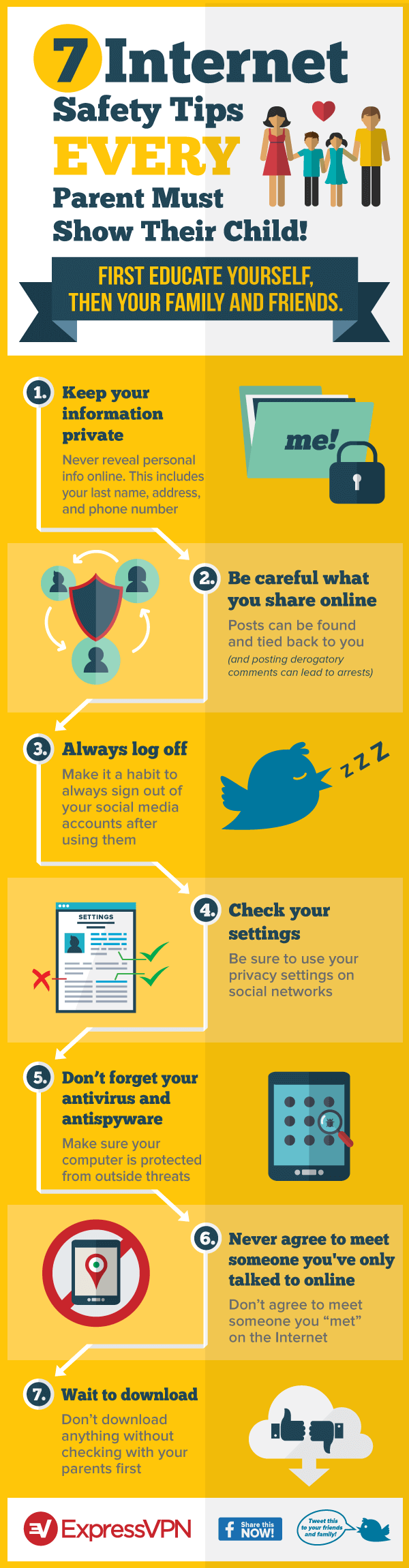
Why Visual Learning Bridges the Digital Safety Gap
Students today navigate an increasingly complex online world packed with instant messaging, shared gaming platforms, and rapid-fire video feeds. When educators and parents rely solely on lengthy text policies or dense rulebooks, children often tune out the core message. Incorporating visual resources into digital citizenship initiatives transforms abstract cybersecurity rules into clear, memorable lessons. By distilling data privacy, password hygiene, and cyberbullying prevention into bite-sized visual formats, adults can ensure children grasp foundational survival skills for the digital age. Organizations like ConnectSafely and the Cybersecurity and Infrastructure Security Agency routinely emphasize that bite-sized, digestible safety concepts improve long-term retention for K-12 students across all grade levels. Related guide: Teachers Of Grades 9–12 Should Expand Internet Safety Instruction To Include Which Of The Following Topics?.
💡 Educational Key Takeaways:
- Core Skill: Structured Infographics Internet Safety For Students focused on developing pencil grip, stroke control, and early literacy/math confidence.
- Target Scope: Suited for homeschoolers, preschool, kindergarten, and elementary learners.
- Best Recommendation: Practice 10–15 minutes daily with ergonomic writing tools to reinforce muscle memory without hand fatigue.
Translating Digital Vulnerabilities into Clear Action Steps
Recognizing early digital warning signs requires a partnership between home and school device monitoring. When students encounter suspicious links, unexpected direct messages, or pressure to share personal information, they need immediate guidance rather than reactionary panic. The following breakdown pairs common digital contexts with practical safeguards that parents and school staff can implement right away.
| Setting / Context | Common Vulnerability | Practical Safeguard |
|---|---|---|
| Home Wi-Fi & Personal Tablets | Unfiltered browsing during late-night hours leading to inappropriate content or sleep disruption. | Establish a centralized household charging station outside bedrooms and utilize router-level bedtime content pauses. |
| School Chromebooks & Portals | Accidental credential sharing or clicking phishing links disguised as academic notifications. | Enforce multi-factor authentication and review fundamental Internet and Digital Safety guidelines regularly. |
| Multiplayer Chat & Social Apps | Oversharing location data or personal identifiers with unknown online peers. | Keep profile privacy settings locked to private or friends-only modes and audit friend lists monthly. |
Establishing Balanced Daily Routines for K-12 Students
Protecting children online depends far more on establishing consistent behavioral habits than on installing rigid, unyielding software blocks. Schools should foster an environment where students feel safe reporting accidental clicks or online harassment without fear of losing their device privileges entirely. Educators can integrate creative learning tools into their lessons, sometimes pairing security rules with Worksheets or visual poster projects to reinforce comprehension. At home, families should host weekly check-ins to discuss online experiences, review privacy settings together, and celebrate smart decision-making when navigating tricky digital scenarios.
When adults implement overly restrictive filtering or immediate device confiscations, students quickly learn to find workarounds, such as using peer hotspots or unauthorized proxy extensions. Instead of engaging in a technological arms race, adults must lean into empathetic communication. Explaining the reasoning behind privacy controls helps students understand that boundaries are designed to protect their emerging digital footprint rather than punish them. Pairing technical guardrails with transparent dialogue builds mutual trust, ensuring that kids come to adults immediately when an online interaction turns hostile or confusing.
Frequently Asked Questions About Visual Safety Tools
How can teachers use visual safety guides in busy classrooms?
Educators can display concise safety posters near computer labs or incorporate quick digital handouts into homeroom check-ins. These visual anchors prompt organic class discussions about respectful communication and password strength without eating into instructional time.
Are visual aids effective for high school students as well as younger children?
Yes, older students respond well to modern, clean graphics that address nuanced topics like data tracking, digital footprints, and deepfakes. Tailoring the visual style to match the age group ensures the material feels relevant rather than juvenile.
Where can parents find reliable materials to review at home?
Trusted organizations like the Family Online Safety Institute offer fantastic toolkits and downloadable materials. You can also explore curated resources on Online and Digital Safety to find age-appropriate guides that align with your school’s digital citizenship curriculum.
Empowering the Next Generation of Digital Citizens
Equipping students with the tools they need to stay safe online is an ongoing journey that requires collaboration between teachers, school administrators, and families. By making safety concepts clear, visual, and approachable, we can build a culture of mindful technology use. Visit SafeWiredSchools.org to discover more actionable guides, lesson plans, and resources designed to protect students in every connected classroom and home.
Visual Reference Gallery