Introduction
Digital devices sit on kitchen tables and inside elementary classrooms every single day. Children encounter online environments long before they fully understand the underlying mechanics of the internet. Modern childhood unfolds across shared family tablets, multiplayer game chats, and educational video platforms. Navigating these spaces requires explicit guidance rather than instinctive caution. Building strong digital habits resembles learning to cross a busy street safely. Adults teach children to look both ways, hold a hand, and stay on the sidewalk through consistent practice and calm repetition. Framing digital citizenship as an essential life skill transforms fear into empowerment. Educational tools designed for young learners bridge the gap between abstract rules and everyday online behavior. Providing structured opportunities for children to discuss their digital experiences creates a foundation of trust between kids and the adults in their lives. Related guide: Digital Bullying Prevention Activities For Young Children.
💡 Educational Key Takeaways:
- Core Skill: Structured How To Teach My Kids About Internet Safety In 2026 focused on developing pencil grip, stroke control, and early literacy/math confidence.
- Target Scope: Suited for homeschoolers, preschool, kindergarten, and elementary learners.
- Best Recommendation: Practice 10–15 minutes daily with ergonomic writing tools to reinforce muscle memory without hand fatigue.
What This Printable Covers
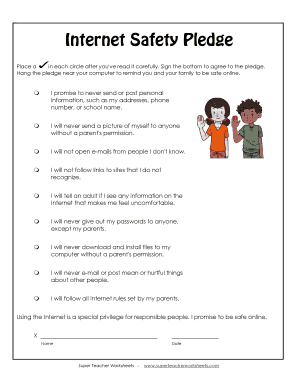
The free printable “how to teach my kids about internet safety in 2026” serves as a practical roadmap for home and classroom environments. It translates complex technological concepts into concrete, age-appropriate actions that young minds can easily grasp. Rather than relying on overwhelming lists of restrictions, the guide highlights four foundational pillars of online well-being. These include guarding personal information, creating reliable passwords, pausing before sharing content, and knowing whom to approach when something feels unusual. It sounds simple, and that is precisely the point. According to the Federal Trade Commission, children frequently encounter digital spaces that prompt them to share identifying details without realizing the implications. This resource addresses those exact moments by giving adults the exact phrasing needed to start meaningful conversations without causing panic.
Key Learning Outcomes
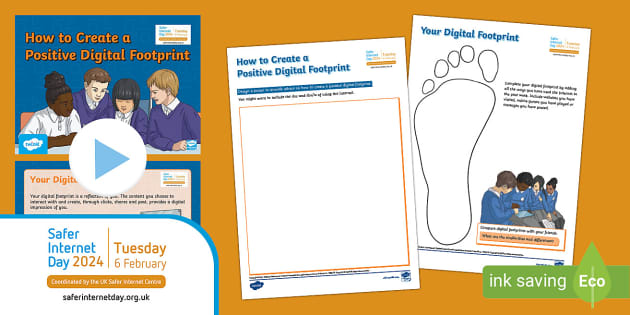
Working through the pages helps children recognize the boundary between the physical world and digital spaces. Learners discover that private information—such as home addresses, full names, and school titles—stays confidential, just like house keys. The activities reinforce the golden rule of reporting: children learn definitively that they are never in trouble for coming forward about an uncomfortable online encounter. Trust remains the ultimate firewall in any digital household or classroom. Educators and parents notice a significant shift in how children articulate their concerns once open reporting is normalized. Furthermore, the material introduces the concept of a digital footprint, teaching students that online actions leave lasting traces that deserve careful thought and intention.
How to Use This Printable
Implementation requires zero technical preparation or specialized equipment. Adults simply download, print, and invite children to sit down together for a collaborative learning session. The layout works seamlessly during morning meeting discussions, school counseling sessions, or rainy weekend afternoons at the kitchen table. Here is what makes this resource different: it relies on guided scenarios rather than lectures. Children actively talk through realistic digital dilemmas instead of passively listening to warnings. Adults can explore broader concepts by pairing these exercises with curated Internet and Digital Safety materials. Guided reflection transforms a standard activity sheet into an engaging conversation starter about responsible technology use.
Practical Tips for Parents and Teachers
Pacing makes all the difference when introducing foundational safety concepts to young learners. Breaking the printable into smaller, bite-sized sessions prevents cognitive overload and keeps engagement high. Asking open-ended questions allows children to express their own perspectives on favorite games and apps. Adults should listen without immediate judgment, validating the child’s perspective while gently correcting misunderstandings. Establishing a routine check-in about online activities normalizes digital conversations as a standard part of daily life. Educators seeking additional hands-on practice often integrate these concepts into broader lessons found within trusted Worksheets collections. Consistency across both home and school environments reinforces the core messages until protective habits become second nature.
Age-Appropriate Recommendations
Developmental stages dictate how children process rules and abstract concepts. Younger elementary students in kindergarten through second grade benefit immensely from concrete visuals, tangible examples, and role-playing games. Upper elementary students in third through fifth grade are ready for deeper discussions regarding peer interactions, in-game communication, and the permanence of digital footprints. Aligning lessons with the Common Sense Education Digital Citizenship Curriculum ensures that pedagogical strategies match the exact cognitive level of the audience. According to Common Sense Media research, children increasingly access digital media through unsupervised mobile devices during late elementary school years, making early and continuous guidance more critical than ever.
Children increasingly access digital media through unsupervised mobile devices during late elementary school years — Common Sense Media
Frequently Asked Questions
Answers to common inquiries help adults maximize the impact of every learning session. Clear guidance removes friction when introducing new technology habits to children. Every family and classroom has unique needs, and these responses provide reliable starting points for addressing digital safety topics.
Explore More Free Kids Online Safety Printables
Expanding a digital citizenship library ensures children receive continuous reinforcement throughout the school year. Adults can browse additional resources like Online and Digital Safety modules for more targeted lesson plans. Creative learners also benefit from visual reinforcement found within standard Coloring Pages collections that make learning approachable and fun. Building a safer digital future happens one conversation at a time.
Developmental Milestone & Activity Table
| Development Stage | Recommended Daily Duration | Primary Learning Objective |
|---|---|---|
| Preschool & Pre-K | 10 – 15 Minutes | Pencil grip development & basic pre-stroke lines |
| Kindergarten | 15 – 20 Minutes | Letter/number formation & spatial line awareness |
| Early Elementary (Grade 1–2) | 20 – 30 Minutes | Fluency, sentence construction & neatness |
Images References