Why Foundational Digital Citizenship Matters for Kindergarteners
Five-year-old children are entering digital spaces earlier than ever, interacting with educational apps, family tablets, and school-issued devices. Establishing early awareness of digital boundaries is critical for preventing accidental data exposure or inappropriate content encounters. Organizations like ConnectSafely and the Cybersecurity and Infrastructure Security Agency emphasize that age-appropriate media literacy begins with concrete, physical lessons rather than abstract technical warnings. Utilizing a safe and unsafe worksheet for kindergarten bridges the gap between digital concepts and young children’s daily routines, helping them recognize healthy technology habits.
💡 Educational Key Takeaways:
- Core Skill: Structured Safe And Unsafe Worksheet For Kindergarten focused on developing pencil grip, stroke control, and early literacy/math confidence.
- Target Scope: Suited for homeschoolers, preschool, kindergarten, and elementary learners.
- Best Recommendation: Practice 10–15 minutes daily with ergonomic writing tools to reinforce muscle memory without hand fatigue.
Digital Risk Signals and Preventive Guardrails in Early Childhood
Young learners navigating touchscreens lack the developmental maturity to spot hidden traps, popup ads, or deceptive links. Adults must implement robust device controls alongside physical learning tools to ensure a secure environment. The matrix below highlights common vulnerabilities across home and school contexts paired with actionable safeguards aligned with federal youth safety recommendations. Related guide: Worksheets For Kindergarten Pdf.
| Setting / Context | Common Vulnerability | Practical Safeguard |
|---|---|---|
| Home Tablets & Phones | Accidental in-app purchases or exposure to unvetted YouTube channels via autoplay. | Enable strict parental controls, disable one-click buying, and use curated children’s portals found in our Internet and Digital Safety hub. |
| School Chromebooks & Tablets | Wandering away from approved educational platforms to external search engines. | Apply classroom management tools that lock browsers to single tabs, mirroring guidance from our Online and Digital Safety resources. |
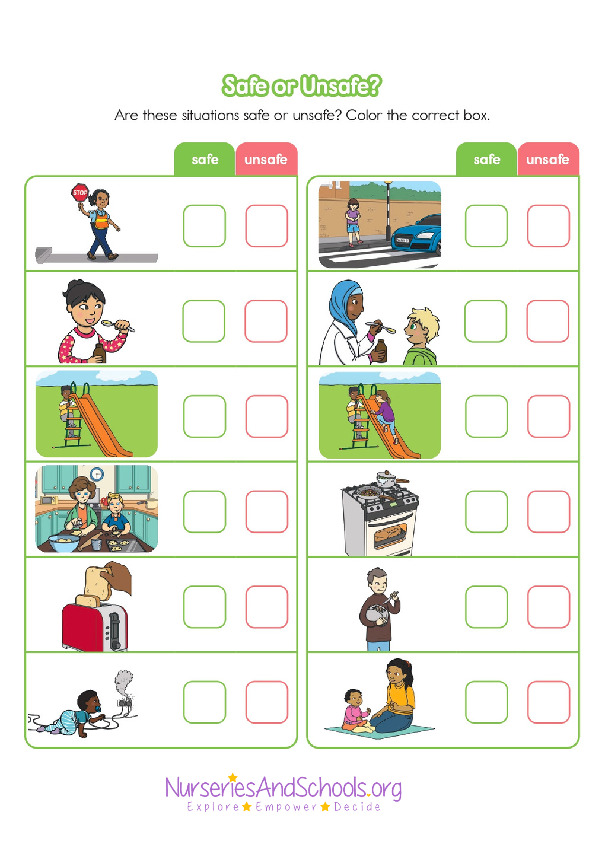
| Interactive Games & Apps | Accidentally tapping external banner ads or unfamiliar popups disguised as game buttons. | Introduce sorting exercises like a safe and unsafe worksheet for kindergarten to visually teach children which buttons to avoid. |
Establishing Healthy Screen Routines and Classroom Rules
Effective digital citizenship in early childhood relies heavily on consistent routines modeled by adults. At school and home, establish clear physical boundaries, such as keeping screens in common areas where adults can monitor activity. Pair these spatial rules with interactive learning tools, including a printable safe and unsafe worksheet for kindergarten, which lets children color, sort, and discuss everyday scenarios like keeping passwords private or telling an adult when a strange screen pops up. Cultivate an environment of trust where children know they can report mistakes or frightening images without fear of punishment or losing device privileges. For supplementary activities that reinforce these habits, explore our collection of Worksheets designed for early learners.
Overcoming Confusion and Managing Student Workarounds
Kindergarteners naturally test boundaries, whether by tapping buttons out of curiosity or trying to bypass app restrictions. Overly restrictive filters that block legitimate educational content can cause frustration, while complete lack of oversight invites risk. Instead of relying solely on technical restrictions, pair your device settings with calm, direct conversations. When introducing a safe and unsafe worksheet for kindergarten, ask open-ended questions like what would you do if a scary monster picture pops up on the screen? This helps children internalize safe behaviors, transforming reactive discipline into proactive digital resilience.
Frequently Asked Questions From Educators and Parents
At what age should children start learning digital safety?
Digital safety education should begin in kindergarten or even preschool using tangible concepts. Simple sorting activities like a safe and unsafe worksheet for kindergarten help young minds grasp boundaries long before they own independent devices.
How can teachers use safety worksheets effectively in a kindergarten classroom?
Teachers can incorporate these sorting exercises into morning meetings or computer lab orientation days. Guide students through picture-based examples of online behaviors, encouraging them to discuss why certain actions are helpful or risky.
Are standard parental controls enough to protect five-year-olds online?
No technical filter is one hundred percent foolproof. Parental controls must be paired with active supervision, open communication, and physical device placement in common household areas.
Explore More Digital Citizenship Resources
Equipping young learners with foundational digital skills sets the stage for safe technology use throughout their school years. Discover more expert-vetted guides, lesson plans, and family toolkits by visiting SafeWiredSchools.org.
Worksheet Previews & Reference Materials