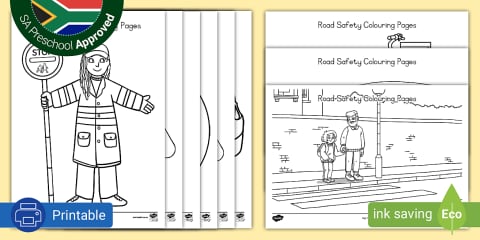
Blending Offline Lessons with Digital Safety: Why Road Safety Colouring Sheets Free Matter
When educators and parents search for road safety colouring sheets free online, they are typically looking for engaging ways to teach young children how to cross streets, recognize traffic lights, and stay safe in neighborhoods. However, downloading content from random websites introduces a digital safety dimension that is frequently overlooked. As children navigate web resources alongside adults, K-12 digital citizenship coordinators must ensure that searching for physical-world safety tools does not inadvertently expose students to malvertising, data tracking, or inappropriate pop-ups. Aligning with guidance from organizations like ConnectSafely and the Federal Trade Commission, adults need to approach free internet printables with a balanced mindset that protects both privacy and device integrity. Related guide: Two Factor Authentication Coloring Page Kids.
💡 Educational Key Takeaways:
- Core Skill: Structured Road Safety Colouring Sheets Free focused on developing pencil grip, stroke control, and early literacy/math confidence.
- Target Scope: Suited for homeschoolers, preschool, kindergarten, and elementary learners.
- Best Recommendation: Practice 10–15 minutes daily with ergonomic writing tools to reinforce muscle memory without hand fatigue.
Digital Risk Signals and Preventive Guardrails for Printable Web Searches
Searching for educational materials on unsecured search engines can lead families to sites laden with aggressive tracking cookies, deceptive download buttons, or phishing links masquerading as PDF files. Adults should monitor how younger students interact with web search results and establish clear technical boundaries to prevent accidental malware downloads. Reviewing the following breakdown helps adults spot common vulnerabilities and implement proactive device safeguards before children begin downloading classroom activities.
| Setting / Context | Common Vulnerability | Practical Safeguard |
|---|---|---|
| Home Devices & Tablets | Malicious pop-ups and fake download buttons masking real PDF files | Install reputable ad-blockers and configure browsers to ask before downloading files |
| School Chromebooks | Unvetted third-party educational portals bypassing district web filters | Rely on curated resource directories and district-approved Internet and Digital Safety guidelines |
| Student Search Habits | Clicking sponsored links or image results that lead to commercial tracking sites | Teach children to use family-friendly search engines and supervise initial query steps |
Establishing Healthy Screen Routines and Classroom Workflows
Integrating creative activities like road safety colouring sheets free into a lesson plan or afternoon routine offers a golden opportunity to discuss internet boundaries. Educators can model safe web browsing by projecting a vetted site directly onto the smartboard, explaining why certain links are skipped and why pop-up blockers are enabled. At home, families can establish shared device zones where all web searches happen in common areas rather than behind closed doors. Pairing these tactile printouts with structured digital citizenship lessons from our Coloring Pages collection ensures that students learn valuable lessons about both street smarts and cyber smarts simultaneously.
Overcoming Workarounds and Managing Student Curiosity
Children are naturally curious and may attempt to bypass adult controls to find specific images or interactive games while looking for printables. When adults overreact to minor search missteps with harsh reprimands, children often learn to hide their online behavior instead of asking for help. To foster trust, adults should maintain a calm demeanor when discussing online missteps, using unexpected pop-ups as teachable moments rather than punishment opportunities. Reinforce that if a strange warning box appears on screen or a download fails to start properly, the best response is simply to close the tab and alert an adult immediately.
Frequently Asked Questions About Safe Web Searching and Printables
Are all websites offering road safety colouring sheets free safe for young children to browse independently?
No. While the content itself may be completely innocent, many free resource sites rely on third-party advertisements, tracking pixels, or misleading download banners that can compromise user privacy or expose devices to adware. Independent browsing by young children should be limited to curated educational portals or supervised directly by an adult.
Teachers should host PDF files directly on secure, district-approved learning management systems rather than directing students to open public web searches. Utilizing resources from trusted hubs like our Worksheets archive helps classrooms avoid external ads and maintain a clean digital environment.
What should a parent do if their child accidentally clicks a deceptive pop-up while downloading a printable file?
Remain calm, immediately disconnect the device from the internet if necessary, close the browser window entirely, and run a standard security scan. Use the incident as a calm, non-judgmental conversation starter about why double-checking download buttons matters.
Explore More Digital Citizenship Resources
Building lifelong safety habits—both on the street and across the internet—requires continuous reinforcement from parents, teachers, and school administrators working together. Discover more practical advice, downloadable guides, and expert recommendations by visiting SafeWiredSchools.org.
Visual Reference Gallery