Introduction
Digital devices sit on kitchen tables, inside school backpacks, and on living room coffee tables alongside traditional books and board games. Children dive into virtual worlds long before they master complex offline logistics, exploring educational apps, multiplayer gaming servers, and video streaming platforms with remarkable dexterity. Yet this enthusiasm frequently outpaces the foundational protective habits required for healthy digital navigation. Adults often attempt to manage this gap through hasty verbal warnings delivered right as a tablet powers down. Experience shows that spoken rules fade quickly from young memories once the next interactive level loads. Bridging the gap between impulse and caution requires concrete, visible tools that anchor expectations without inducing fear. A structured internet safety contract for students transforms abstract boundaries into shared commitments. Utilizing tangible agreements helps establish positive digital citizenship early, framing safety as an empowering life skill rather than an endless list of restrictions.
💡 Educational Key Takeaways:
- Core Skill: Structured Internet Safety Contract For Students focused on developing pencil grip, stroke control, and early literacy/math confidence.
- Target Scope: Suited for homeschoolers, preschool, kindergarten, and elementary learners.
- Best Recommendation: Practice 10–15 minutes daily with ergonomic writing tools to reinforce muscle memory without hand fatigue.
WhatThis Printable Covers
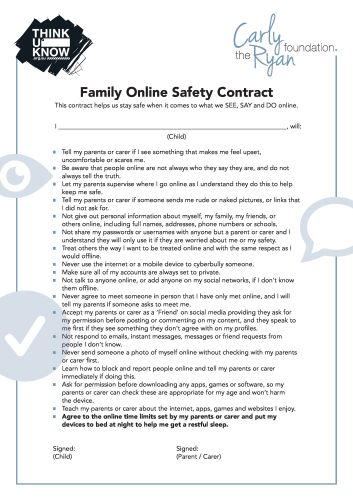
The free internet safety contract for students addresses the daily realities of children interacting online. Modern risks rarely stem from elaborate external threats; instead, children typically encounter sticky situations through shared household devices left logged into personal accounts, unexpected direct messages inside gaming lobbies, or autoplay video recommendations on streaming platforms. This printable establishes clear expectations around core protective habits. Signatories commit to guarding personal information like home addresses, full names, and school names. The document reviews the importance of creating strong passwords, thinking critically before clicking or sharing, and recognizing when an interaction feels uncomfortable. Central to every section is the reassuring promise that children are never in trouble for reporting a confusing or upsetting digital experience to a trusted adult. While this printable supports conversation and habit-building, it does not guarantee safety. True security grows through ongoing dialogue between children and the adults guiding them. For more related activities, check out our Online Safety Direct Worksheet Ks2.
Key Learning Outcomes
Working through a written agreement encourages young learners to articulate their understanding of responsible technology use. Children move from passive consumers of media to active participants who recognize their own agency in digital spaces. Discussing privacy rules helps students identify the distinct boundary between public sharing and private details. Furthermore, analyzing password strength and account security demystifies the backend mechanics of the websites children visit daily. Establishing a protocol for reporting discomfort transforms anxiety into proactive communication. According to the Federal Trade Commission, open family dialogue remains one of the most effective ways to guide children safely through their earliest digital explorations. When children understand the rationale behind each rule, compliance shifts from forced obedience to thoughtful self-regulation.
How to Use This Printable
Effective implementation turns a piece of paper into an active collaborative exercise rather than a top-down mandate. Educators and parents can introduce the contract during a calm, neutral moment, such as a classroom morning meeting or a weekend family discussion. Reading through each clause together allows children to ask clarifying questions and offer examples from their own online experiences. It sounds simple, and that’s the point. Once both parties review the expectations, everyone signs the document to symbolize a mutual pledge of trust and support. Hanging the completed contract near home charging stations or classroom computer labs provides a constant, gentle reminder of shared digital standards.
Practical Tips for Parents and Teachers
Consistency and warmth determine whether digital safety lessons take root in a child’s daily routine. Adults should revisit the agreement periodically, especially when a child gains access to a new device, app, or multiplayer game. Praising children when they proactively report a broken link or a strange popup reinforces honest communication. Here’s what makes this resource different: it shifts the focus away from monitoring software and toward building internal judgment. When adults model healthy tech habits themselves, children notice and mirror those balanced behaviors. Keeping conversations curious rather than punitive ensures that children feel safe speaking up when digital interactions go awry.
Age-Appropriate Recommendations
Tailoring digital safety conversations to a child’s developmental stage prevents cognitive overload and maintains engagement. For younger elementary students ages five to eight, discussions should center on basic boundaries, such as asking permission before downloading games and keeping personal details private. Older elementary students ages nine to twelve can explore more nuanced concepts, including digital footprint management, respectful communication in group chats, and evaluating the reliability of online sources. Grounding these educational goals in the Common Sense Education Digital Citizenship Curriculum ensures that lessons align with established developmental milestones. Educators and caregivers can scaffold these conversations to match the exact platforms children currently navigate.
Open family communication about online habits helps children navigate digital risks more effectively — Federal Trade Commission
Frequently Asked Questions
How does this printable support learning? The contract facilitates structured discussions about privacy, strong passwords, and transparent reporting, helping children build internal digital judgment. Can this be downloaded and printed easily? Yes, the resource is formatted for standard printers, making it simple to duplicate for classrooms or home use. What do safety organizations recommend regarding kids and screens? According to the National Center for Missing & Exploited Children, maintaining open lines of communication between children and trusted adults is vital for online safety.
Explore More Free Kids Online Safety Printables
Expanding a digital citizenship toolkit requires a variety of engaging formats tailored to different learning styles. Educators can introduce foundational concepts using creative Coloring Pages that spark early conversations about screen boundaries. To reinforce specific technical skills like password creation, explore interactive Worksheets designed for classroom centers. Comprehensive lessons on broader digital habits are also available within the Internet and Digital Safety archives. For continuous guidance on managing modern connected devices, review the expert strategies found under Online and Digital Safety.
Developmental Milestone & Activity Table
| Development Stage | Recommended Daily Duration | Primary Learning Objective |
|---|---|---|
| Preschool & Pre-K | 10 – 15 Minutes | Pencil grip development & basic pre-stroke lines |
| Kindergarten | 15 – 20 Minutes | Letter/number formation & spatial line awareness |
| Early Elementary (Grade 1–2) | 20 – 30 Minutes | Fluency, sentence construction & neatness |
Images References