Introduction
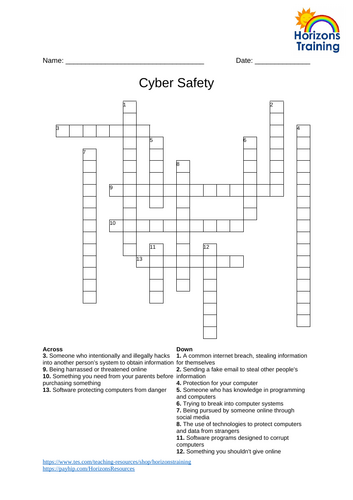
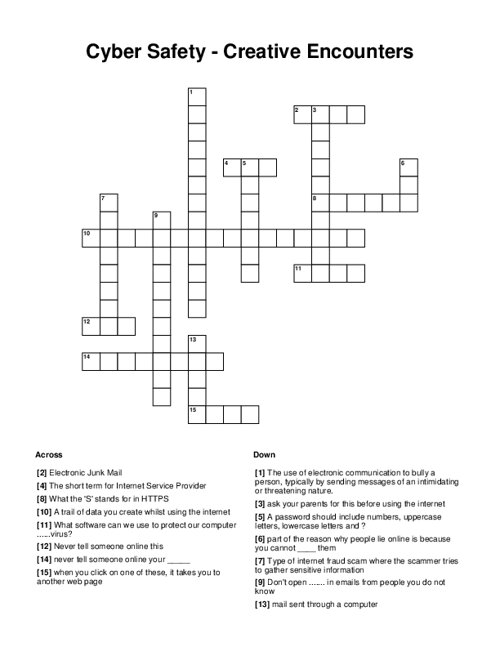
Digital citizenship begins long before a child receives a personal device, often starting quietly on shared living room tablets or family laptops. Young learners frequently navigate video platforms, educational apps, and in-game chat features before fully grasping the permanence of the digital world. Educators and families constantly search for engaging ways to introduce foundational digital safety habits without inducing fear. Traditional lectures about online privacy rarely resonate with elementary students. Instead, active learning tools transform abstract digital rules into concrete, manageable concepts. The free cyber safety crossword for kids provides a gentle, low-pressure entry point for these essential conversations. Exploring Internet and Digital Safety concepts through puzzle play helps children internalize protective behaviors naturally.
💡 Educational Key Takeaways:
- Core Skill: Structured Cyber Safety Crossword For Kids focused on developing pencil grip, stroke control, and early literacy/math confidence.
- Target Scope: Suited for homeschoolers, preschool, kindergarten, and elementary learners.
- Best Recommendation: Practice 10–15 minutes daily with ergonomic writing tools to reinforce muscle memory without hand fatigue.
What This Printable Covers
Puzzles reinforce critical vocabulary related to positive digital habits. Children encounter terms like password, private, browser, and adult while searching for correct letter placements. Rather than focusing on online dangers, the activity highlights proactive choices. It emphasizes keeping personal information private, creating strong credentials, and pausing before clicking links. According to the Federal Trade Commission, children increasingly engage with digital environments through gaming consoles and messaging apps, making early vocabulary comprehension vital. Working through these Worksheets gives children the linguistic tools to articulate their digital experiences and recognize when something feels wrong.
Key Learning Outcomes
Completing the puzzle strengthens spelling while anchoring core safety rules in long-term memory. Students learn that a password functions like a house key that should never be shared with friends. They discover the difference between public information, such as a favorite color, and private details, like a home address or school name. Most importantly, the activity reinforces the golden rule of digital spaces: children are never in trouble for reporting something uncomfortable to a trusted adult. Building this confidence transforms adults into allies rather than enforcers, creating a safety net for unexpected online encounters.
How to Use This Printable
Flexibility defines the best educational materials. Teachers can integrate the puzzle into morning meeting routines, computer lab transition times, or digital citizenship units. Parents find success using the printout during weekend downtime at the kitchen table, turning a quiet activity into a meaningful conversation starter. It sounds simple, and that is the point. When children focus on solving clues, their guard drops, opening a natural window for dialogue about their favorite online games and apps. Adults can simply ask what a certain clue means to spark an authentic exchange about daily screen habits.
Practical Tips for Parents and Teachers
Guiding children through the clues requires a supportive, curious mindset. Adults should avoid turning the puzzle into a graded quiz. Instead, collaborative problem-solving works best. Asking open-ended questions like “Why do you think passwords need to be secret?” encourages critical thinking. Educators can pair students to encourage peer discussion about how they handle tricky moments in multiplayer video games. Establishing a calm environment ensures children feel safe sharing real digital dilemmas they might have experienced firsthand.
Age-Appropriate Recommendations
Developmental readiness dictates how adults should frame digital safety lessons. Younger elementary students in kindergarten through second grade benefit from guided reading of the clues, focusing primarily on basic rules like asking permission before downloading apps. Upper elementary students in third through fifth grade can complete the puzzle independently before discussing broader concepts. This tiered approach aligns directly with the Common Sense Education Digital Citizenship Curriculum, which emphasizes age-specific milestones for media balance, privacy, and cyberbullying prevention. Introducing these concepts gradually ensures children build resilience step by step.
According to Common Sense Media, the vast majority of children access mobile devices before the age of five, highlighting the need for foundational digital literacy tools in early elementary years. — Common Sense Media
Frequently Asked Questions
Navigating digital citizenship resources often raises practical questions for educators and families. Clear answers help maximize the impact of every learning tool. The following details address downloading procedures, educational value, and institutional guidelines for digital wellness.
Explore More Free Kids Online Safety Printables
Expanding a digital citizenship library requires diverse materials tailored to different learning styles. Supplementing word puzzles with visual resources deepens comprehension for diverse learners across various age groups. Reviewing additional Online and Digital Safety materials provides comprehensive coverage of modern digital etiquette. Pairing puzzles with creative exercises found in Coloring Pages keeps engagement high while reinforcing core protective habits at home and in the classroom.
Developmental Milestone & Activity Table
| Development Stage | Recommended Daily Duration | Primary Learning Objective |
|---|---|---|
| Preschool & Pre-K | 10 – 15 Minutes | Pencil grip development & basic pre-stroke lines |
| Kindergarten | 15 – 20 Minutes | Letter/number formation & spatial line awareness |
| Early Elementary (Grade 1–2) | 20 – 30 Minutes | Fluency, sentence construction & neatness |
Images References